# Fortigate IPSEC Aggregate + OSPF + SDWAN 實作

### <span style="color: rgb(35, 111, 161);">參考資料</span>

<p class="callout info">[https://docs.fortinet.com/document/fortigate/6.2.16/cookbook/25967/equal-cost-multi-path](https://docs.fortinet.com/document/fortigate/6.2.16/cookbook/25967/equal-cost-multi-path)</p>

<p class="callout info">[https://docs.fortinet.com/document/fortigate/6.4.0/administration-guide/779544/ipsec-aggregate-for-redundancy-and-traffic-load-balancing](https://docs.fortinet.com/document/fortigate/6.4.0/administration-guide/779544/ipsec-aggregate-for-redundancy-and-traffic-load-balancing)</p>

### <span style="color: rgb(35, 111, 161);">前言</span>

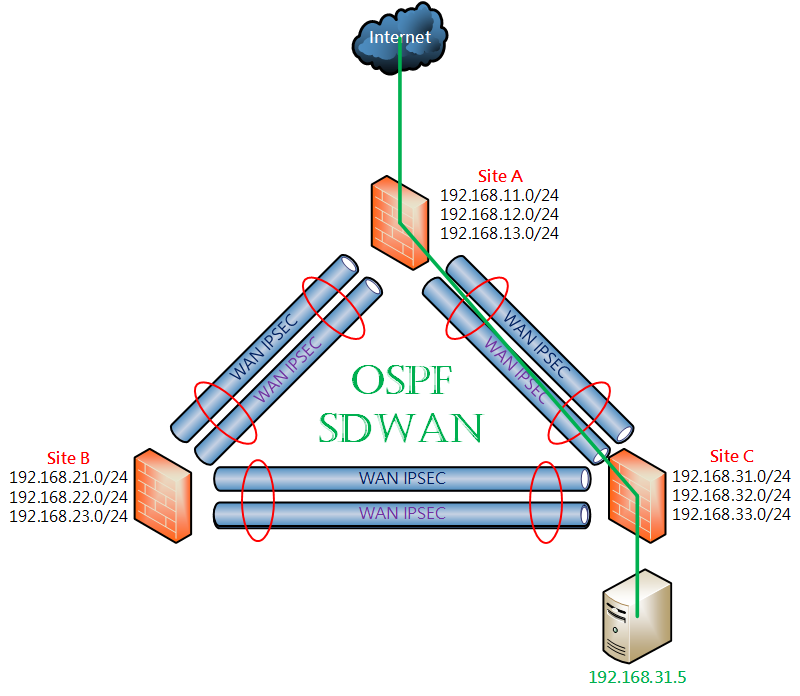
延續前一篇技術分享 [Fortigate IPSEC + OSPF + SDWAN 實作](https://mdfk.goddamn.idv.tw/books/fortigate/page/fortigate-ipsec-ospf-sdwan)，在該篇中OSPF不但能自動交換路由，同時也能 <span style="color: rgb(230, 126, 35);">**Fail Over**</span> 與 <span style="color: rgb(230, 126, 35);">**Load Balance**</span> 的特性，在內部交換與上網時的彈性線路切換，這在Fortigate上稱為<span style="color: rgb(22, 145, 121);">**ECMP**</span>的機制 (Equal-Cost Multi-Path)，但在Fortigate中還有另一個方式可以做到 IPSEC Fail Over 與 Load Balance 的功能，就是所謂的 **<span style="color: rgb(22, 145, 121);">IPSEC Aggregate</span>**，此篇帶大家來看看怎麼搞，並分析其優劣。

### <span style="color: rgb(35, 111, 161);">環境說明</span>

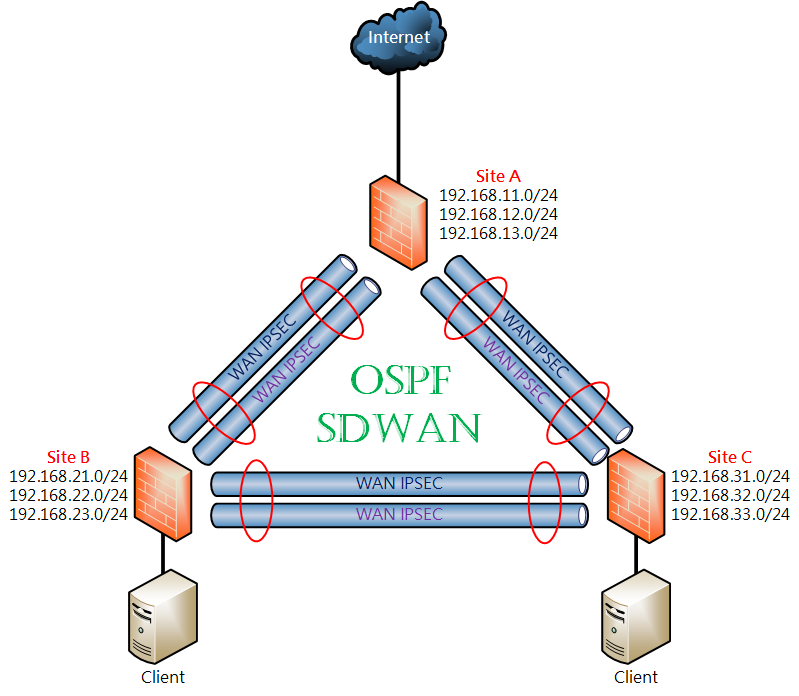
![圖片.png](https://mdfk.goddamn.idv.tw/uploads/images/gallery/2024-08/scaled-1680-/su9CM28bLf.png)

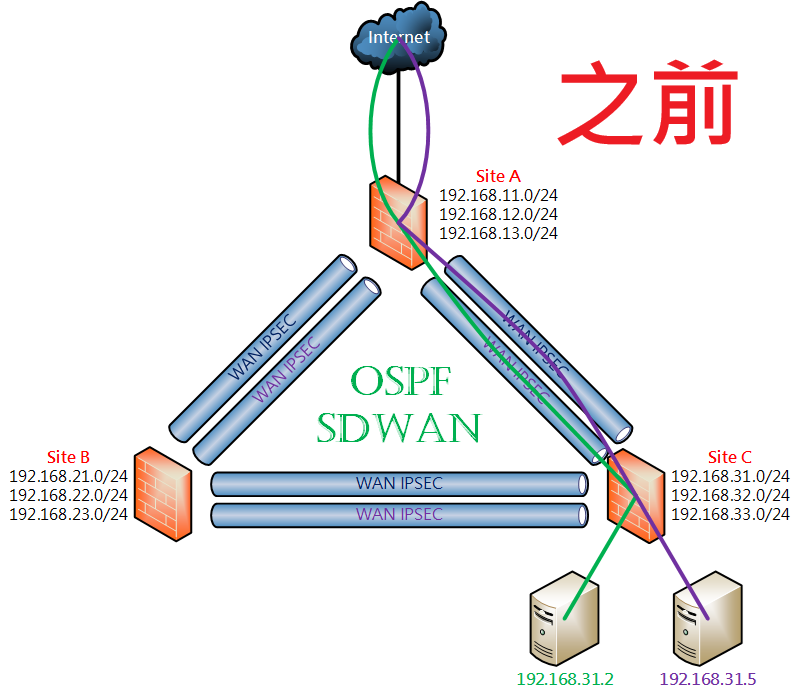
<span style="color: rgb(22, 145, 121);">**設計概念：**</span> 三個Site透過 IPSEC Aggregate +OSPF+SDWAN 來達成多線路OSPF動態路由，任一條線路故障時可透過其他線路接續連線，並透過SDWAN來監測線路品質狀況，同時由於資訊安全控管的原則希望能統一由同一個Gateway進出。

<span style="color: rgb(224, 62, 45);">**Firmware Ver. ：** </span>Fortigate-VM 7.0.15

<table border="1" id="bkmrk-wan-ip-lan-subnets-w" style="border-collapse: collapse; width: 100%; height: 220px; border: 1px solid rgb(52, 73, 94);"><colgroup><col style="width: 25.0298%;"></col><col style="width: 25.0298%;"></col><col style="width: 25.0298%;"></col><col style="width: 25.0298%;"></col></colgroup><tbody><tr style="height: 29.8px;"><td class="align-center" style="height: 29.8px; border-color: rgb(52, 73, 94);">  
</td><td class="align-center" style="height: 29.8px; border-color: rgb(52, 73, 94);">**<span style="color: rgb(35, 111, 161);">WAN IP</span>**  
</td><td class="align-center" style="height: 29.8px; border-color: rgb(52, 73, 94);">**<span style="color: rgb(35, 111, 161);">LAN Subnets</span>**  
</td><td class="align-center" style="height: 29.8px; border-color: rgb(52, 73, 94);">**<span style="color: rgb(35, 111, 161);">WAN IPSEC IP</span>**  
</td></tr><tr style="height: 63.4px;"><td class="align-center" style="height: 63.4px; border-color: rgb(52, 73, 94);"><span style="color: rgb(224, 62, 45);">**SiteA**</span>  
</td><td class="align-center" style="height: 63.4px; border-color: rgb(52, 73, 94);">WAN1 10.1.1.1

WAN2 10.1.2.1

Port4 (to Internet)

</td><td class="align-center" style="height: 63.4px; border-color: rgb(52, 73, 94);">192.168.11.254/24

192.168.12.254/24

192.168.13.254/24

</td><td class="align-center" style="height: 63.4px; border-color: rgb(52, 73, 94);"><span style="color: rgb(224, 62, 45);">**AtoB**</span> 172.17.1.1

<span style="color: rgb(224, 62, 45);">**AtoC**</span> 172.17.1.6

</td></tr><tr style="height: 63.4px;"><td class="align-center" style="height: 63.4px; border-color: rgb(52, 73, 94);"><span style="color: rgb(224, 62, 45);">**SiteB**</span>  
</td><td class="align-center" style="height: 63.4px; border-color: rgb(52, 73, 94);">WAN1 10.1.1.2

WAN2 10.1.2.2

</td><td class="align-center" style="height: 63.4px; border-color: rgb(52, 73, 94);">192.168.21.254/24

192.168.22.254/24

192.168.23.254/24

</td><td class="align-center" style="height: 63.4px; border-color: rgb(52, 73, 94);">**<span style="color: rgb(224, 62, 45);">BtoA</span>** 172.17.1.2

**<span style="color: rgb(224, 62, 45);">BtoC</span>** 172.17.1.3

</td></tr><tr style="height: 63.4px;"><td class="align-center" style="height: 63.4px; border-color: rgb(52, 73, 94);">**<span style="color: rgb(224, 62, 45);">SiteC</span>**  
</td><td class="align-center" style="height: 63.4px; border-color: rgb(52, 73, 94);">WAN1 10.1.1.3

WAN2 10.1.2.3

</td><td class="align-center" style="height: 63.4px; border-color: rgb(52, 73, 94);">192.168.31.254/24

192.168.32.254/24

192.168.33.254/24

</td><td class="align-center" style="height: 63.4px; border-color: rgb(52, 73, 94);">**<span style="color: rgb(224, 62, 45);">CtoB</span>** 172.17.1.4

**<span style="color: rgb(224, 62, 45);">CtoA</span>** 172.17.1.5

</td></tr></tbody></table>

### <span style="color: rgb(35, 111, 161);">設定過程</span>

我們直接接續前一篇的設定繼續做，有問題的人請參照前一篇技術分享 [Fortigate IPSEC + OSPF + SDWAN 實作](https://mdfk.goddamn.idv.tw/books/fortigate/page/fortigate-ipsec-ospf-sdwan) 。

<span style="color: rgb(224, 62, 45);">**<span style="font-size: 12.0pt; mso-bidi-font-size: 11.0pt; font-family: '新細明體',serif; mso-bidi-font-family: 新細明體; mso-ansi-language: EN-US; mso-fareast-language: ZH-TW; mso-bidi-language: AR-SA;">※</span>**</span>以下設定皆以一台**<span style="color: rgb(224, 62, 45);">SiteC</span>**為範例，請對照該台設定相關對應設定至**<span style="color: rgb(224, 62, 45);">SiteB</span>** &amp; <span style="color: rgb(224, 62, 45);">**SiteA**</span>。

#### <span style="color: rgb(35, 111, 161);">移除</span><span style="color: rgb(35, 111, 161);">SD-WAN </span><span style="color: rgb(35, 111, 161);">IPSEC設定</span>

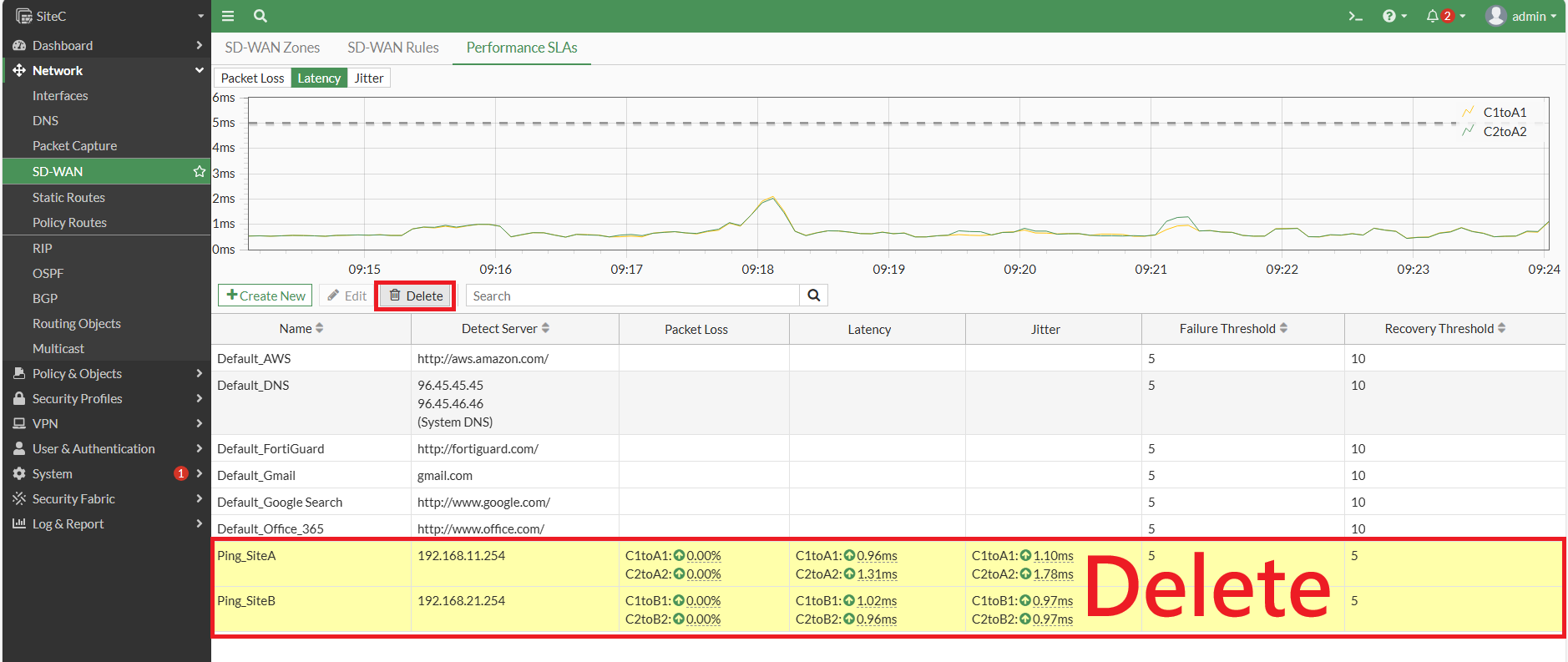
Delete SD-WAN Performance SLA

[![圖片.png](https://mdfk.goddamn.idv.tw/uploads/images/gallery/2024-08/scaled-1680-/6QCBer0jk4.png)](https://mdfk.goddamn.idv.tw/uploads/images/gallery/2024-08/6QCBer0jk4.png)

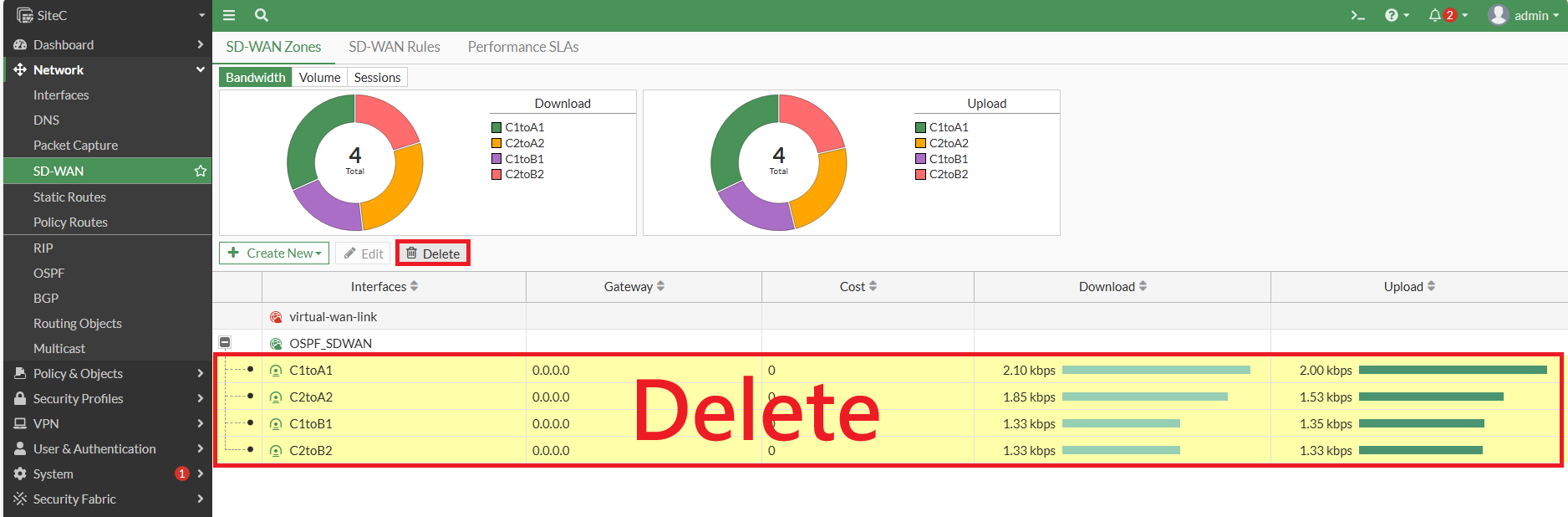
Delete SD-WAN Members

[![圖片.png](https://mdfk.goddamn.idv.tw/uploads/images/gallery/2024-08/scaled-1680-/zoKswUmyJd.png)](https://mdfk.goddamn.idv.tw/uploads/images/gallery/2024-08/zoKswUmyJd.png)
#### <span style="color: rgb(35, 111, 161);">移除</span><span style="color: rgb(35, 111, 161);">OSPF </span><span style="color: rgb(35, 111, 161);">IPSEC設定</span>

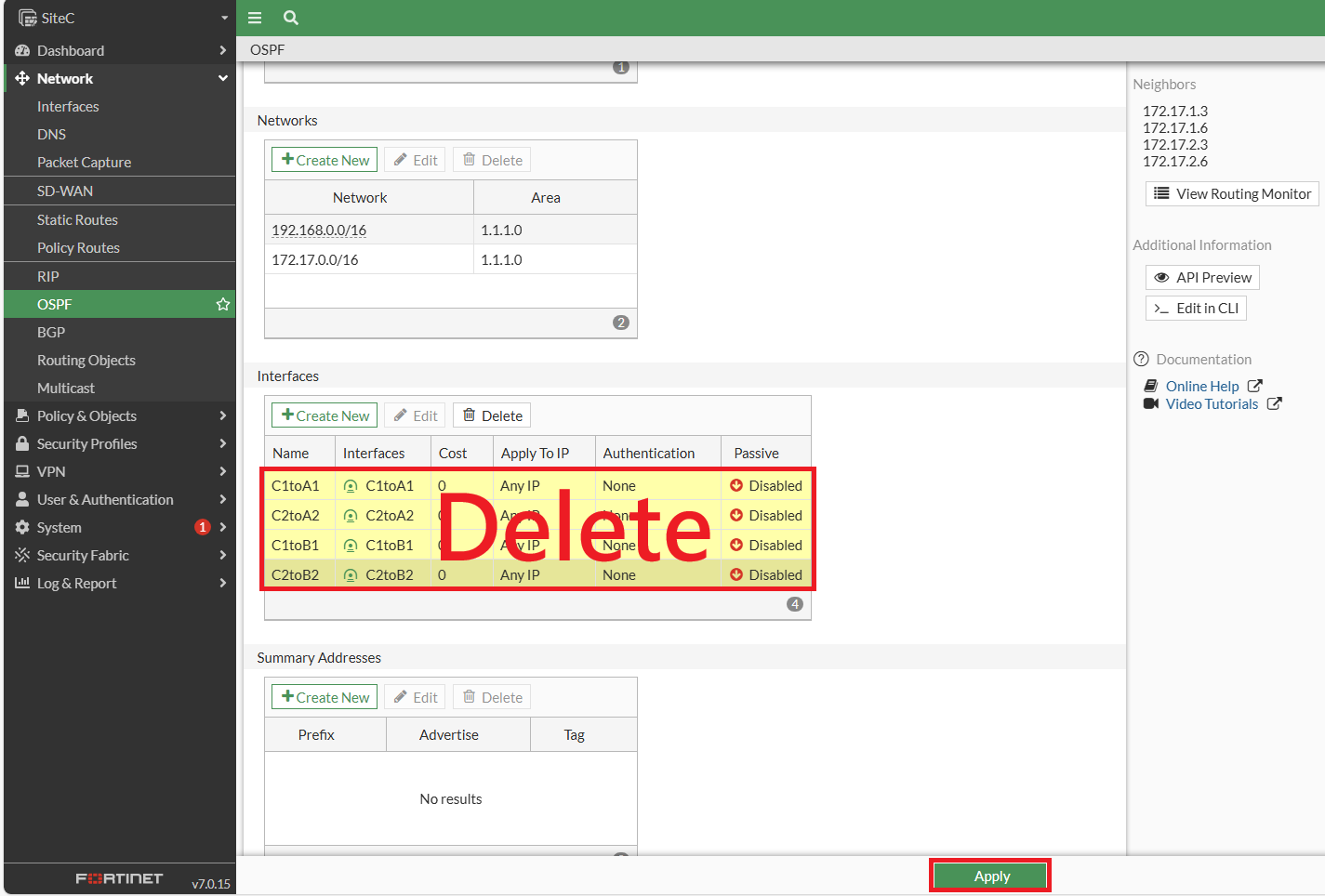
Delete IPSEC Interface，完成後 <span style="color: rgb(224, 62, 45);">**<span style="font-size: 12.0pt; mso-bidi-font-size: 11.0pt; font-family: '新細明體',serif; mso-bidi-font-family: 新細明體; mso-ansi-language: EN-US; mso-fareast-language: ZH-TW; mso-bidi-language: AR-SA;">要Apply !!</span>**<span style="font-size: 12.0pt; mso-bidi-font-size: 11.0pt; font-family: '新細明體',serif; mso-bidi-font-family: 新細明體; mso-ansi-language: EN-US; mso-fareast-language: ZH-TW; mso-bidi-language: AR-SA;"> </span></span>(鍵人我不知道忘了多少次 ......)

[![圖片.png](https://mdfk.goddamn.idv.tw/uploads/images/gallery/2024-08/scaled-1680-/fSwWrhaKfm.png)](https://mdfk.goddamn.idv.tw/uploads/images/gallery/2024-08/fSwWrhaKfm.png)

#### <span style="color: rgb(35, 111, 161);">**建立IPSEC Aggregate**</span>

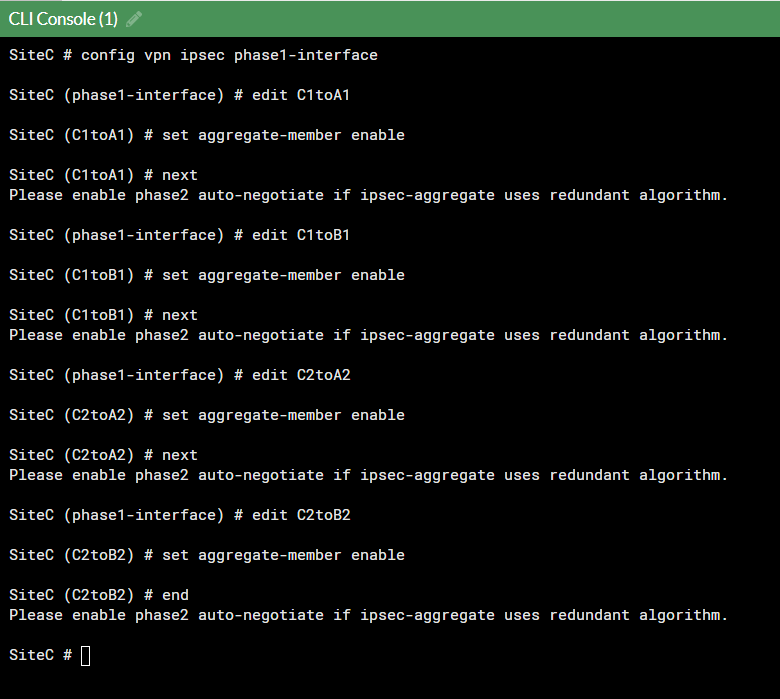
在Console輸入下列指令

```
config vpn ipsec phase2-interface 
edit C1toA1 
set auto-negotiate enable 
next
edit C1toB1 
set auto-negotiate enable 
next
edit C2toA2 
set auto-negotiate enable 
next
edit C2toB2 
set auto-negotiate enable 
end

config vpn ipsec phase1-interface 
edit C1toA1 
set aggregate-member enable 
next
edit C1toB1 
set aggregate-member enable 
next
edit C2toA2 
set aggregate-member enable 
next
edit C2toB2 
set aggregate-member enable 
end
```
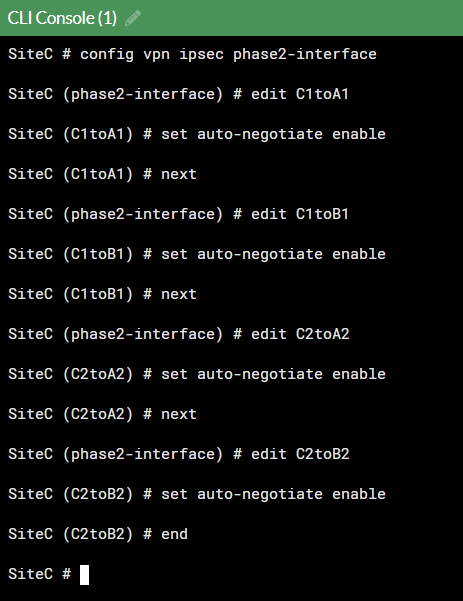
![圖片.png](https://mdfk.goddamn.idv.tw/uploads/images/gallery/2024-08/scaled-1680-/AYXw4egLhr.png)

![圖片.png](https://mdfk.goddamn.idv.tw/uploads/images/gallery/2024-08/scaled-1680-/9UrGQEzzGJ.png)

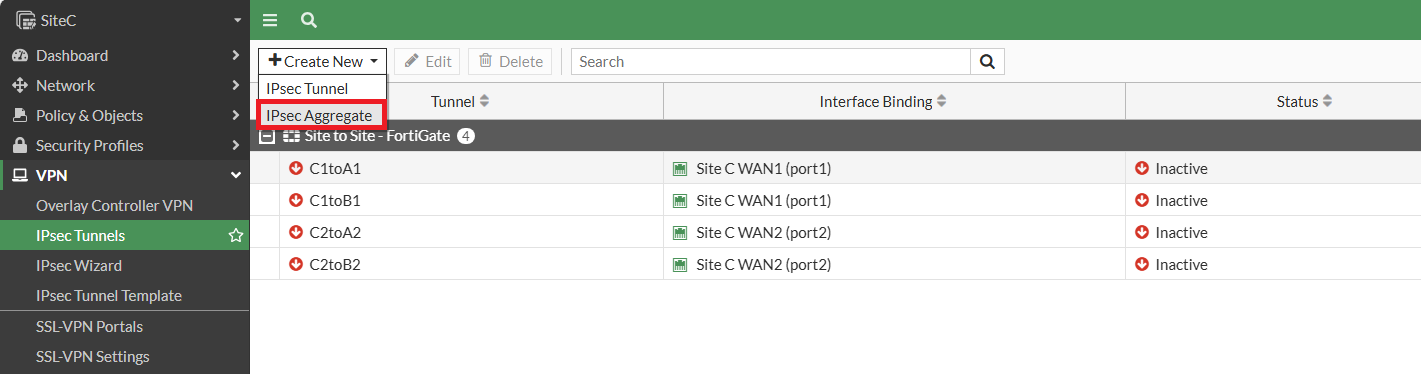
VPN =&gt; IPSEC Turnnels =&gt; Create New =&gt; IPSEC Aggregate

[![圖片.png](https://mdfk.goddamn.idv.tw/uploads/images/gallery/2024-08/scaled-1680-/qQ0r0q5lCo.png)](https://mdfk.goddamn.idv.tw/uploads/images/gallery/2024-08/qQ0r0q5lCo.png)

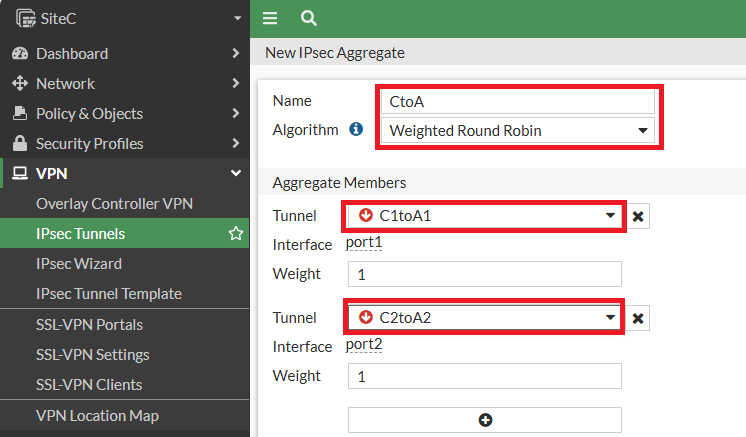
建立 Aggregate，名稱取為<span style="color: rgb(224, 62, 45);">**CtoA**</span>，將**<span style="color: rgb(224, 62, 45);">C1toA1</span>**、<span style="color: rgb(224, 62, 45);">**C2toA2**</span>選起來

![圖片.png](https://mdfk.goddamn.idv.tw/uploads/images/gallery/2024-08/scaled-1680-/kcV7L5uESz.png)

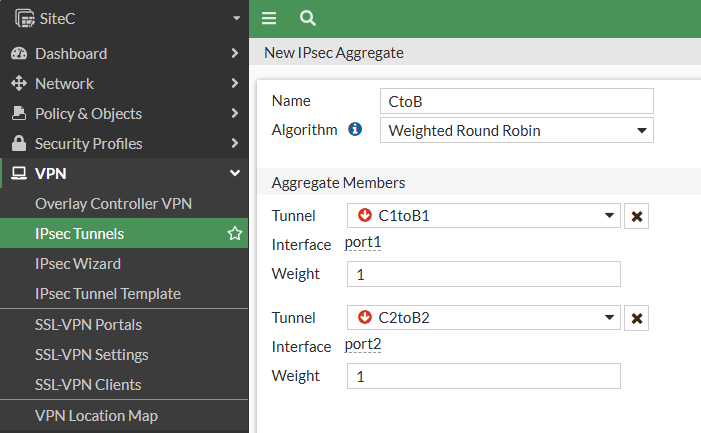
建立第二個 Aggregate <span style="color: rgb(224, 62, 45);">**CtoB** </span>如法炮製

![圖片.png](https://mdfk.goddamn.idv.tw/uploads/images/gallery/2024-08/scaled-1680-/QZE1RRwDpY.png)

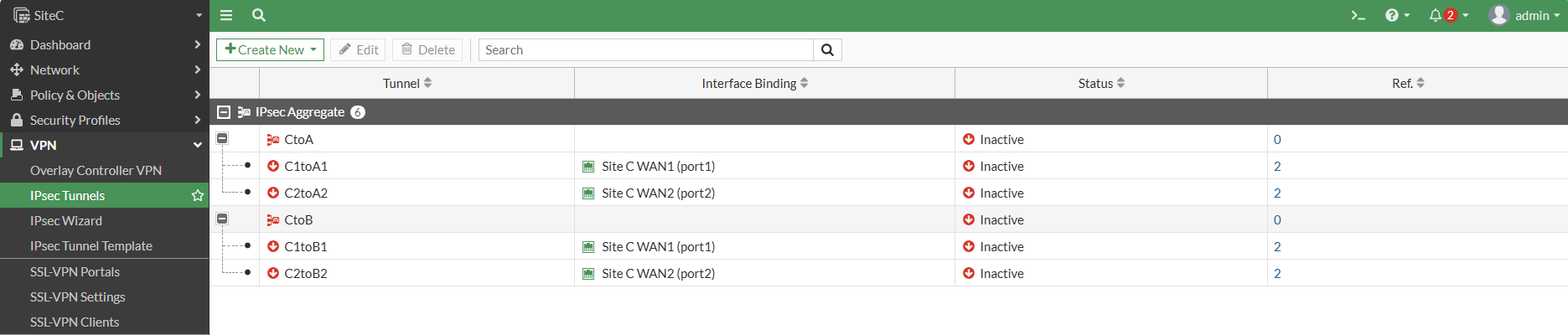
完成後如下圖

[![圖片.png](https://mdfk.goddamn.idv.tw/uploads/images/gallery/2024-08/scaled-1680-/AtCWzqKUuq.png)](https://mdfk.goddamn.idv.tw/uploads/images/gallery/2024-08/AtCWzqKUuq.png)

#### <span style="color: rgb(35, 111, 161);">設定 IPSEC Aggregate Interface IP</span>

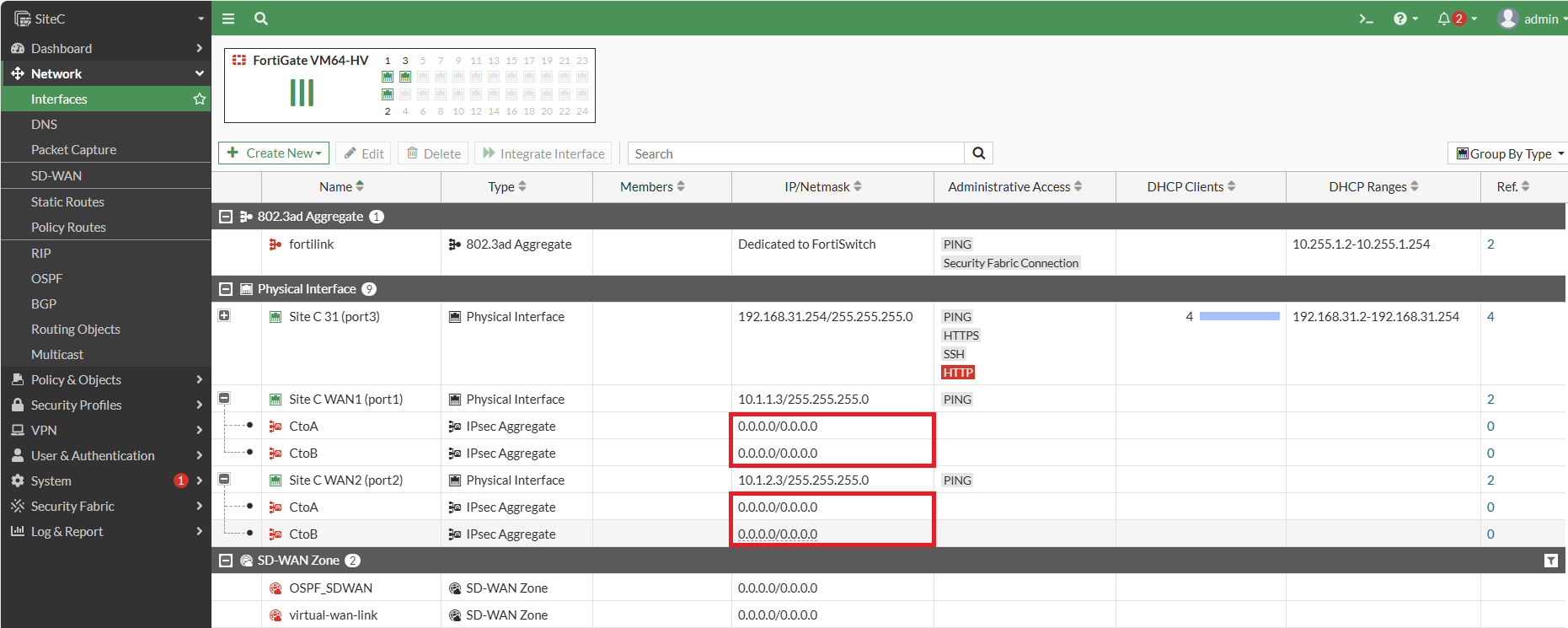
完成Aggregate後發現，IPSEC Interface的IP都被移除了，把它們設回去

[![圖片.png](https://mdfk.goddamn.idv.tw/uploads/images/gallery/2024-08/scaled-1680-/0J7lVab0OD.png)](https://mdfk.goddamn.idv.tw/uploads/images/gallery/2024-08/0J7lVab0OD.png)

[![圖片.png](https://mdfk.goddamn.idv.tw/uploads/images/gallery/2024-08/scaled-1680-/u9kM5CBPe6.png)](https://mdfk.goddamn.idv.tw/uploads/images/gallery/2024-08/u9kM5CBPe6.png)
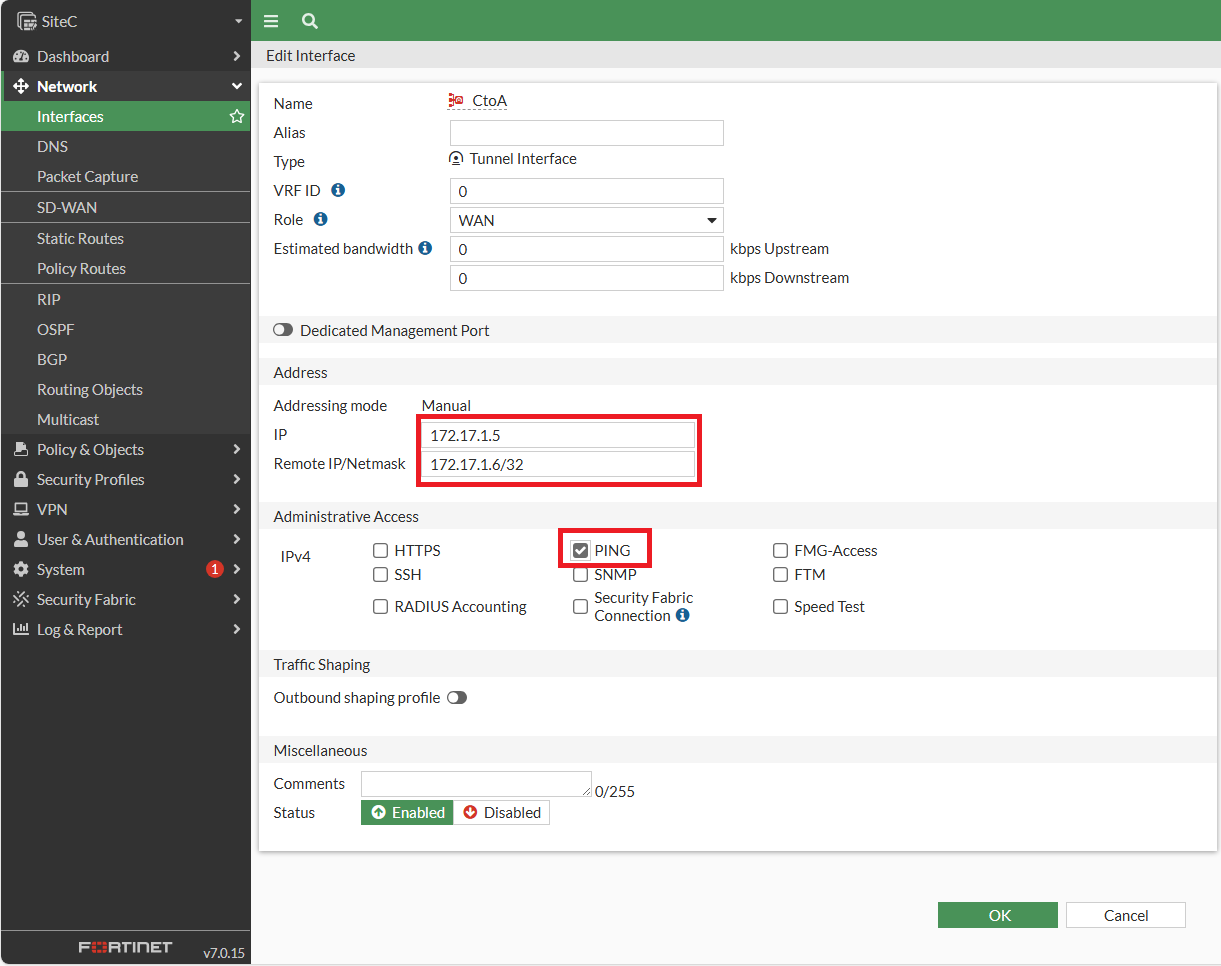
[![圖片.png](https://mdfk.goddamn.idv.tw/uploads/images/gallery/2024-08/scaled-1680-/B4sAMIzvov.png)](https://mdfk.goddamn.idv.tw/uploads/images/gallery/2024-08/B4sAMIzvov.png)
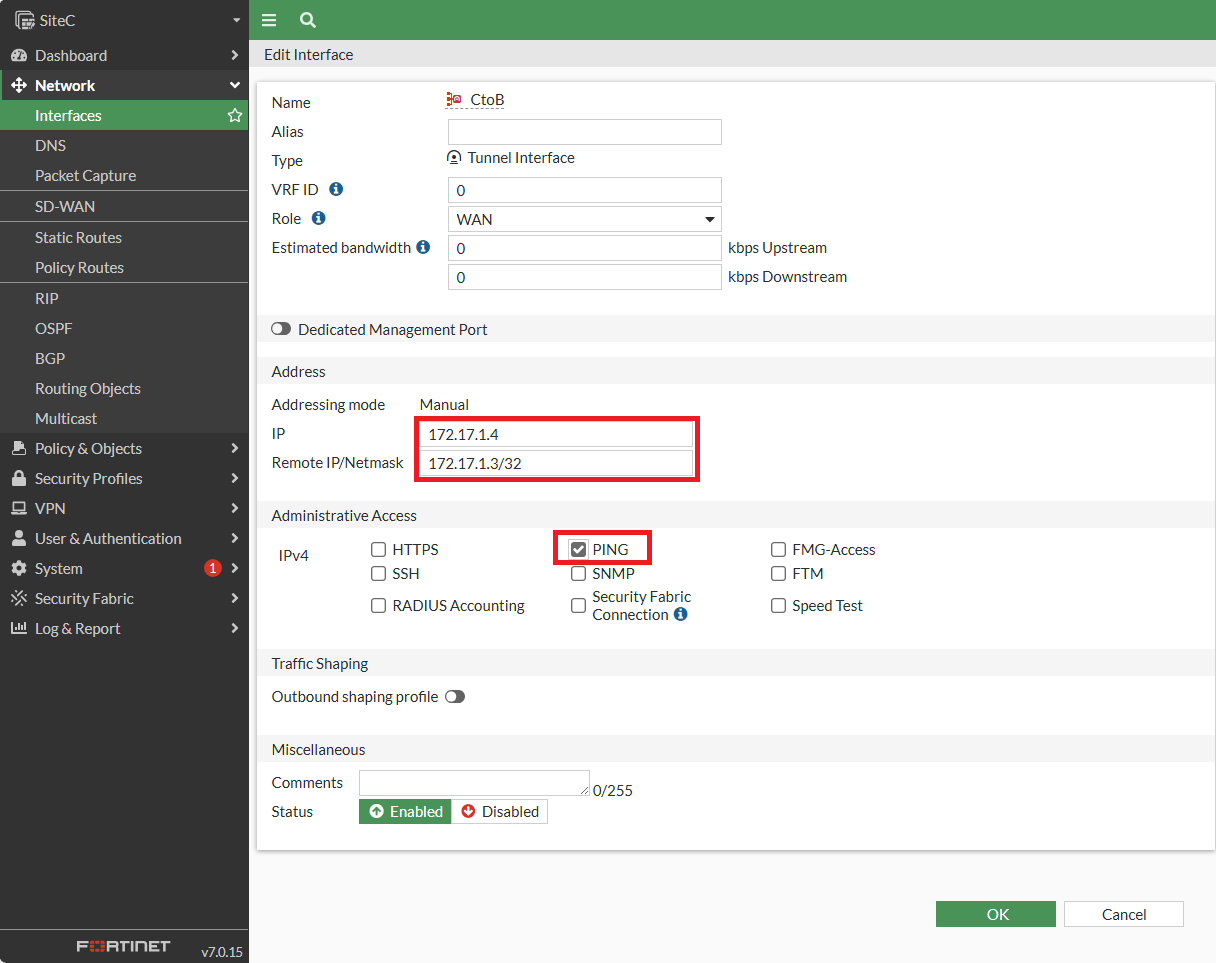
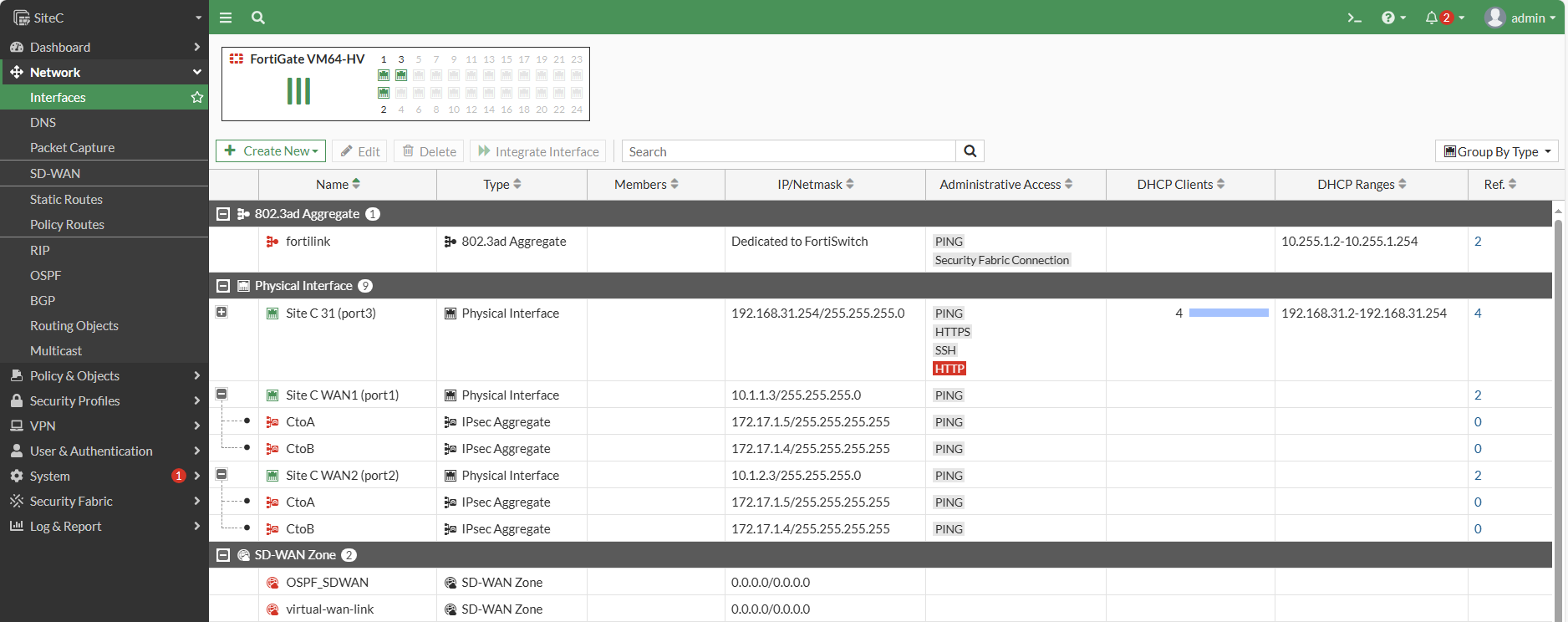
完成如下圖

[![圖片.png](https://mdfk.goddamn.idv.tw/uploads/images/gallery/2024-08/scaled-1680-/HWndFm3DwO.png)](https://mdfk.goddamn.idv.tw/uploads/images/gallery/2024-08/HWndFm3DwO.png)
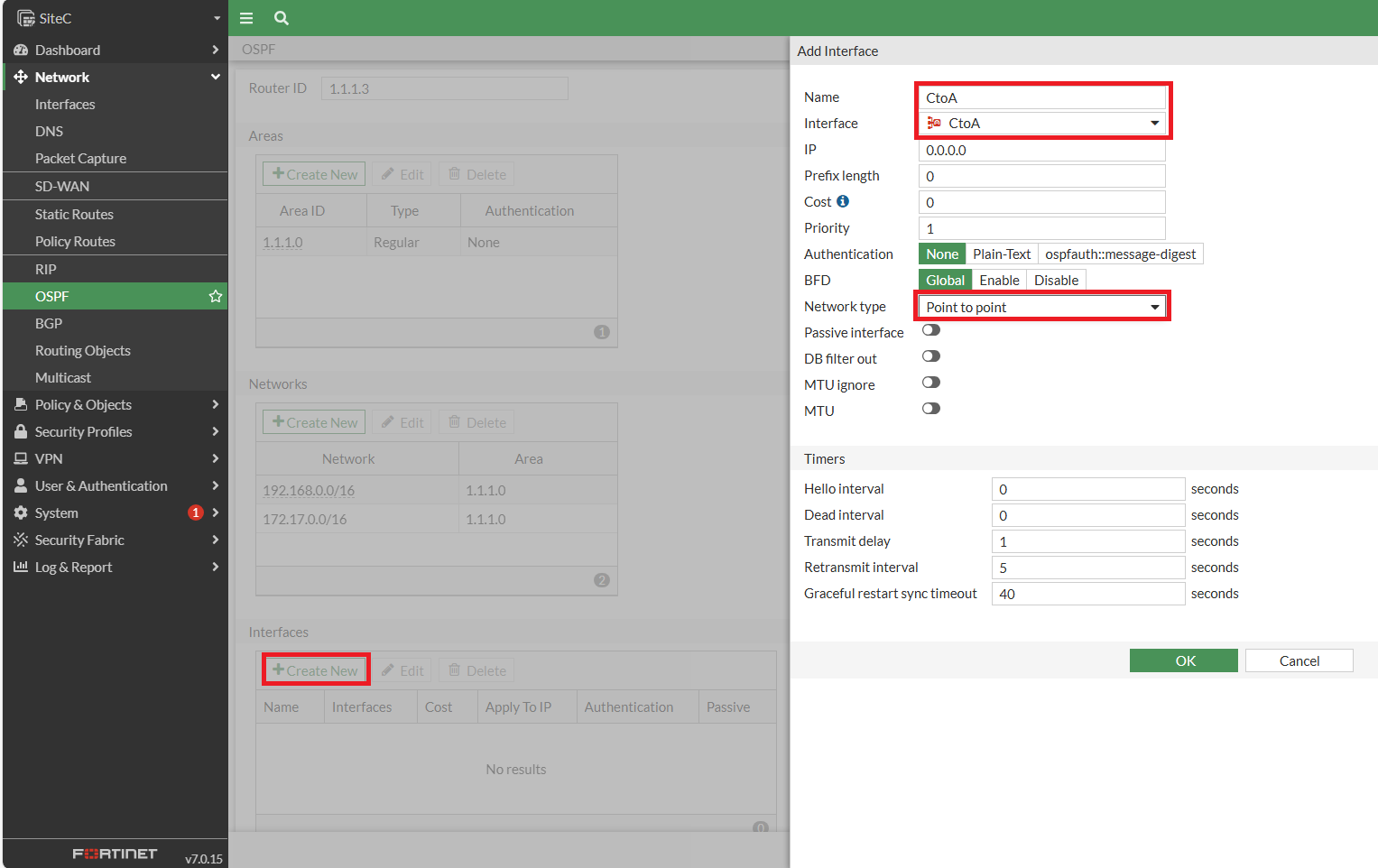
#### <span style="color: rgb(35, 111, 161);">設定OSPF Interface</span>

[![圖片.png](https://mdfk.goddamn.idv.tw/uploads/images/gallery/2024-08/scaled-1680-/xVDYMIipML.png)](https://mdfk.goddamn.idv.tw/uploads/images/gallery/2024-08/xVDYMIipML.png)

[![圖片.png](https://mdfk.goddamn.idv.tw/uploads/images/gallery/2024-08/scaled-1680-/9fxNzaaQJT.png)](https://mdfk.goddamn.idv.tw/uploads/images/gallery/2024-08/9fxNzaaQJT.png)
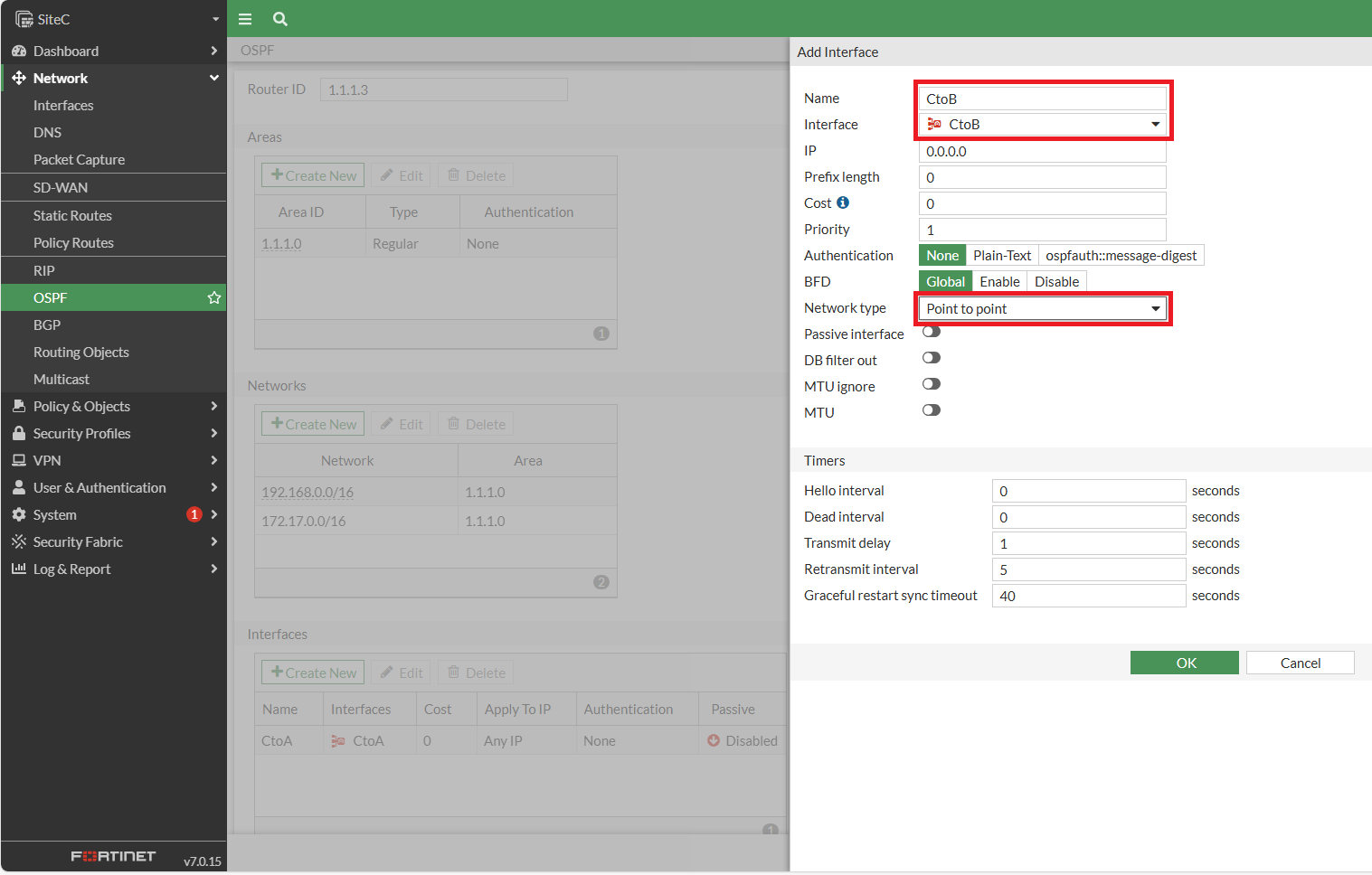
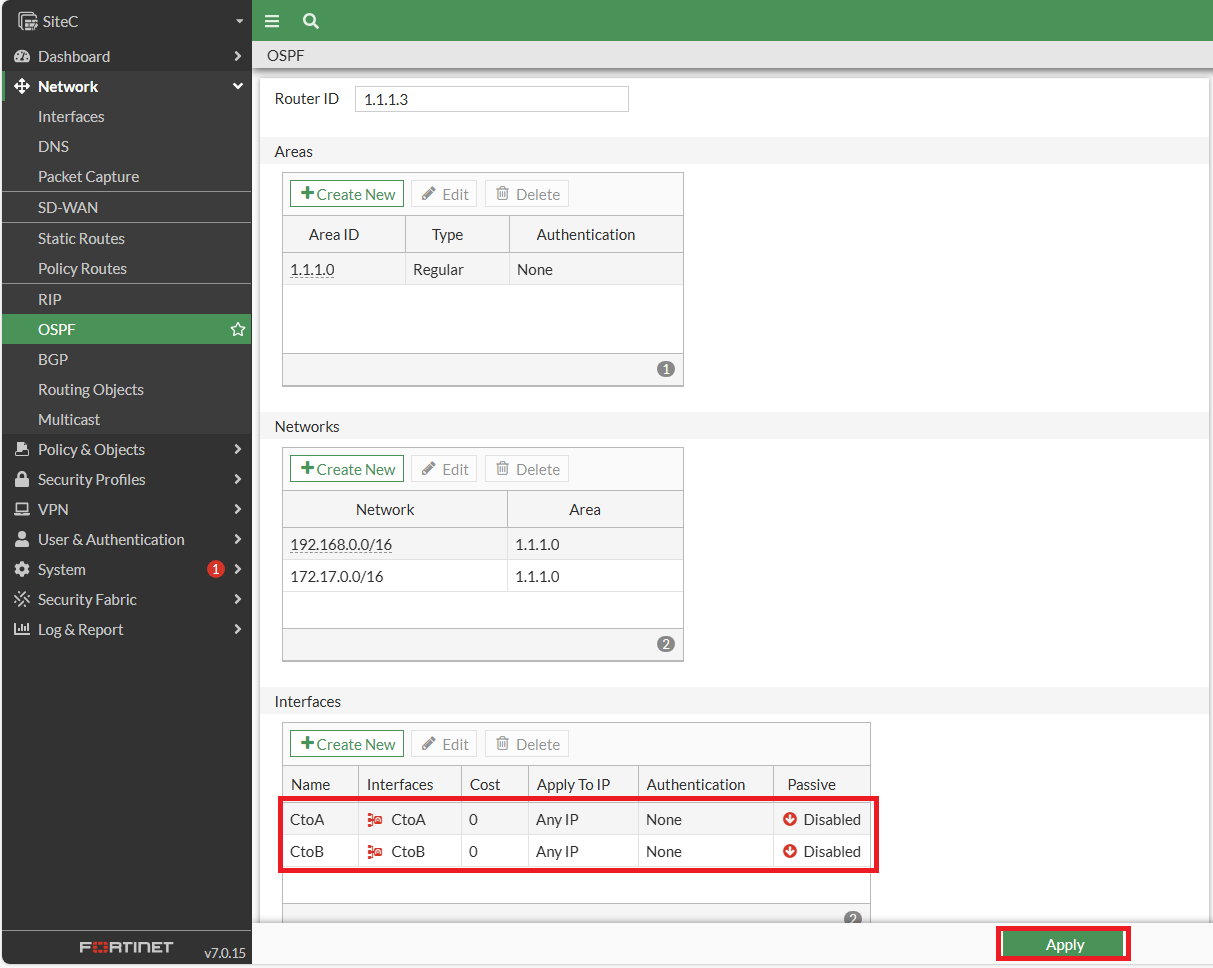
完成如下圖，記得<span style="color: rgb(224, 62, 45);">**<span style="font-size: 12.0pt; mso-bidi-font-size: 11.0pt; font-family: '新細明體',serif; mso-bidi-font-family: 新細明體; mso-ansi-language: EN-US; mso-fareast-language: ZH-TW; mso-bidi-language: AR-SA;">要Apply !!</span>**<span style="font-size: 12.0pt; mso-bidi-font-size: 11.0pt; font-family: '新細明體',serif; mso-bidi-font-family: 新細明體; mso-ansi-language: EN-US; mso-fareast-language: ZH-TW; mso-bidi-language: AR-SA;"> </span></span>(鍵人我不知道忘了多少次 ...... Again ...... )

[![圖片.png](https://mdfk.goddamn.idv.tw/uploads/images/gallery/2024-08/scaled-1680-/JuJPlpeJ13.png)](https://mdfk.goddamn.idv.tw/uploads/images/gallery/2024-08/JuJPlpeJ13.png)

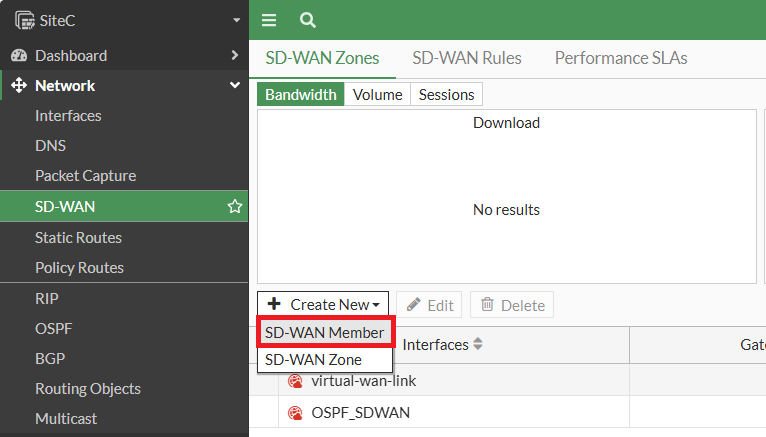
#### <span style="color: rgb(35, 111, 161);">設定SD-WAN</span>

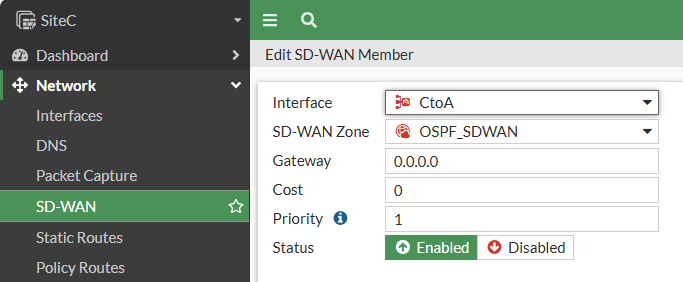
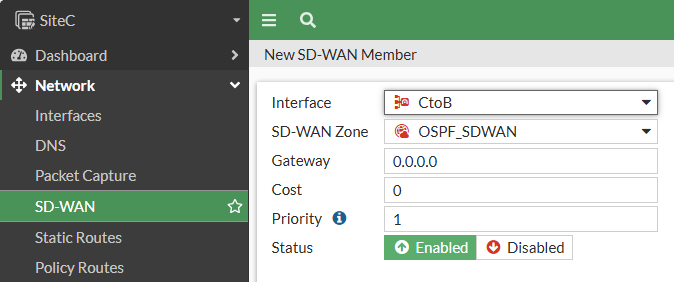
新增 SD-WAN Member

![圖片.png](https://mdfk.goddamn.idv.tw/uploads/images/gallery/2024-08/scaled-1680-/FtXA4fWXHU.png)

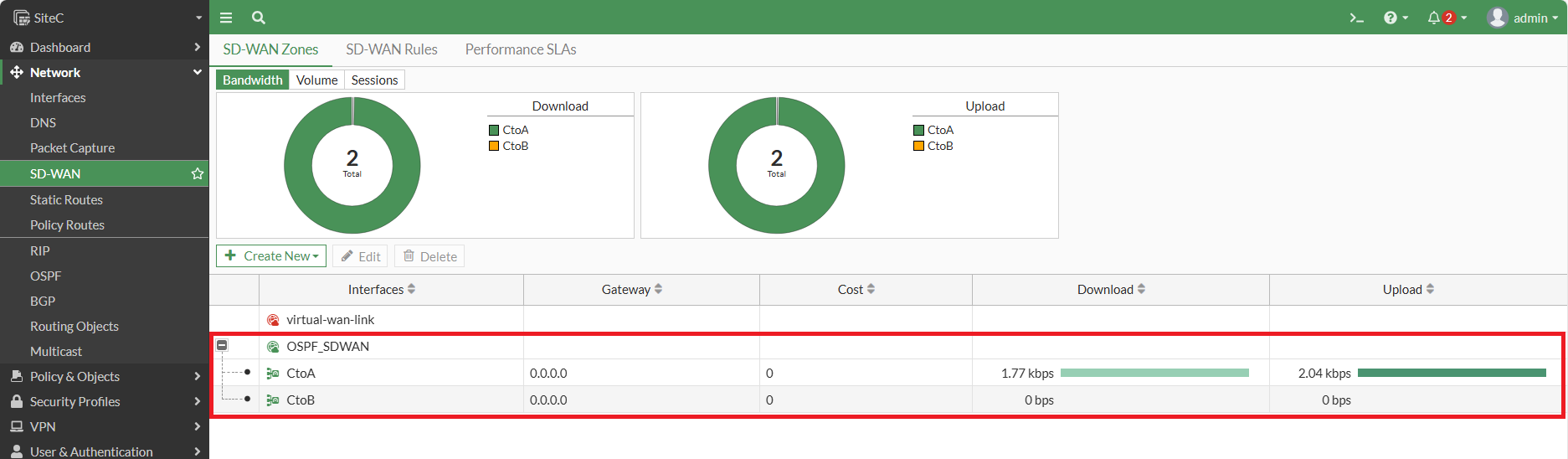
把<span style="color: rgb(224, 62, 45);">**CtoA**</span>、**<span style="color: rgb(224, 62, 45);">CtoB</span>** 加入**<span style="color: rgb(224, 62, 45);">OSPF\_SDWAN</span>** Zone

![圖片.png](https://mdfk.goddamn.idv.tw/uploads/images/gallery/2024-08/scaled-1680-/zIRR5QDoVu.png)

![圖片.png](https://mdfk.goddamn.idv.tw/uploads/images/gallery/2024-08/scaled-1680-/adESZpjSGT.png)

完成如下圖

[![圖片.png](https://mdfk.goddamn.idv.tw/uploads/images/gallery/2024-08/scaled-1680-/XpX4LzNB0c.png)](https://mdfk.goddamn.idv.tw/uploads/images/gallery/2024-08/XpX4LzNB0c.png)

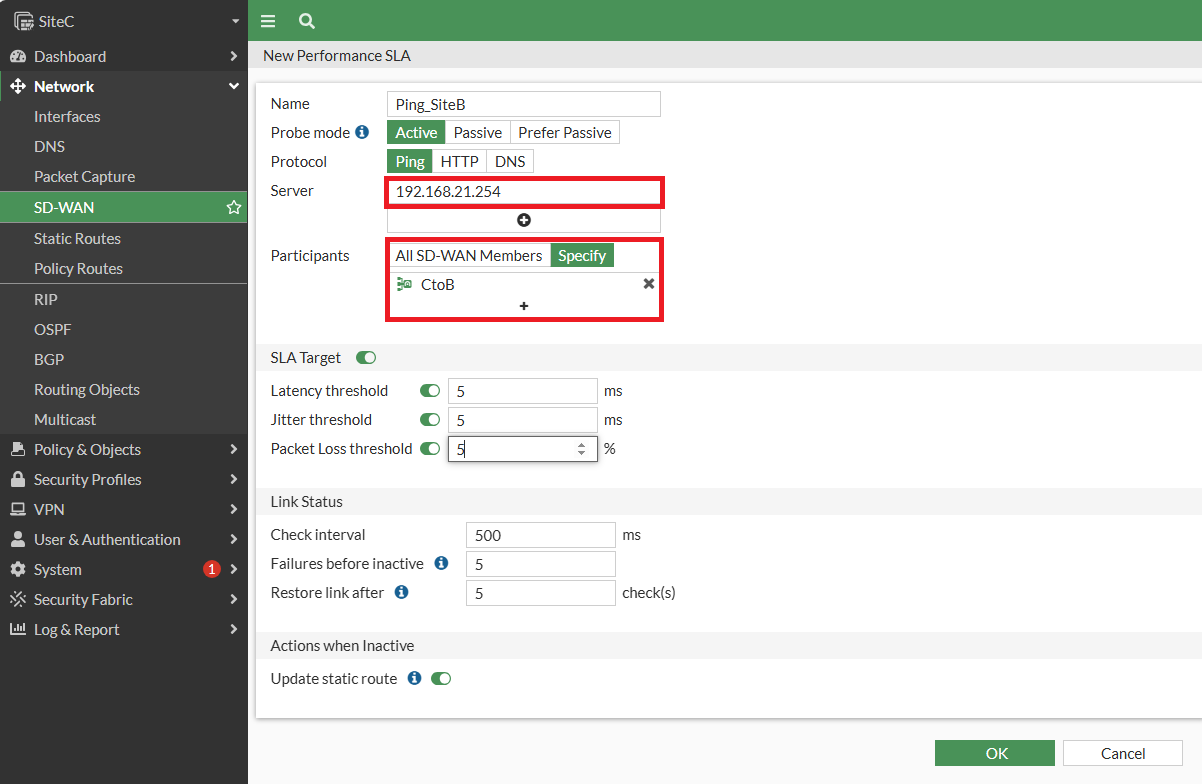
重建 SD-WAN Performance SLA

[![圖片.png](https://mdfk.goddamn.idv.tw/uploads/images/gallery/2024-08/scaled-1680-/d6IUpkIc80.png)](https://mdfk.goddamn.idv.tw/uploads/images/gallery/2024-08/d6IUpkIc80.png)
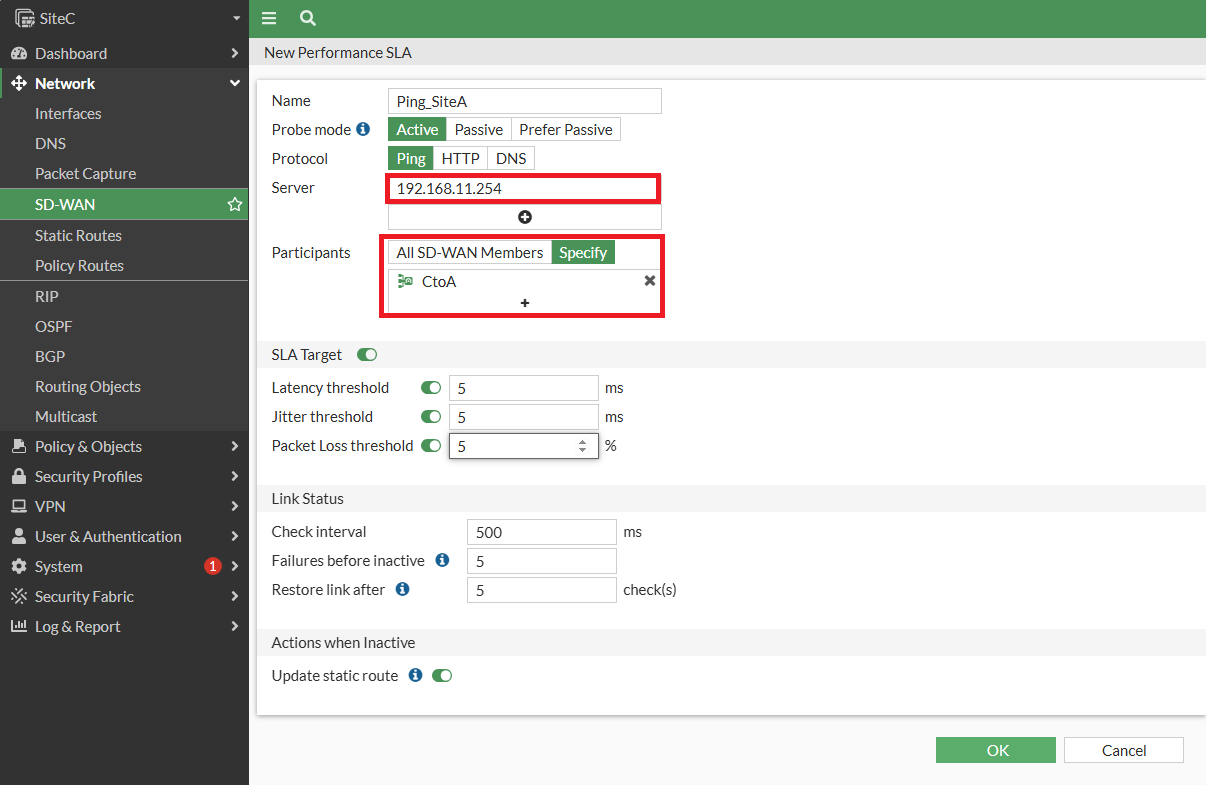
[![圖片.png](https://mdfk.goddamn.idv.tw/uploads/images/gallery/2024-08/scaled-1680-/3SesZrI9RB.png)](https://mdfk.goddamn.idv.tw/uploads/images/gallery/2024-08/3SesZrI9RB.png)
Performance SLA 完成如下圖

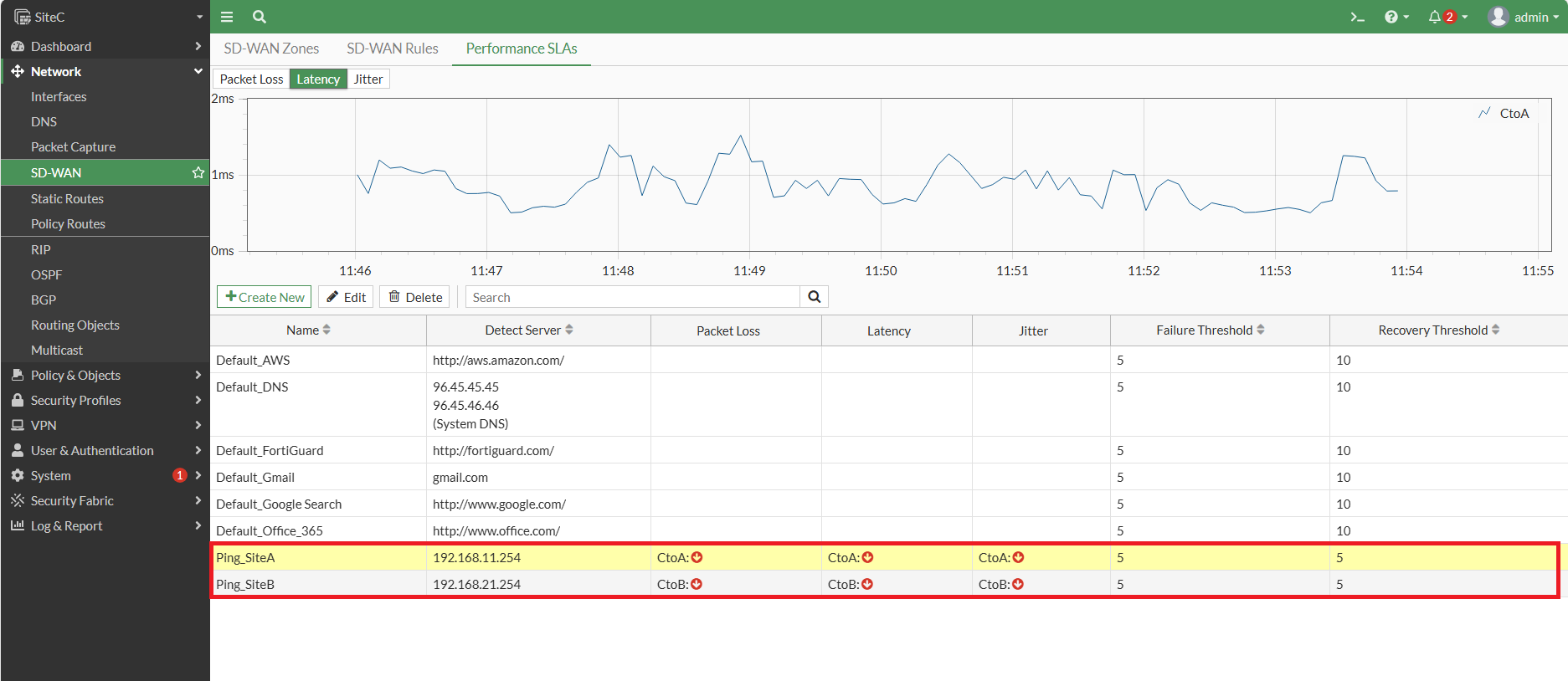
[![圖片.png](https://mdfk.goddamn.idv.tw/uploads/images/gallery/2024-08/scaled-1680-/x6Bfocue8U.png)](https://mdfk.goddamn.idv.tw/uploads/images/gallery/2024-08/x6Bfocue8U.png)
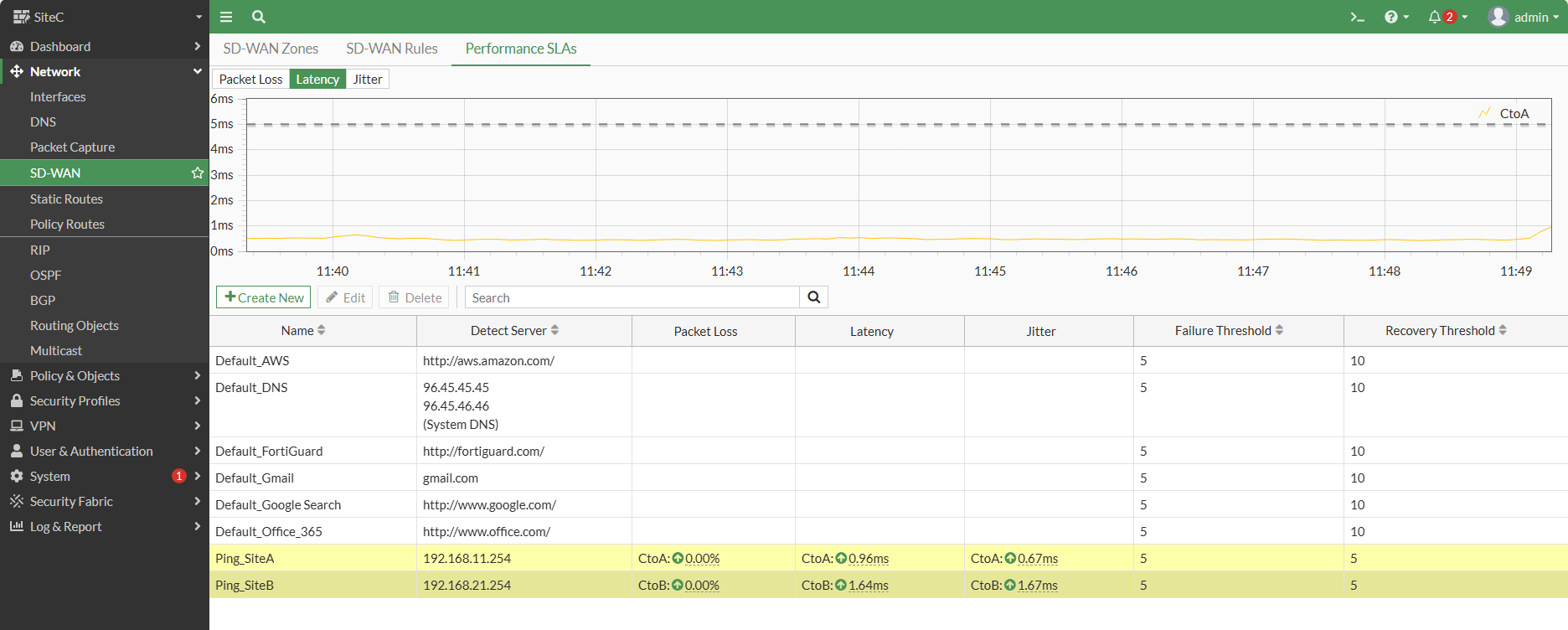
設定至此全部完成

> <span style="color: rgb(230, 126, 35);">**<span style="color: rgb(224, 62, 45);"><span style="font-size: 12.0pt; mso-bidi-font-size: 11.0pt; font-family: '新細明體',serif; mso-bidi-font-family: 新細明體; mso-ansi-language: EN-US; mso-fareast-language: ZH-TW; mso-bidi-language: AR-SA;">※ </span></span>以防有人忘記了，在此我們沒有建立Firewall Policy的原因是上一篇我們已經制定好了**</span>
> 
> <span style="color: rgb(230, 126, 35);">**路由的部分全部交由OSPF處理，<span style="color: rgb(224, 62, 45);">SiteB</span>、<span style="color: rgb(224, 62, 45);">SiteC</span> 請不要設定任何Static Route進入SD-WAN。**</span>

### <span style="color: rgb(35, 111, 161);">狀態確認</span>

#### <span style="color: rgb(35, 111, 161);">OSPF 狀態</span>

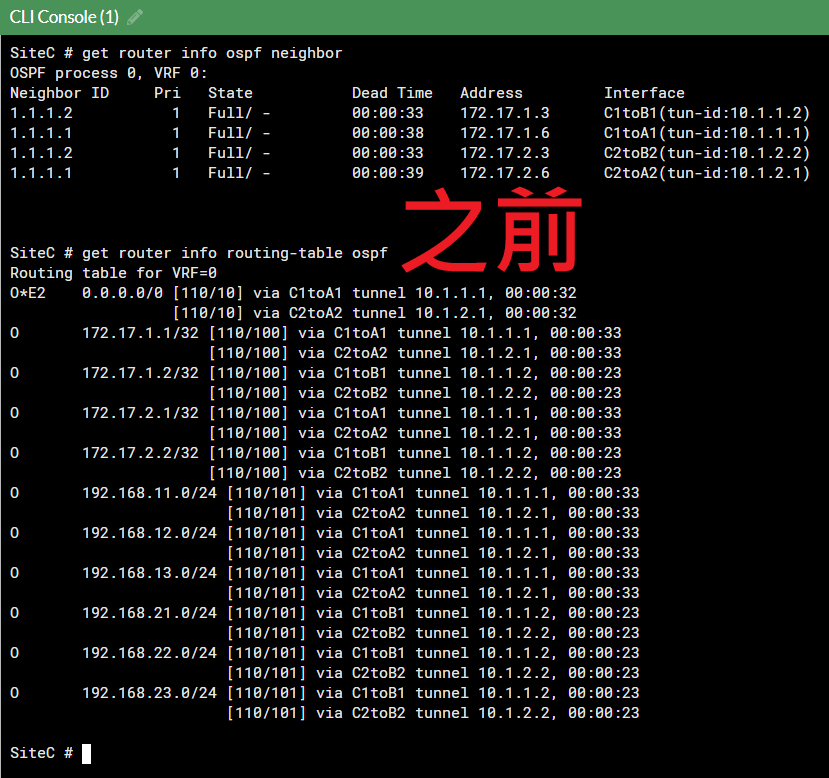
```
get router info ospf neighbor
get router info routing-table ospf
```
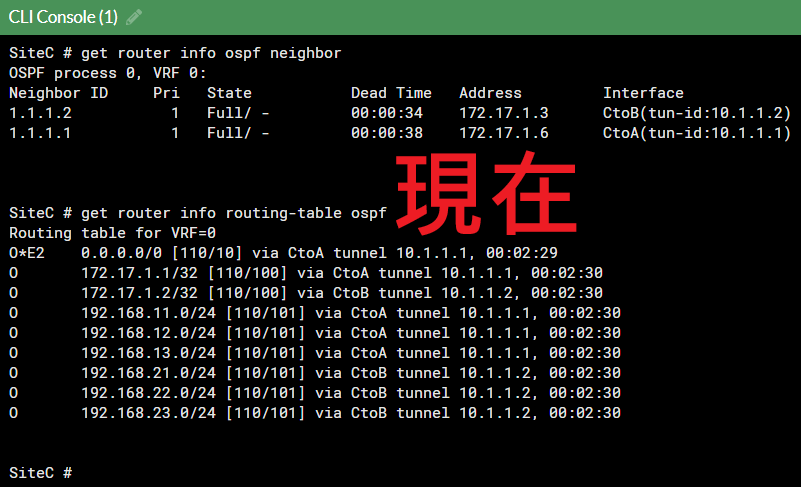
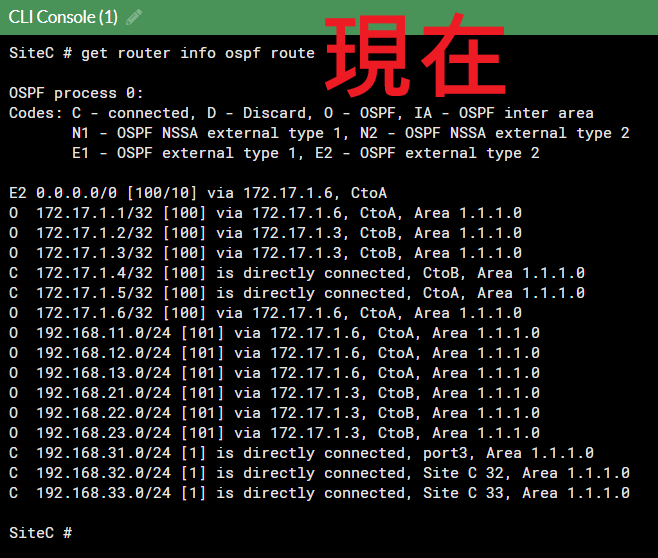
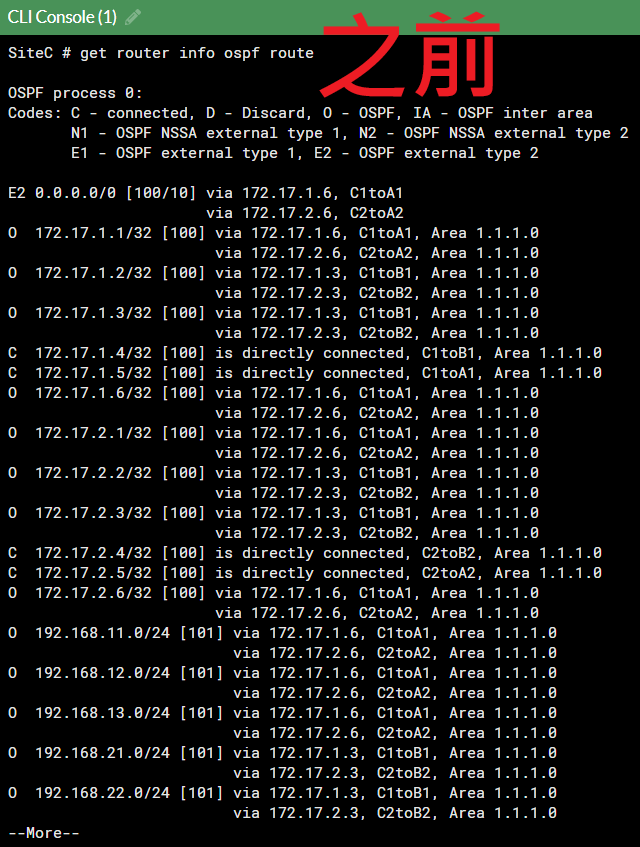
![圖片.png](https://mdfk.goddamn.idv.tw/uploads/images/gallery/2024-08/scaled-1680-/KSi7vboFO6.png)

![圖片.png](https://mdfk.goddamn.idv.tw/uploads/images/gallery/2024-08/scaled-1680-/0emRDRC1OS.png)

```
get router info ospf route
```

![圖片.png](https://mdfk.goddamn.idv.tw/uploads/images/gallery/2024-08/scaled-1680-/syB4J1sHMN.png)

![圖片.png](https://mdfk.goddamn.idv.tw/uploads/images/gallery/2024-08/scaled-1680-/XwtYLdU16Q.png)

```
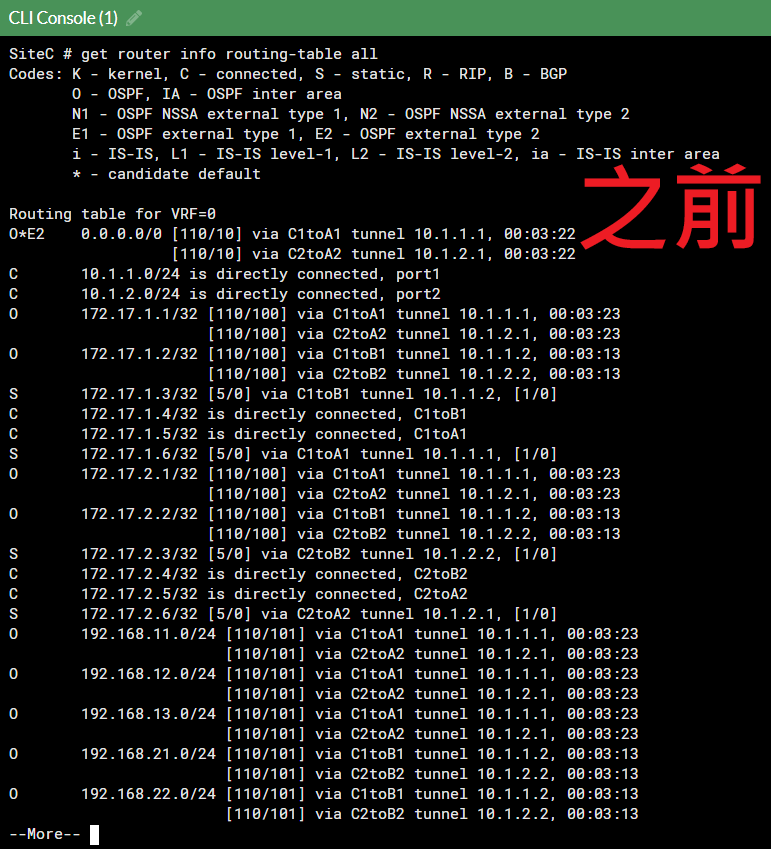
get router info routing-table all
```
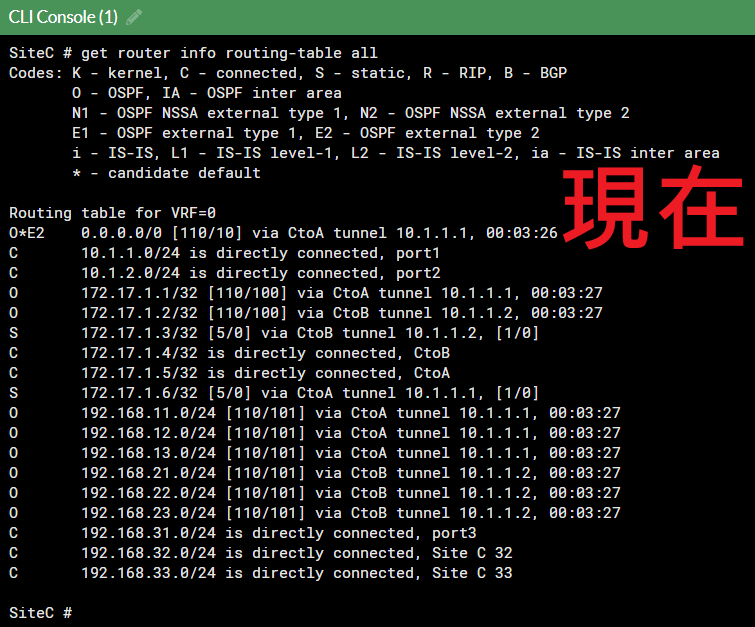
![圖片.png](https://mdfk.goddamn.idv.tw/uploads/images/gallery/2024-08/scaled-1680-/9zkoQo3aAn.png)

![圖片.png](https://mdfk.goddamn.idv.tw/uploads/images/gallery/2024-08/scaled-1680-/LoRwDyBXfw.png)

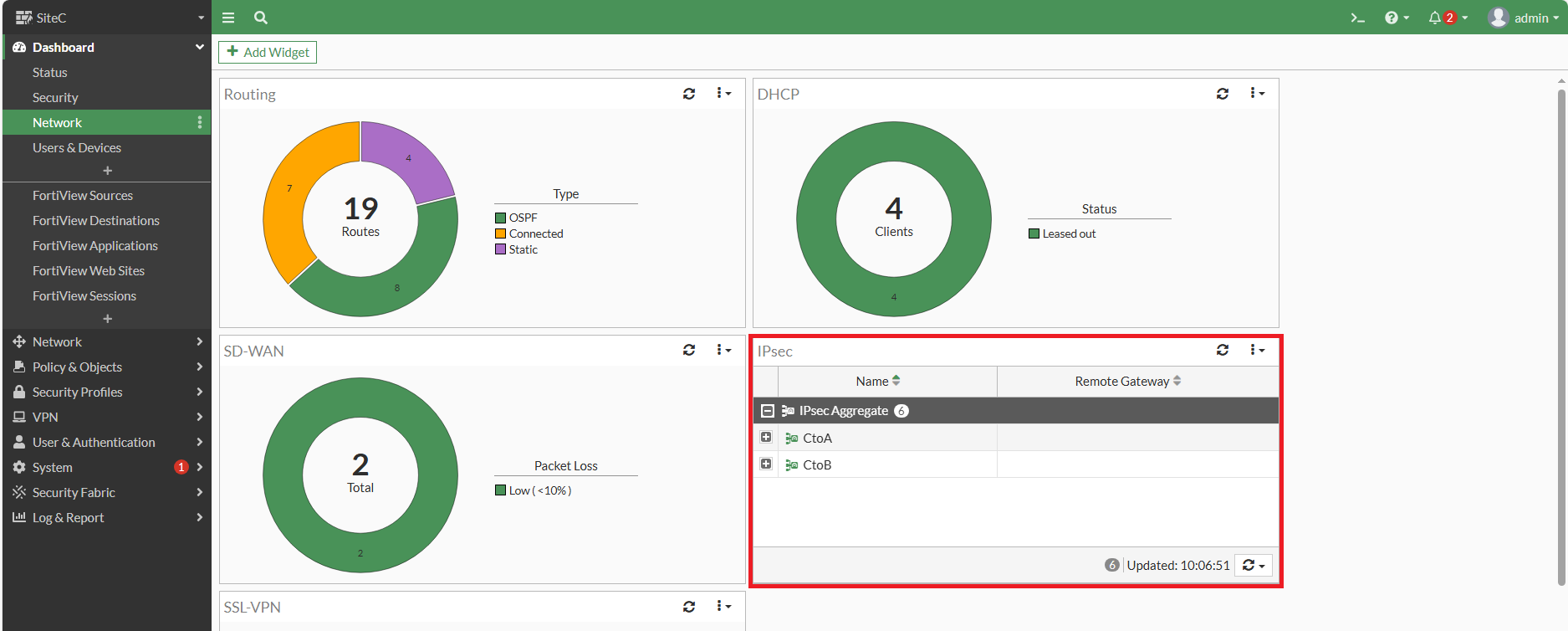
#### <span style="color: rgb(35, 111, 161);">IPSEC 狀態</span>

[![圖片.png](https://mdfk.goddamn.idv.tw/uploads/images/gallery/2024-08/scaled-1680-/jJs6tDdhJr.png)](https://mdfk.goddamn.idv.tw/uploads/images/gallery/2024-08/jJs6tDdhJr.png)

[![圖片.png](https://mdfk.goddamn.idv.tw/uploads/images/gallery/2024-08/scaled-1680-/u1y2WM4t7p.png)](https://mdfk.goddamn.idv.tw/uploads/images/gallery/2024-08/u1y2WM4t7p.png)
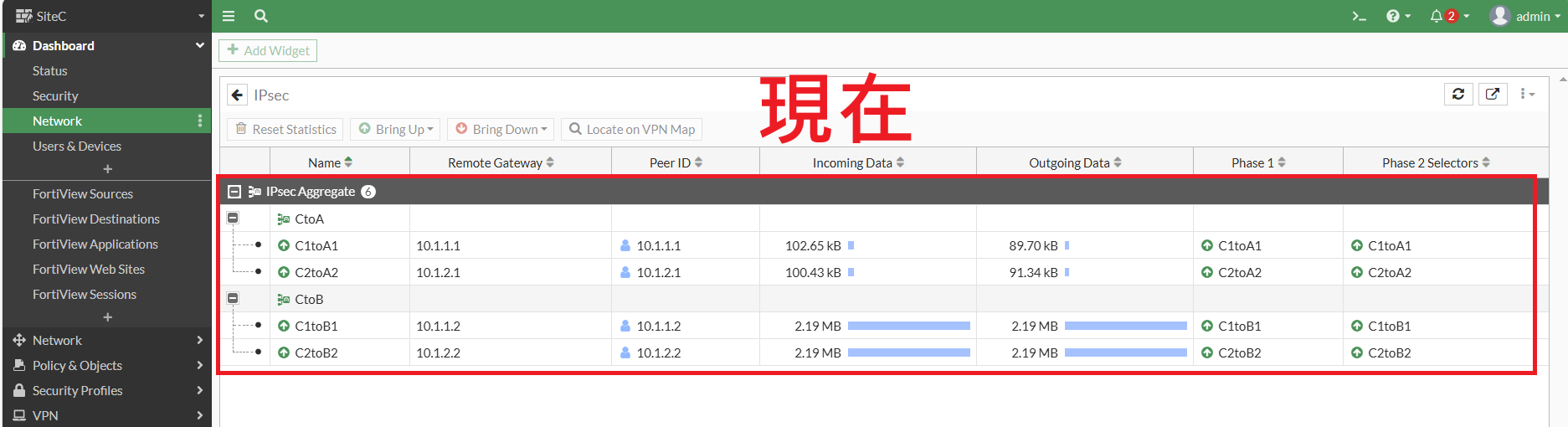
[![圖片.png](https://mdfk.goddamn.idv.tw/uploads/images/gallery/2024-08/scaled-1680-/bolpu1gtNl.png)](https://mdfk.goddamn.idv.tw/uploads/images/gallery/2024-08/bolpu1gtNl.png)
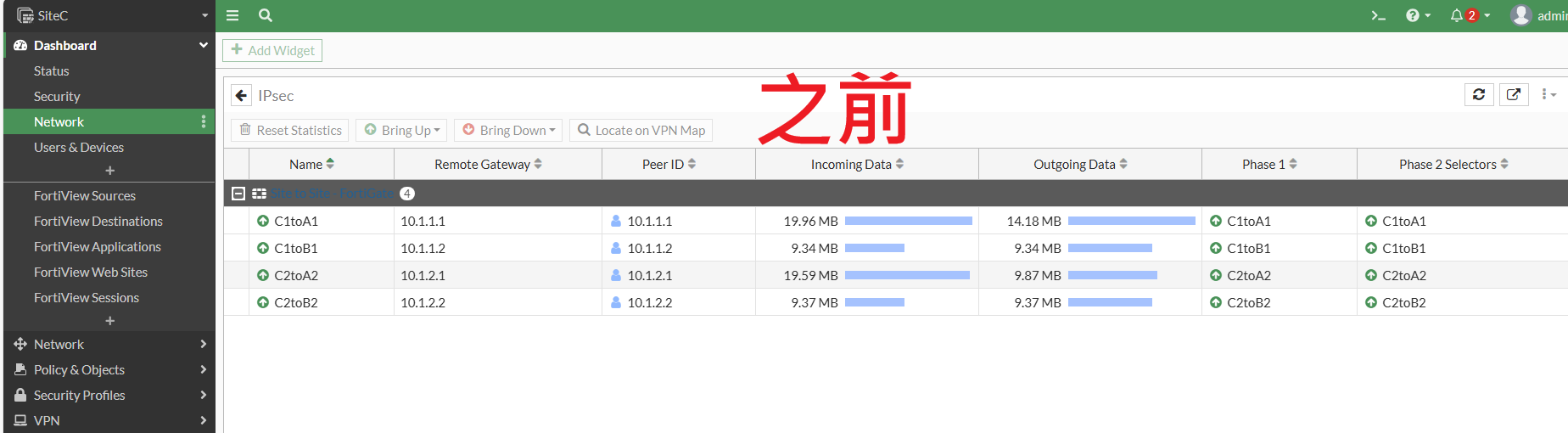
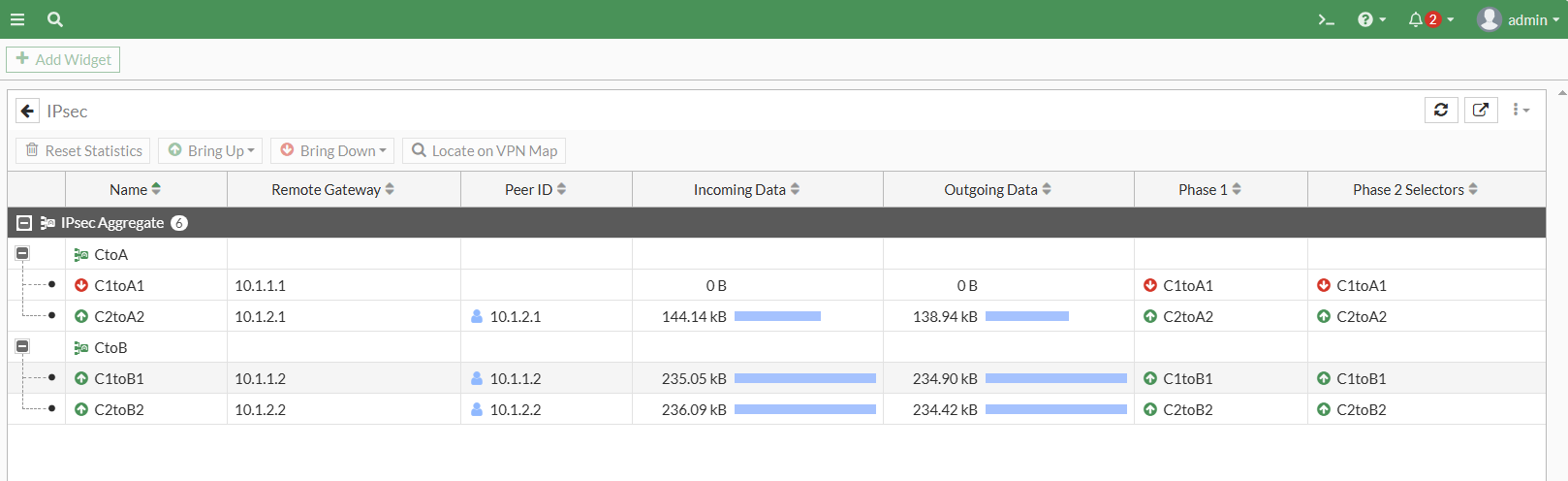
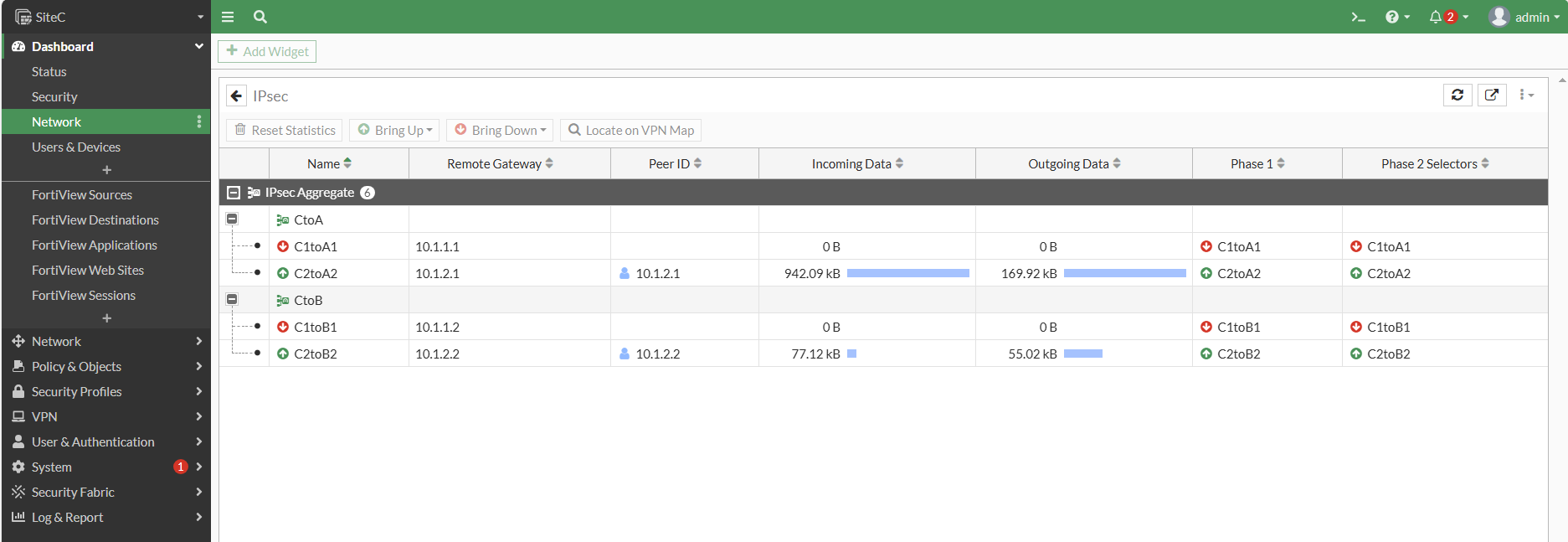
> <span style="color: rgb(224, 62, 45);">**<span style="font-size: 12.0pt; mso-bidi-font-size: 11.0pt; font-family: '新細明體',serif; mso-bidi-font-family: 新細明體; mso-ansi-language: EN-US; mso-fareast-language: ZH-TW; mso-bidi-language: AR-SA;">※</span>**</span>比較過後，是不是看到流量分配的比之前更平均了 ?

#### <span style="color: rgb(35, 111, 161);">  
</span>

### <span style="color: rgb(35, 111, 161);">連線測試</span>

<span style="color: rgb(35, 111, 161);">[![圖片.png](https://mdfk.goddamn.idv.tw/uploads/images/gallery/2024-08/scaled-1680-/CsxiymUtiT.png)](https://mdfk.goddamn.idv.tw/uploads/images/gallery/2024-08/CsxiymUtiT.png)</span>

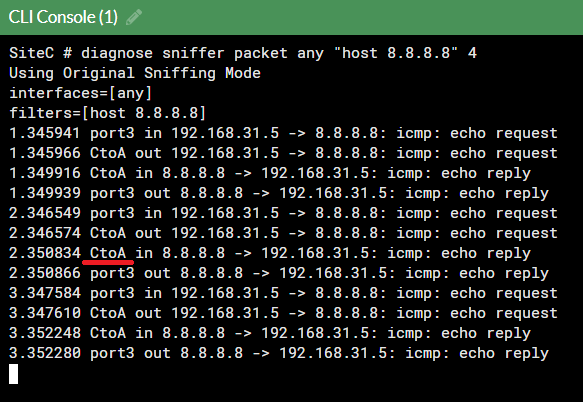
從<span style="color: rgb(224, 62, 45);">**SiteC**</span> PC 連續Ping 8.8.8.8，透過Sniffer可知道是走<span style="color: rgb(224, 62, 45);">**CtoA**</span>

![圖片.png](https://mdfk.goddamn.idv.tw/uploads/images/gallery/2024-08/scaled-1680-/haLkCXSjk9.png)

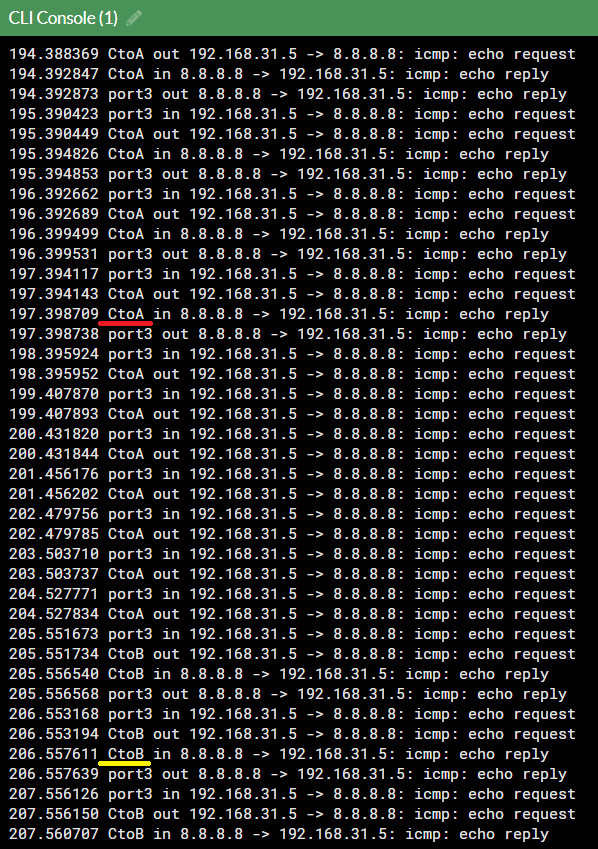
將 <span style="color: rgb(224, 62, 45);">**CtoA** </span>斷線，流量改走 <span style="color: rgb(224, 62, 45);">**CtoB**</span>

![圖片.png](https://mdfk.goddamn.idv.tw/uploads/images/gallery/2024-08/scaled-1680-/72DiT2kZu9.png)

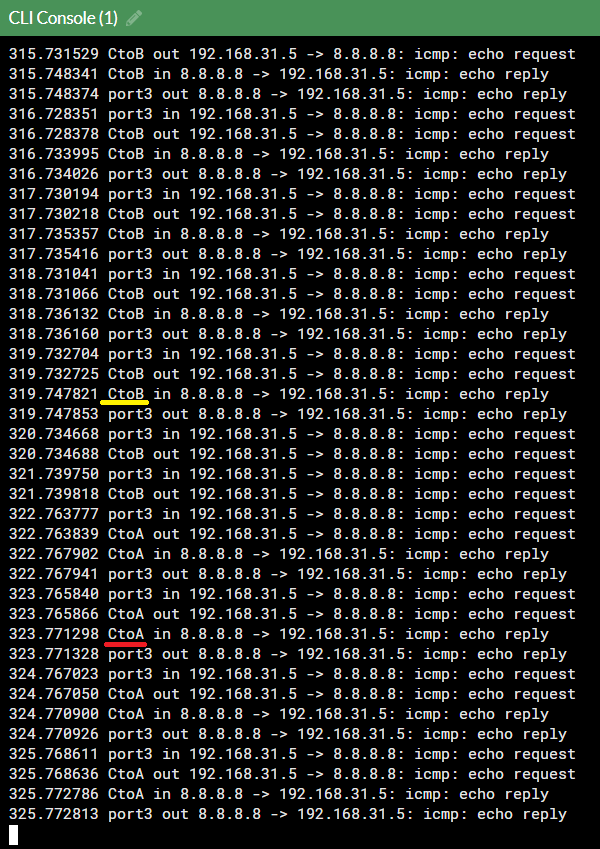
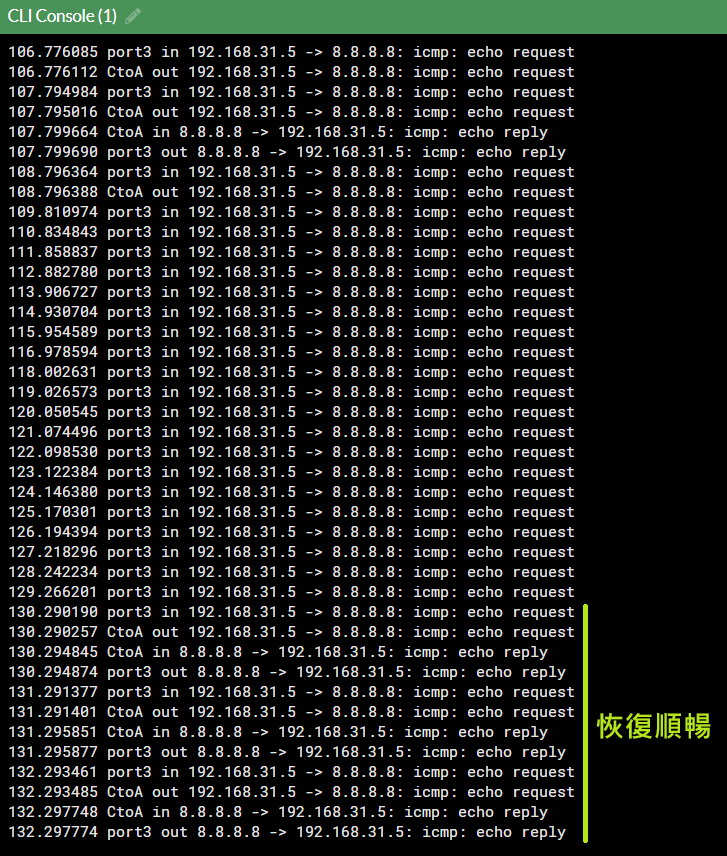
將 <span style="color: rgb(224, 62, 45);">**CtoA** </span>恢復，流量又回到 <span style="color: rgb(224, 62, 45);">**CtoA**</span>

![圖片.png](https://mdfk.goddamn.idv.tw/uploads/images/gallery/2024-08/scaled-1680-/gZkA9BbJrH.png)

有此可證明Fail Over正常運作

### <span style="color: rgb(35, 111, 161);">Pros and Cons</span>

所以，一路看下來，整體設定變得更簡潔、流量分配更平均，這樣設定應該是更好的選擇 ...... 吧 ?

讓我們來看看 IPSEC Aggregate的問題

#### <span style="color: rgb(35, 111, 161);">問題1</span>

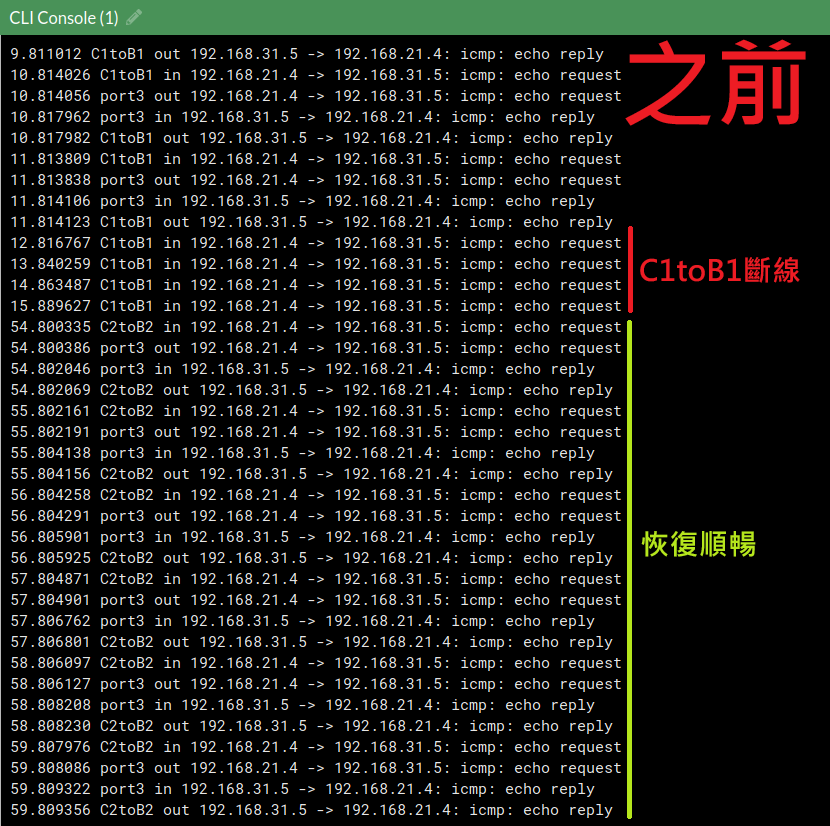
回到上面的Fail Over測試，其實鍵人我不是只單純做了**<span style="color: rgb(224, 62, 45);">CtoA</span>**斷線測試，我其實是優先做**<span style="color: rgb(224, 62, 45);">C1toA1</span>**的斷線測試

[![圖片.png](https://mdfk.goddamn.idv.tw/uploads/images/gallery/2024-08/scaled-1680-/AUXClr9RrO.png)](https://mdfk.goddamn.idv.tw/uploads/images/gallery/2024-08/AUXClr9RrO.png)
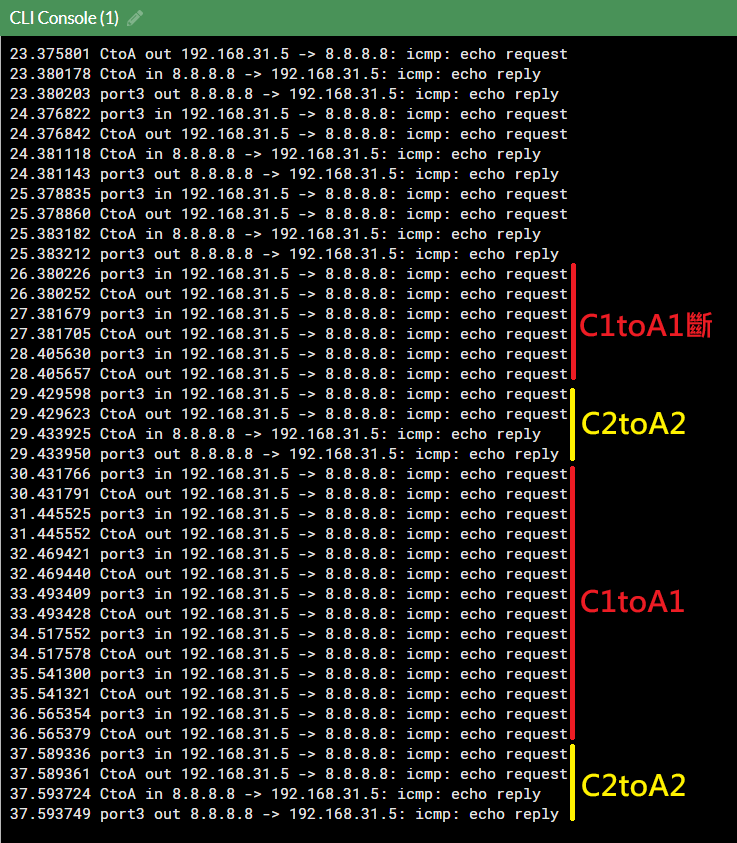
![圖片.png](https://mdfk.goddamn.idv.tw/uploads/images/gallery/2024-08/scaled-1680-/tWKdVBKP4V.png)

看到了嗎 ? IPSEC Aggregate下，因為IPSEC斷線偵測比較慢，所以Aggregate還是很盡責地將封包分給兩條IPSEC所以會導致掉封包，等到IPSEC斷乾淨了之後才恢復順暢(如下圖)

![圖片.png](https://mdfk.goddamn.idv.tw/uploads/images/gallery/2024-08/scaled-1680-/OIDdc6hebE.png)

你要說這個問題會很嚴重嗎 ? 也不見得，但是相較於沒有Aggregate以OSPF的切換機制來說是慢得多了

[![圖片.png](https://mdfk.goddamn.idv.tw/uploads/images/gallery/2024-08/scaled-1680-/ah4cWmd4ri.png)](https://mdfk.goddamn.idv.tw/uploads/images/gallery/2024-08/ah4cWmd4ri.png)

#### <span style="color: rgb(35, 111, 161);">問題2</span>

還記得我們最初為什麼要嘗試把OSPF去結合SD-WAN嗎 ? 就是因為要去監測OSPF線路品質是很困難的事情，所以雖然這樣設定SD-WAN完全沒有生效，但能藉由SD-WAN Performance SLA去監測OSPF線路品質還是一件很棒的事。

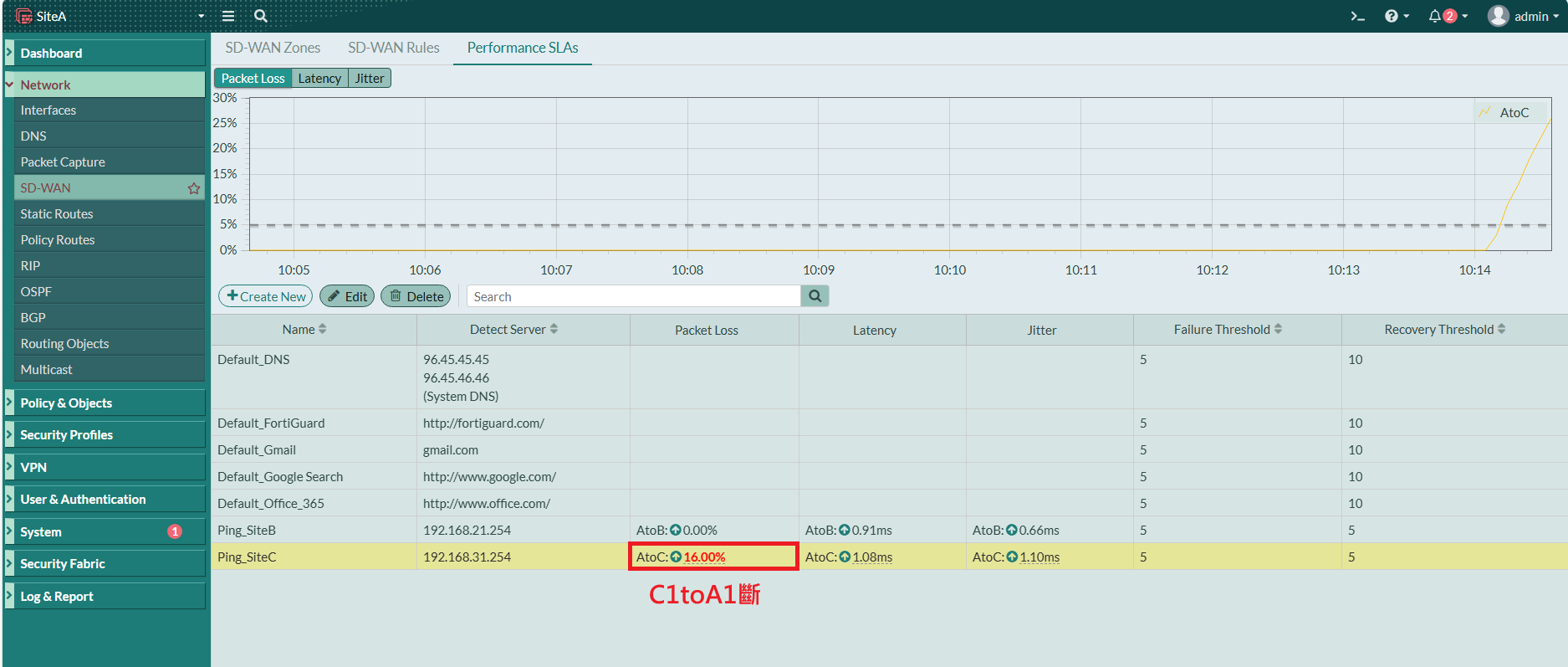
但一旦IPSEC Aggregate之後，SD-WAN Performace SLA監測機制就失去意義了，下圖是以<span style="color: rgb(224, 62, 45);">**SiteA**</span>的角度來看**<span style="color: rgb(224, 62, 45);">C1toA1</span>**斷線

[![圖片.png](https://mdfk.goddamn.idv.tw/uploads/images/gallery/2024-08/scaled-1680-/OzMCBqagPC.png)](https://mdfk.goddamn.idv.tw/uploads/images/gallery/2024-08/OzMCBqagPC.png)

看到了嗎 ? 上圖只知道<span style="color: rgb(224, 62, 45);">**AtoC**</span>有掉包，但卻無法直觀的得知是由於**<span style="color: rgb(224, 62, 45);">C1toA1</span>**斷線所造成的

再來請看下圖，這是實務上容易發生的，當整個**<span style="color: rgb(224, 62, 45);">SiteC</span>** WAN1斷了的時候，**<span style="color: rgb(224, 62, 45);">C1toA1</span>** &amp; **<span style="color: rgb(224, 62, 45);">C1toB1</span>** 會同時斷線。

[![圖片.png](https://mdfk.goddamn.idv.tw/uploads/images/gallery/2024-08/scaled-1680-/uNasXY6yKC.png)](https://mdfk.goddamn.idv.tw/uploads/images/gallery/2024-08/uNasXY6yKC.png)

但在IPSEC還沒切乾淨網路還沒恢復通順的期間，SD-WAN Performance SLA有可能會變成這樣

[![圖片.png](https://mdfk.goddamn.idv.tw/uploads/images/gallery/2024-08/scaled-1680-/iF2O1rAoEw.png)](https://mdfk.goddamn.idv.tw/uploads/images/gallery/2024-08/iF2O1rAoEw.png)

對，就像上圖，顯示上**<span style="color: rgb(224, 62, 45);">SiteA</span>**、**<span style="color: rgb(224, 62, 45);">SiteB</span>**都斷了，但其實沒斷還能夠連線，偵測要等恢復通順才會回來，那這樣就大大的降低了利用SD-WAN Performance SLA監測的意義與正確性。

#### <span style="color: rgb(35, 111, 161);">優勢</span>

說完了問題，IPSEC Aggregate還是有優勢的地方

記得一開始前言的地方，我有提到沒有Aggregate的時候，Fortigate是透過OSPF ECMP的方式來達成Fail Over &amp; Load Balance的，預設的ECMP Policy是基於 Source-IP-Base 去作分流，也就是如下圖

[![圖片.png](https://mdfk.goddamn.idv.tw/uploads/images/gallery/2024-08/scaled-1680-/wuQFxrLrYD.png)](https://mdfk.goddamn.idv.tw/uploads/images/gallery/2024-08/wuQFxrLrYD.png)

也因為ECMP是Source-IP-Base的關係，單一Source IP的**<span style="color: rgb(224, 62, 45);">流量無法超過單一線路頻寬</span>**，假設你WAN1、WAN2皆為100M/100M，在ECMP 單一Source IP 最大流量就是100M。

但再看一次上面那張圖，反而佐證了透過IPSEC Aggregate Fortigate會去拆分封包分別丟入兩個IPSEC Turnnel

![圖片.png](https://mdfk.goddamn.idv.tw/uploads/images/gallery/2024-08/scaled-1680-/tWKdVBKP4V.png)

所以我們可以確定，在IPSEC Aggregate下，單一Source IP的流量<span style="color: rgb(45, 194, 107);">**可以超過單一條線路頻寬**</span>，也就是WAN1、WAN2皆為100M/100M，在IPSEC Aggregate下單一Source IP 最大流量可達 200M。

#### <span style="color: rgb(35, 111, 161);">優劣比較</span>

綜合以上優劣，僅以下表呈現鍵人我的推薦程度，✅較為推薦，❌較不推薦

<table border="1" cellpadding="0" cellspacing="0" id="bkmrk-%E3%80%80-ipsec-ipsec-aggreg" style="border-collapse: collapse; width: 237pt; border-spacing: 0px; border: 0px solid rgb(53, 152, 219);" width="316"><colgroup><col style="mso-width-source: userset; mso-width-alt: 4022; width: 83pt;" width="110"></col> <col span="2" style="mso-width-source: userset; mso-width-alt: 3766; width: 77pt;" width="103"></col> </colgroup><tbody><tr style="height: 30.0pt;"><td class="xl64 align-center" height="40" style="height: 30pt; width: 83pt; border-color: rgb(53, 152, 219);" width="110"> </td><td class="xl65 align-center" style="border-left: rgb(53, 152, 219); width: 77pt; border-color: rgb(53, 152, 219);" width="103">IPSEC</td><td class="xl66 align-center" style="border-left: rgb(53, 152, 219); width: 77pt; border-color: rgb(53, 152, 219);" width="103">IPSEC Aggregate</td></tr><tr style="height: 15.75pt;"><td class="xl67 align-center" height="21" style="height: 15.75pt; border-top: rgb(53, 152, 219); border-color: rgb(53, 152, 219);">動態路由</td><td class="xl64 align-center" style="border-top: rgb(53, 152, 219); border-left: rgb(53, 152, 219); border-color: rgb(53, 152, 219);">✅</td><td class="xl64 align-center" style="border-top: rgb(53, 152, 219); border-left: rgb(53, 152, 219); border-color: rgb(53, 152, 219);">✅</td></tr><tr style="height: 15.75pt;"><td class="xl67 align-center" height="21" style="height: 15.75pt; border-top: rgb(53, 152, 219); border-color: rgb(53, 152, 219);">Fail Over</td><td class="xl64 align-center" style="border-top: rgb(53, 152, 219); border-left: rgb(53, 152, 219); border-color: rgb(53, 152, 219);">✅</td><td class="xl64 align-center" style="border-top: rgb(53, 152, 219); border-left: rgb(53, 152, 219); border-color: rgb(53, 152, 219);">✅</td></tr><tr style="height: 15.75pt;"><td class="xl67 align-center" height="21" style="height: 15.75pt; border-top: rgb(53, 152, 219); border-color: rgb(53, 152, 219);">Load Balance</td><td class="xl64 align-center" style="border-top: rgb(53, 152, 219); border-left: rgb(53, 152, 219); border-color: rgb(53, 152, 219);">✅</td><td class="xl64 align-center" style="border-top: rgb(53, 152, 219); border-left: rgb(53, 152, 219); border-color: rgb(53, 152, 219);">✅</td></tr><tr style="height: 15.75pt;"><td class="xl67 align-center" height="21" style="height: 15.75pt; border-top: rgb(53, 152, 219); border-color: rgb(53, 152, 219);">線路監控</td><td class="xl64 align-center" style="border-top: rgb(53, 152, 219); border-left: rgb(53, 152, 219); border-color: rgb(53, 152, 219);">✅</td><td class="xl64 align-center" style="border-top: rgb(53, 152, 219); border-left: rgb(53, 152, 219); border-color: rgb(53, 152, 219);">❌</td></tr><tr style="height: 15.75pt;"><td class="xl67 align-center" height="21" style="height: 15.75pt; border-top: rgb(53, 152, 219); border-color: rgb(53, 152, 219);">即時切換</td><td class="xl64 align-center" style="border-top: rgb(53, 152, 219); border-left: rgb(53, 152, 219); border-color: rgb(53, 152, 219);">✅</td><td class="xl64 align-center" style="border-top: rgb(53, 152, 219); border-left: rgb(53, 152, 219); border-color: rgb(53, 152, 219);">❌</td></tr><tr style="height: 15.75pt;"><td class="xl67 align-center" height="21" style="height: 15.75pt; border-top: rgb(53, 152, 219); border-color: rgb(53, 152, 219);">整合頻寬</td><td class="xl64 align-center" style="border-top: rgb(53, 152, 219); border-left: rgb(53, 152, 219); border-color: rgb(53, 152, 219);">❌</td><td class="xl64 align-center" style="border-top: rgb(53, 152, 219); border-left: rgb(53, 152, 219); border-color: rgb(53, 152, 219);">✅</td></tr></tbody></table>

如果是鍵人我，我會選擇 IPSEC 不作 Aggregate，這樣才能充分發揮OSPF的優勢

但在某些不是這麼Critical的Site，線路頻寬小且無法升速的區域 (比方說偏鄉地區)，IPSEC Aggregate依然是個不錯的選擇