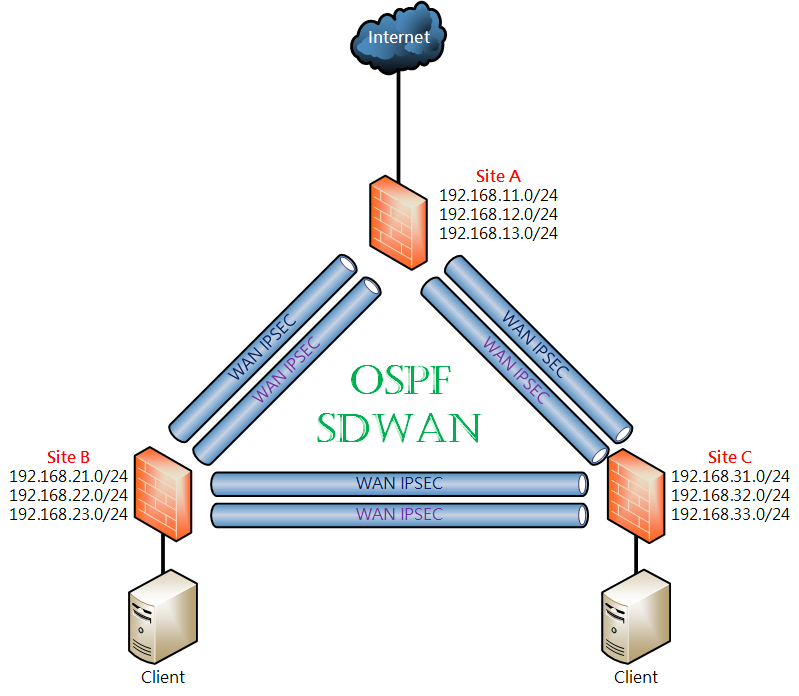
# Fortigate IPSEC + OSPF + SDWAN 實作

### <span style="color: rgb(35, 111, 161);">參考資料</span>

<p class="callout info">[https://docs.fortinet.com/document/fortigate/6.2.16/cookbook/632796/ospf-with-ipsec-vpn-for-network-redundancy](https://docs.fortinet.com/document/fortigate/6.2.16/cookbook/632796/ospf-with-ipsec-vpn-for-network-redundancy)</p>

### <span style="color: rgb(35, 111, 161);">前言</span>

上一篇分享了 [Fortigate IPSEC + iBGP](https://mdfk.goddamn.idv.tw/books/fortigate/page/fortigate-ipsec-ibgp) 的動態路由，但畢竟一般企業中鮮少使用BGP，大多反而是使用OSPF，OSPF不但能自動交換路由，同時也能 Fail Over 與 Load Balance，此篇實作帶大家一起來看看 Fortigate IPSEC + OSPF + SDWAN 有沒有搞頭。

### <span style="color: rgb(35, 111, 161);">環境說明</span>

![圖片.png](https://mdfk.goddamn.idv.tw/uploads/images/gallery/2024-08/scaled-1680-/k5z5nlEAsa.png)

<span style="color: rgb(22, 145, 121);">**設計概念：**</span> 三個Site透過 IPSEC+OSPF+SDWAN 來達成多線路OSPF動態路由，任一條線路故障時可透過其他線路接續連線，並透過SDWAN來監測線路品質狀況，同時由於資訊安全控管的原則希望能統一由同一個Gateway進出。

<span style="color: rgb(224, 62, 45);">**Firmware Ver. ：** </span>Fortigate-VM 7.0.15

<table border="1" id="bkmrk-wan-ip-lan-subnets-w" style="border-collapse: collapse; width: 100%; height: 220px; border: 1px solid rgb(52, 73, 94);"><colgroup><col style="width: 20.0238%;"></col><col style="width: 20.0238%;"></col><col style="width: 20.0238%;"></col><col style="width: 20.0238%;"></col><col style="width: 20.0238%;"></col></colgroup><tbody><tr style="height: 29.8px;"><td class="align-center" style="height: 29.8px; border-color: rgb(52, 73, 94);">  
</td><td class="align-center" style="height: 29.8px; border-color: rgb(52, 73, 94);">**<span style="color: rgb(35, 111, 161);">WAN IP</span>**  
</td><td class="align-center" style="height: 29.8px; border-color: rgb(52, 73, 94);">**<span style="color: rgb(35, 111, 161);">LAN Subnets</span>**  
</td><td class="align-center" style="height: 29.8px; border-color: rgb(52, 73, 94);">**<span style="color: rgb(35, 111, 161);">WAN1 IPSEC IP</span>**  
</td><td class="align-center" style="height: 29.8px; border-color: rgb(52, 73, 94);">**<span style="color: rgb(35, 111, 161);">WAN2 IPSEC IP</span>**  
</td></tr><tr style="height: 63.4px;"><td class="align-center" style="height: 63.4px; border-color: rgb(52, 73, 94);"><span style="color: rgb(224, 62, 45);">**SiteA**</span>  
</td><td class="align-center" style="height: 63.4px; border-color: rgb(52, 73, 94);">WAN1 10.1.1.1

WAN2 10.1.2.1

Port4 (to Internet)

</td><td class="align-center" style="height: 63.4px; border-color: rgb(52, 73, 94);">192.168.11.254/24

192.168.12.254/24

192.168.13.254/24

</td><td class="align-center" style="height: 63.4px; border-color: rgb(52, 73, 94);"><span style="color: rgb(224, 62, 45);">**A1toB1**</span> 172.17.1.1

**<span style="color: rgb(224, 62, 45);">A1toC1</span>** 172.17.1.6

</td><td class="align-center" style="height: 63.4px; border-color: rgb(52, 73, 94);"><span style="color: rgb(224, 62, 45);">**A2toB2**</span> 172.17.2.1

**<span style="color: rgb(224, 62, 45);">A2toC2</span>** 172.17.2.6

</td></tr><tr style="height: 63.4px;"><td class="align-center" style="height: 63.4px; border-color: rgb(52, 73, 94);"><span style="color: rgb(224, 62, 45);">**SiteB**</span>  
</td><td class="align-center" style="height: 63.4px; border-color: rgb(52, 73, 94);">WAN1 10.1.1.2

WAN2 10.1.2.2

</td><td class="align-center" style="height: 63.4px; border-color: rgb(52, 73, 94);">192.168.21.254/24

192.168.22.254/24

192.168.23.254/24

</td><td class="align-center" style="height: 63.4px; border-color: rgb(52, 73, 94);">**<span style="color: rgb(224, 62, 45);">B1toA1</span>** 172.17.1.2

**<span style="color: rgb(224, 62, 45);">B1toC1</span>** 172.17.1.3

</td><td class="align-center" style="height: 63.4px; border-color: rgb(52, 73, 94);">**<span style="color: rgb(224, 62, 45);">B2toA2</span>** 172.17.2.2

**<span style="color: rgb(224, 62, 45);">B2toC2</span>** 172.17.2.3

</td></tr><tr style="height: 63.4px;"><td class="align-center" style="height: 63.4px; border-color: rgb(52, 73, 94);">**<span style="color: rgb(224, 62, 45);">SiteC</span>**  
</td><td class="align-center" style="height: 63.4px; border-color: rgb(52, 73, 94);">WAN1 10.1.1.3

WAN2 10.1.2.3

</td><td class="align-center" style="height: 63.4px; border-color: rgb(52, 73, 94);">192.168.31.254/24

192.168.32.254/24

192.168.33.254/24

</td><td class="align-center" style="height: 63.4px; border-color: rgb(52, 73, 94);">**<span style="color: rgb(224, 62, 45);">C1toB1</span>** 172.17.1.4

**<span style="color: rgb(224, 62, 45);">C1toA1</span>** 172.17.1.5

</td><td class="align-center" style="height: 63.4px; border-color: rgb(52, 73, 94);">**<span style="color: rgb(224, 62, 45);">C2toB2</span>** 172.17.2.4

**<span style="color: rgb(224, 62, 45);">C2toA2</span>** 172.17.2.5

</td></tr></tbody></table>

### <span style="color: rgb(35, 111, 161);">設定過程(1)</span>

#### <span style="color: rgb(35, 111, 161);">設定Interface</span>

以下設定皆以一台**<span style="color: rgb(224, 62, 45);">SiteC</span>**為範例，請對照該台設定相關對應設定至**<span style="color: rgb(224, 62, 45);">SiteB</span>**，第一階段我們先忽略SDWAN，先把IPSEC+OSPF設起來。

[![圖片.png](https://mdfk.goddamn.idv.tw/uploads/images/gallery/2024-08/scaled-1680-/BjZhlTC5LX.png)](https://mdfk.goddamn.idv.tw/uploads/images/gallery/2024-08/BjZhlTC5LX.png)

先把 WAN1、WAN2、LAN Interface設定好如下圖

[![圖片.png](https://mdfk.goddamn.idv.tw/uploads/images/gallery/2024-08/scaled-1680-/l0zNdnTkFz.png)](https://mdfk.goddamn.idv.tw/uploads/images/gallery/2024-08/l0zNdnTkFz.png)

為了方便設定，我將 LAN Interface綁成一個Zone，並且不要Block內部流量互通

![圖片.png](https://mdfk.goddamn.idv.tw/uploads/images/gallery/2024-08/scaled-1680-/F2DbIKhzwe.png)

#### <span style="color: rgb(35, 111, 161);">設定IPSEC</span>

至 VPN =&gt; IPSEC 建立 WAN1 IPSEC VPN，我以 **<span style="color: rgb(224, 62, 45);">C1toB1</span>** 來命名

[![圖片.png](https://mdfk.goddamn.idv.tw/uploads/images/gallery/2024-08/scaled-1680-/3m3U67X92g.png)](https://mdfk.goddamn.idv.tw/uploads/images/gallery/2024-08/3m3U67X92g.png)

Remote IP設定<span style="color: rgb(224, 62, 45);">**SiteB**</span> WAN1 IP，指定Pre-shared Key

[![圖片.png](https://mdfk.goddamn.idv.tw/uploads/images/gallery/2024-08/scaled-1680-/eZ0XnHJnl2.png)](https://mdfk.goddamn.idv.tw/uploads/images/gallery/2024-08/eZ0XnHJnl2.png)

本地Interface就選剛剛做好的LAN Zone，Local &amp; Remote Subnets 都鍵入 0.0.0.0/0

[![圖片.png](https://mdfk.goddamn.idv.tw/uploads/images/gallery/2024-08/scaled-1680-/JGr2UoqsTU.png)](https://mdfk.goddamn.idv.tw/uploads/images/gallery/2024-08/JGr2UoqsTU.png)

Wizard會建立一堆討厭的東西，晚一點砍掉

[![圖片.png](https://mdfk.goddamn.idv.tw/uploads/images/gallery/2024-08/scaled-1680-/zZrJ9RMfCm.png)](https://mdfk.goddamn.idv.tw/uploads/images/gallery/2024-08/zZrJ9RMfCm.png)

[![圖片.png](https://mdfk.goddamn.idv.tw/uploads/images/gallery/2024-08/scaled-1680-/ICrgyfRAhA.png)](https://mdfk.goddamn.idv.tw/uploads/images/gallery/2024-08/ICrgyfRAhA.png)

建立SiteC WAN2 IPSEC VPN **<span style="color: rgb(224, 62, 45);">C2toB2</span>**

![圖片.png](https://mdfk.goddamn.idv.tw/uploads/images/gallery/2024-08/scaled-1680-/y6UOJVvzHT.png)

![圖片.png](https://mdfk.goddamn.idv.tw/uploads/images/gallery/2024-08/scaled-1680-/fCxQCRCGmb.png)

![圖片.png](https://mdfk.goddamn.idv.tw/uploads/images/gallery/2024-08/scaled-1680-/TPQEMRaJH2.png)

![圖片.png](https://mdfk.goddamn.idv.tw/uploads/images/gallery/2024-08/scaled-1680-/nQhYj4WaTf.png)

![圖片.png](https://mdfk.goddamn.idv.tw/uploads/images/gallery/2024-08/scaled-1680-/82Bsa1VmO1.png)

建好兩條VPN之後，至Policy砍掉Wizard自動建立的Policy

[![圖片.png](https://mdfk.goddamn.idv.tw/uploads/images/gallery/2024-08/scaled-1680-/EtZEkZ2CVQ.png)](https://mdfk.goddamn.idv.tw/uploads/images/gallery/2024-08/EtZEkZ2CVQ.png)

至Static Route砍掉Wizard自動建立的路由

[![圖片.png](https://mdfk.goddamn.idv.tw/uploads/images/gallery/2024-08/scaled-1680-/6fcbFs6AL9.png)](https://mdfk.goddamn.idv.tw/uploads/images/gallery/2024-08/6fcbFs6AL9.png)

至Network Interface，來進行 <span style="color: rgb(224, 62, 45);">**C1toB1**</span>、**<span style="color: rgb(224, 62, 45);">C2toB2</span>** Interface設定

[![圖片.png](https://mdfk.goddamn.idv.tw/uploads/images/gallery/2024-08/scaled-1680-/4VsfYxICA5.png)](https://mdfk.goddamn.idv.tw/uploads/images/gallery/2024-08/4VsfYxICA5.png)

如下圖設定自己(SiteC)與對方(SiteB)的預先定義IP，Netmask設定 /32，開啟Ping

[![圖片.png](https://mdfk.goddamn.idv.tw/uploads/images/gallery/2024-08/scaled-1680-/fHBMY4qzeW.png)](https://mdfk.goddamn.idv.tw/uploads/images/gallery/2024-08/fHBMY4qzeW.png)

設定完後如下圖

[![圖片.png](https://mdfk.goddamn.idv.tw/uploads/images/gallery/2024-08/scaled-1680-/5VeeEi88zF.png)](https://mdfk.goddamn.idv.tw/uploads/images/gallery/2024-08/5VeeEi88zF.png)

我們將兩個IPSEC VPN綁成一個Zone (**<span style="color: rgb(224, 62, 45);">VPN\_Zone</span>**)，並且不要Block內部流量讓裡面介面能互通(後面會用到)

![圖片.png](https://mdfk.goddamn.idv.tw/uploads/images/gallery/2024-08/scaled-1680-/AeRVubU2hU.png)


#### <span style="color: rgb(35, 111, 161);">設定Firewall Policy</span>

建立Firewall Policy，允許LAN Zone與VPN Zone互通，**<span style="color: rgb(224, 62, 45);">不要NAT</span>**

[![圖片.png](https://mdfk.goddamn.idv.tw/uploads/images/gallery/2024-08/scaled-1680-/sEIEVJ84c0.png)](https://mdfk.goddamn.idv.tw/uploads/images/gallery/2024-08/sEIEVJ84c0.png)

[![圖片.png](https://mdfk.goddamn.idv.tw/uploads/images/gallery/2024-08/scaled-1680-/M3YT7Pv9dF.png)](https://mdfk.goddamn.idv.tw/uploads/images/gallery/2024-08/M3YT7Pv9dF.png)

設定好後Firewall Policy如下圖

[![圖片.png](https://mdfk.goddamn.idv.tw/uploads/images/gallery/2024-08/scaled-1680-/V9LIkqgNkM.png)](https://mdfk.goddamn.idv.tw/uploads/images/gallery/2024-08/V9LIkqgNkM.png)

至此完成了**<span style="color: rgb(224, 62, 45);">SiteC</span>** IPSEC設定，<span style="color: rgb(224, 62, 45);">**<span style="font-size: 12.0pt; mso-bidi-font-size: 11.0pt; font-family: '新細明體',serif; mso-bidi-font-family: 新細明體; mso-ansi-language: EN-US; mso-fareast-language: ZH-TW; mso-bidi-language: AR-SA;">※</span>**請依照上面步驟去完成**SiteB** IPSEC的步驟</span>

當 **<span style="color: rgb(224, 62, 45);">SiteC</span>**、<span style="color: rgb(224, 62, 45);">**SiteB** </span>Firewall Policy設定完成後，你應該可以發現IPSEC Turnel已經起來了

[![圖片.png](https://mdfk.goddamn.idv.tw/uploads/images/gallery/2024-08/scaled-1680-/XXeniitQgE.png)](https://mdfk.goddamn.idv.tw/uploads/images/gallery/2024-08/XXeniitQgE.png)

如果還沒起來，可以透過IPSEC介面，點擊 Bring Up

[![圖片.png](https://mdfk.goddamn.idv.tw/uploads/images/gallery/2024-08/scaled-1680-/6aD5vFwtNc.png)](https://mdfk.goddamn.idv.tw/uploads/images/gallery/2024-08/6aD5vFwtNc.png)

從<span style="color: rgb(224, 62, 45);">**SiteC**</span>去Ping **<span style="color: rgb(224, 62, 45);">SiteB </span>**的 IPSEC IP，已經可以Ping的到，但是<span style="color: rgb(224, 62, 45);">**SiteB**</span>的LAN Ping不到，這是正確的

[![圖片.png](https://mdfk.goddamn.idv.tw/uploads/images/gallery/2024-08/scaled-1680-/VcLaoG6toh.png)](https://mdfk.goddamn.idv.tw/uploads/images/gallery/2024-08/VcLaoG6toh.png)

下圖可知 IPSEC Interface 的路由已經起來了所以Ping的到，因為沒有LAN Subnet的路由所以Ping不到，這個部分就是要靠OSPF上場了。

[![圖片.png](https://mdfk.goddamn.idv.tw/uploads/images/gallery/2024-08/scaled-1680-/m9YJwpMvX8.png)](https://mdfk.goddamn.idv.tw/uploads/images/gallery/2024-08/m9YJwpMvX8.png)

#### <span style="color: rgb(35, 111, 161);">設定OSPF</span>

至 Network =&gt; OSPF，指定Router ID、Area ID、要自動交換路由的網段 <span style="color: rgb(224, 62, 45);">**<span style="font-size: 12.0pt; mso-bidi-font-size: 11.0pt; font-family: '新細明體',serif; mso-bidi-font-family: 新細明體; mso-ansi-language: EN-US; mso-fareast-language: ZH-TW; mso-bidi-language: AR-SA;">※</span>**(需要包括IPSEC介面的路由)</span>

[![圖片.png](https://mdfk.goddamn.idv.tw/uploads/images/gallery/2024-08/scaled-1680-/dDPA3Vbl1Z.png)](https://mdfk.goddamn.idv.tw/uploads/images/gallery/2024-08/dDPA3Vbl1Z.png)

Interfaces將IPSEC介面加入，Network Type 選擇 "Point to Point"

[![圖片.png](https://mdfk.goddamn.idv.tw/uploads/images/gallery/2024-08/scaled-1680-/PRIjxqbNqP.png)](https://mdfk.goddamn.idv.tw/uploads/images/gallery/2024-08/PRIjxqbNqP.png)

[![圖片.png](https://mdfk.goddamn.idv.tw/uploads/images/gallery/2024-08/scaled-1680-/hE00HXLQ5k.png)](https://mdfk.goddamn.idv.tw/uploads/images/gallery/2024-08/hE00HXLQ5k.png)

<span style="color: rgb(224, 62, 45);">**<span style="font-size: 12.0pt; mso-bidi-font-size: 11.0pt; font-family: '新細明體',serif; mso-bidi-font-family: 新細明體; mso-ansi-language: EN-US; mso-fareast-language: ZH-TW; mso-bidi-language: AR-SA;">※</span>**請依照上面步驟去完成**SiteB**</span> <span style="color: rgb(224, 62, 45);">OSPF設定</span>

完成後至CLI Console，輸入下列指令可查詢OSPF Neighbor、OSPF路由

```
get router info ospf neighbor
get router info routing-table ospf
```

![圖片.png](https://mdfk.goddamn.idv.tw/uploads/images/gallery/2024-08/scaled-1680-/e5lPi86IXM.png)

輸入下列指令顯示完整路由

```
get router info routing-table all
```

![圖片.png](https://mdfk.goddamn.idv.tw/uploads/images/gallery/2024-08/scaled-1680-/T46bwXh8hN.png)

或者可由 Dashboard =&gt; Network =&gt; Routing，確認路由

[![圖片.png](https://mdfk.goddamn.idv.tw/uploads/images/gallery/2024-08/scaled-1680-/TiKZdmiZhH.png)](https://mdfk.goddamn.idv.tw/uploads/images/gallery/2024-08/TiKZdmiZhH.png)

[![圖片.png](https://mdfk.goddamn.idv.tw/uploads/images/gallery/2024-08/scaled-1680-/zCNzcbSFxs.png)](https://mdfk.goddamn.idv.tw/uploads/images/gallery/2024-08/zCNzcbSFxs.png)

#### <span style="color: rgb(35, 111, 161);">連線測試</span>

我們在<span style="color: rgb(224, 62, 45);">**SiteB**</span>放一台PC (192.168.21.4)、**<span style="color: rgb(224, 62, 45);">SiteC</span>**放一台PC (192.168.31.5)

![圖片.png](https://mdfk.goddamn.idv.tw/uploads/images/gallery/2024-08/scaled-1680-/jB20f42mG2.png)

Ping ok

![圖片.png](https://mdfk.goddamn.idv.tw/uploads/images/gallery/2024-08/scaled-1680-/KPQhj6Oi5K.png)

Traceroute 確認路由

![圖片.png](https://mdfk.goddamn.idv.tw/uploads/images/gallery/2024-08/scaled-1680-/rZNqDydo3V.png)

### <span style="color: rgb(35, 111, 161);">設定過程(2)</span>

比照上述 <span style="color: rgb(224, 62, 45);">**SiteC**</span> &lt;=&gt; **<span style="color: rgb(224, 62, 45);">SiteB</span>** 設定過程，來完成 **<span style="color: rgb(224, 62, 45);">SiteA</span>** &lt;=&gt; **<span style="color: rgb(224, 62, 45);">SiteB</span>**、**<span style="color: rgb(224, 62, 45);">SiteC</span>** &lt;=&gt; **<span style="color: rgb(224, 62, 45);">SiteA</span>** 的設定。

![圖片.png](https://mdfk.goddamn.idv.tw/uploads/images/gallery/2024-08/scaled-1680-/B2WQLleGuL.png)

#### <span style="color: rgb(35, 111, 161);">設定IPSEC</span>

設定IPSEC Turnel

[![圖片.png](https://mdfk.goddamn.idv.tw/uploads/images/gallery/2024-08/scaled-1680-/lOksC4E0FE.png)](https://mdfk.goddamn.idv.tw/uploads/images/gallery/2024-08/lOksC4E0FE.png)

#### <span style="color: rgb(35, 111, 161);">設定Interface  
</span>

設定IPSEC Interface IP、並把新增的IPSEC加入<span style="color: rgb(224, 62, 45);">**VPN\_Zone**</span>

[![圖片.png](https://mdfk.goddamn.idv.tw/uploads/images/gallery/2024-08/scaled-1680-/YHYqdoz5Lq.png)](https://mdfk.goddamn.idv.tw/uploads/images/gallery/2024-08/YHYqdoz5Lq.png)

[![圖片.png](https://mdfk.goddamn.idv.tw/uploads/images/gallery/2024-08/scaled-1680-/5nbmmqIFPn.png)](https://mdfk.goddamn.idv.tw/uploads/images/gallery/2024-08/5nbmmqIFPn.png)

[![圖片.png](https://mdfk.goddamn.idv.tw/uploads/images/gallery/2024-08/scaled-1680-/4Nf70SY0pE.png)](https://mdfk.goddamn.idv.tw/uploads/images/gallery/2024-08/4Nf70SY0pE.png)

#### <span style="color: rgb(35, 111, 161);">設定Firewall Policy  
</span>

Firewall Policy由於一開始是由Zone來設定的，所以完全不需要調整

[![圖片.png](https://mdfk.goddamn.idv.tw/uploads/images/gallery/2024-08/scaled-1680-/s8spk6eOct.png)](https://mdfk.goddamn.idv.tw/uploads/images/gallery/2024-08/s8spk6eOct.png)

IPSEC應該就起來了

[![圖片.png](https://mdfk.goddamn.idv.tw/uploads/images/gallery/2024-08/scaled-1680-/tUe4Hnd7Su.png)](https://mdfk.goddamn.idv.tw/uploads/images/gallery/2024-08/tUe4Hnd7Su.png)

#### <span style="color: rgb(35, 111, 161);">設定OSPF</span>

將新增的IPSEC介面加入

[![圖片.png](https://mdfk.goddamn.idv.tw/uploads/images/gallery/2024-08/scaled-1680-/nuhZ2CiwQq.png)](https://mdfk.goddamn.idv.tw/uploads/images/gallery/2024-08/nuhZ2CiwQq.png)

完成後至CLI Console，查詢OSPF Neighbor、OSPF路由

```
get router info ospf neighbor
get router info routing-table ospf
```

[![圖片.png](https://mdfk.goddamn.idv.tw/uploads/images/gallery/2024-08/scaled-1680-/BlIDy8HqTF.png)](https://mdfk.goddamn.idv.tw/uploads/images/gallery/2024-08/BlIDy8HqTF.png)

輸入下列指令顯示OSPF路由詳細資訊

```
get router info ospf route
```

[![圖片.png](https://mdfk.goddamn.idv.tw/uploads/images/gallery/2024-08/scaled-1680-/zVFqx3V1yu.png)](https://mdfk.goddamn.idv.tw/uploads/images/gallery/2024-08/zVFqx3V1yu.png)

#### <span style="color: rgb(35, 111, 161);">Fail Over測試</span>

我測試的方式如下

1\. 由<span style="color: rgb(224, 62, 45);">**Site<span style="color: rgb(224, 62, 45);">B</span> PC**</span>連續Ping **<span style="color: rgb(224, 62, 45);">SiteC PC</span>**，先確定是走哪一條IPSEC

![圖片.png](https://mdfk.goddamn.idv.tw/uploads/images/gallery/2024-08/scaled-1680-/5JlBZdezhS.png)

![圖片.png](https://mdfk.goddamn.idv.tw/uploads/images/gallery/2024-08/scaled-1680-/VAmxnoaAE3.png)

透過packet sniffer確認是由<span style="color: rgb(224, 62, 45);">**C1toB1**</span>過來的

![圖片.png](https://mdfk.goddamn.idv.tw/uploads/images/gallery/2024-08/scaled-1680-/P8C6u4hnUJ.png)

2\. 將<span style="color: rgb(224, 62, 45);">**C1toB1**</span> IPSEC手動斷線，觀察是否會走另一條IPSEC

![圖片.png](https://mdfk.goddamn.idv.tw/uploads/images/gallery/2024-08/scaled-1680-/5JPoCBbBdC.png)

確認由<span style="color: rgb(224, 62, 45);">**C1toB1**</span>切到**<span style="color: rgb(224, 62, 45);">C2toB2</span>**

![圖片.png](https://mdfk.goddamn.idv.tw/uploads/images/gallery/2024-08/scaled-1680-/TkKrazqxlz.png)

3\. 將**<span style="color: rgb(224, 62, 45);">C2toB2</span>**再度手動斷線，觀察流量是否會透過<span style="color: rgb(224, 62, 45);">**SiteA**</span>過來

![圖片.png](https://mdfk.goddamn.idv.tw/uploads/images/gallery/2024-08/scaled-1680-/LCv8ouvDz6.png)

確認由<span style="color: rgb(224, 62, 45);">**C2toB2**</span>切到**<span style="color: rgb(224, 62, 45);">C1toA1</span>**，流量從<span style="color: rgb(224, 62, 45);">**SiteA**</span>過來了

![圖片.png](https://mdfk.goddamn.idv.tw/uploads/images/gallery/2024-08/scaled-1680-/1jrqrehYkA.png)

如此一來就驗證了OSPF運作ok 👍

### <span style="color: rgb(35, 111, 161);">SDWAN設定過程</span>

ok，OSPF運作ok了，那說好的SDWAN呢 ? 這邊哪來的SDWAN ?

別急，現在我們就來把VPN\_Zone改接成SDWAN

#### <span style="color: rgb(35, 111, 161);">把IPSEC從Zone移除</span>

至Network =&gt; VPN\_Zone將IPSEC移出Zone

[![圖片.png](https://mdfk.goddamn.idv.tw/uploads/images/gallery/2024-08/scaled-1680-/VQJdvyHS9M.png)](https://mdfk.goddamn.idv.tw/uploads/images/gallery/2024-08/VQJdvyHS9M.png)

#### <span style="color: rgb(35, 111, 161);">設定SD-WAN Zone  
</span>

Network =&gt; SD-WAN =&gt; Create New =&gt; SD-WAN Zone

[![圖片.png](https://mdfk.goddamn.idv.tw/uploads/images/gallery/2024-08/scaled-1680-/chQO0uHmnh.png)](https://mdfk.goddamn.idv.tw/uploads/images/gallery/2024-08/chQO0uHmnh.png)

在此建立一個<span style="color: rgb(224, 62, 45);">**OSPF\_SDWAN**</span>的Zone

[![圖片.png](https://mdfk.goddamn.idv.tw/uploads/images/gallery/2024-08/scaled-1680-/9ysYbGaPmW.png)](https://mdfk.goddamn.idv.tw/uploads/images/gallery/2024-08/9ysYbGaPmW.png)

將剛剛移除Zone的四條IPSEC VPN新增至SD-WAN Member

[![圖片.png](https://mdfk.goddamn.idv.tw/uploads/images/gallery/2024-08/scaled-1680-/29hKM97drp.png)](https://mdfk.goddamn.idv.tw/uploads/images/gallery/2024-08/29hKM97drp.png)

[![圖片.png](https://mdfk.goddamn.idv.tw/uploads/images/gallery/2024-08/scaled-1680-/ZQbbjGIK9S.png)](https://mdfk.goddamn.idv.tw/uploads/images/gallery/2024-08/ZQbbjGIK9S.png)

[![圖片.png](https://mdfk.goddamn.idv.tw/uploads/images/gallery/2024-08/scaled-1680-/XSxPduHy7C.png)](https://mdfk.goddamn.idv.tw/uploads/images/gallery/2024-08/XSxPduHy7C.png)

到Interface也可以看到SD-WAN Zone

[![圖片.png](https://mdfk.goddamn.idv.tw/uploads/images/gallery/2024-08/scaled-1680-/O469EOg0Er.png)](https://mdfk.goddamn.idv.tw/uploads/images/gallery/2024-08/O469EOg0Er.png)

#### <span style="color: rgb(35, 111, 161);">建立Firewall Policy</span>

建立 LAN &lt;=&gt; SDWAN、SDWAN &lt;=&gt; LAN的 Firewall Policy，一樣皆不要做NAT。

[![圖片.png](https://mdfk.goddamn.idv.tw/uploads/images/gallery/2024-08/scaled-1680-/IoIHeoqKiT.png)](https://mdfk.goddamn.idv.tw/uploads/images/gallery/2024-08/IoIHeoqKiT.png)

[![圖片.png](https://mdfk.goddamn.idv.tw/uploads/images/gallery/2024-08/scaled-1680-/29VMF11P15.png)](https://mdfk.goddamn.idv.tw/uploads/images/gallery/2024-08/29VMF11P15.png)

在此要建立一條 SDWAN &lt;=&gt; SDWAN，使其IPSEC VPN可內部互通

[![圖片.png](https://mdfk.goddamn.idv.tw/uploads/images/gallery/2024-08/scaled-1680-/dyxEB7Ea2t.png)](https://mdfk.goddamn.idv.tw/uploads/images/gallery/2024-08/dyxEB7Ea2t.png)

[![圖片.png](https://mdfk.goddamn.idv.tw/uploads/images/gallery/2024-08/scaled-1680-/slLhScwpQn.png)](https://mdfk.goddamn.idv.tw/uploads/images/gallery/2024-08/slLhScwpQn.png)

#### <span style="color: rgb(35, 111, 161);">OSPF設定</span>

不需異動

[![圖片.png](https://mdfk.goddamn.idv.tw/uploads/images/gallery/2024-08/scaled-1680-/SOkOMo9Nnl.png)](https://mdfk.goddamn.idv.tw/uploads/images/gallery/2024-08/SOkOMo9Nnl.png)

用Console看一下OSPF Neighbor，看起來沒問題，路由也都有正確交換

![圖片.png](https://mdfk.goddamn.idv.tw/uploads/images/gallery/2024-08/scaled-1680-/ksWc9cVVzw.png)

#### <span style="color: rgb(35, 111, 161);">設定SD-WAN Performance SLA</span>

分別針對**<span style="color: rgb(224, 62, 45);">SiteB</span>**、**<span style="color: rgb(224, 62, 45);">SiteA</span>**設定線路SLA，檢查的對象就設為對方的Interface IP

[![圖片.png](https://mdfk.goddamn.idv.tw/uploads/images/gallery/2024-08/scaled-1680-/o6lBlNPEqv.png)](https://mdfk.goddamn.idv.tw/uploads/images/gallery/2024-08/o6lBlNPEqv.png)

[![圖片.png](https://mdfk.goddamn.idv.tw/uploads/images/gallery/2024-08/scaled-1680-/MA4k8Cgmoi.png)](https://mdfk.goddamn.idv.tw/uploads/images/gallery/2024-08/MA4k8Cgmoi.png)

[![圖片.png](https://mdfk.goddamn.idv.tw/uploads/images/gallery/2024-08/scaled-1680-/iZdi5WsDjM.png)](https://mdfk.goddamn.idv.tw/uploads/images/gallery/2024-08/iZdi5WsDjM.png)

[![圖片.png](https://mdfk.goddamn.idv.tw/uploads/images/gallery/2024-08/scaled-1680-/f3PAXvxeBK.png)](https://mdfk.goddamn.idv.tw/uploads/images/gallery/2024-08/f3PAXvxeBK.png)

[![圖片.png](https://mdfk.goddamn.idv.tw/uploads/images/gallery/2024-08/scaled-1680-/VF0NclzZJD.png)](https://mdfk.goddamn.idv.tw/uploads/images/gallery/2024-08/VF0NclzZJD.png)

#### <span style="color: rgb(35, 111, 161);">Fail Over</span><span style="color: rgb(35, 111, 161);">測試</span>

再做一次Fail Over測試

1\. 由<span style="color: rgb(224, 62, 45);">**SiteB PC**</span>連續Ping **<span style="color: rgb(224, 62, 45);">SiteC PC</span>**，先確定是走哪一條IPSEC

![圖片.png](https://mdfk.goddamn.idv.tw/uploads/images/gallery/2024-08/scaled-1680-/44lFLOqS9j.png)

ok，目前是走 <span style="color: rgb(224, 62, 45);">**C1toB1**</span>

![圖片.png](https://mdfk.goddamn.idv.tw/uploads/images/gallery/2024-08/scaled-1680-/IfPPXQQAj5.png)

2\. 將<span style="color: rgb(224, 62, 45);">**C1toB1**</span> IPSEC手動斷線

![圖片.png](https://mdfk.goddamn.idv.tw/uploads/images/gallery/2024-08/scaled-1680-/1YMRx1XbAo.png)

流量改走<span style="color: rgb(224, 62, 45);">**C2toB2**</span>

![圖片.png](https://mdfk.goddamn.idv.tw/uploads/images/gallery/2024-08/scaled-1680-/vHa1NVCUOY.png)

3\. 將**<span style="color: rgb(224, 62, 45);">C2toB2</span>**再度手動斷線

![圖片.png](https://mdfk.goddamn.idv.tw/uploads/images/gallery/2024-08/scaled-1680-/8I3EaIRK7a.png)

流量改走<span style="color: rgb(224, 62, 45);">**C2toA2**</span>

![圖片.png](https://mdfk.goddamn.idv.tw/uploads/images/gallery/2024-08/scaled-1680-/EbWki8hFzf.png)

驗證了OSPF運作ok

### <span style="color: rgb(35, 111, 161);">統一上網出口</span>

最後，我們來將 <span style="color: rgb(224, 62, 45);">**SiteA**</span>、<span style="color: rgb(224, 62, 45);">**SiteB**</span>、**<span style="color: rgb(224, 62, 45);">SiteC</span>** 設定為統一透過 <span style="color: rgb(224, 62, 45);">**SiteA** </span>出去上網

![圖片.png](https://mdfk.goddamn.idv.tw/uploads/images/gallery/2024-08/scaled-1680-/k5z5nlEAsa.png)

#### <span style="color: rgb(35, 111, 161);">設定**<span style="color: rgb(224, 62, 45);">SiteA</span>** Interface &amp; SD-WAN</span>

將<span style="color: rgb(224, 62, 45);">**SiteA**</span> <span style="color: rgb(224, 62, 45);">**Port4** </span>接到Internet，設定SD-WAN Interface Gateway，並把<span style="color: rgb(224, 62, 45);">**Port4**</span>加入Default SD-WAN Zone

[![圖片.png](https://mdfk.goddamn.idv.tw/uploads/images/gallery/2024-08/scaled-1680-/XtxMYb9yss.png)](https://mdfk.goddamn.idv.tw/uploads/images/gallery/2024-08/XtxMYb9yss.png)

#### <span style="color: rgb(35, 111, 161);">設定<span style="color: rgb(224, 62, 45);">**SiteA**</span> SD-WAN Rule</span>

設定出Internet走Default SD-WAN Zone

[![圖片.png](https://mdfk.goddamn.idv.tw/uploads/images/gallery/2024-08/scaled-1680-/zofU2OamqF.png)](https://mdfk.goddamn.idv.tw/uploads/images/gallery/2024-08/zofU2OamqF.png)

#### <span style="color: rgb(35, 111, 161);">設定<span style="color: rgb(224, 62, 45);">**SiteA**</span> Static Route  
</span>

設定Default Route進Default SDWAN

![圖片.png](https://mdfk.goddamn.idv.tw/uploads/images/gallery/2024-08/scaled-1680-/5oih9AyxHS.png)

[![圖片.png](https://mdfk.goddamn.idv.tw/uploads/images/gallery/2024-08/scaled-1680-/AmpIl84yeH.png)](https://mdfk.goddamn.idv.tw/uploads/images/gallery/2024-08/AmpIl84yeH.png)

#### <span style="color: rgb(35, 111, 161);">設定**<span style="color: rgb(224, 62, 45);">SiteA</span>** OSPF Inject Static Route</span>

[![圖片.png](https://mdfk.goddamn.idv.tw/uploads/images/gallery/2024-08/scaled-1680-/rx9XBKhgwa.png)](https://mdfk.goddamn.idv.tw/uploads/images/gallery/2024-08/rx9XBKhgwa.png)

#### <span style="color: rgb(35, 111, 161);">設定<span style="color: rgb(224, 62, 45);">**SiteA**</span> Firewall Policy</span>

設定 OSPF\_SDWAN Zone、SiteA LAN 出Internet Firewall Policy，此處需開啟<span style="color: rgb(224, 62, 45);">**NAT**</span>

[![圖片.png](https://mdfk.goddamn.idv.tw/uploads/images/gallery/2024-08/scaled-1680-/lMDWHnfM2o.png)](https://mdfk.goddamn.idv.tw/uploads/images/gallery/2024-08/lMDWHnfM2o.png)

[![圖片.png](https://mdfk.goddamn.idv.tw/uploads/images/gallery/2024-08/scaled-1680-/tbAeJy6a0G.png)](https://mdfk.goddamn.idv.tw/uploads/images/gallery/2024-08/tbAeJy6a0G.png)

#### <span style="color: rgb(35, 111, 161);">確認**<span style="color: rgb(224, 62, 45);">SiteA</span>** Default Route  
</span>

確認一下上面設定進SDWAN的Static Route

```
get router info routing-table all
```

![圖片.png](https://mdfk.goddamn.idv.tw/uploads/images/gallery/2024-08/scaled-1680-/uJASPueEpZ.png)

#### <span style="color: rgb(35, 111, 161);">確認**<span style="color: rgb(224, 62, 45);">SiteC</span>** Default Route</span>

可以發現OSPF自動生成了<span style="color: rgb(224, 62, 45);">**SiteC** </span>的Default Route

[![圖片.png](https://mdfk.goddamn.idv.tw/uploads/images/gallery/2024-08/scaled-1680-/UFgBYDnV1q.png)](https://mdfk.goddamn.idv.tw/uploads/images/gallery/2024-08/UFgBYDnV1q.png)

到此，設定大功告成

來看一下 **<span style="color: rgb(224, 62, 45);">SiteC</span>** 的SDWAN Rule，沒有 !! 這是正確的

[![圖片.png](https://mdfk.goddamn.idv.tw/uploads/images/gallery/2024-08/scaled-1680-/QvIcd7znxF.png)](https://mdfk.goddamn.idv.tw/uploads/images/gallery/2024-08/QvIcd7znxF.png)

來看一下 <span style="color: rgb(224, 62, 45);">**SiteC**</span> 的Static Route，沒有 !! 這是正確的，因為路由我們全靠OSPF

[![圖片.png](https://mdfk.goddamn.idv.tw/uploads/images/gallery/2024-08/scaled-1680-/F2QCf0RoaX.png)](https://mdfk.goddamn.idv.tw/uploads/images/gallery/2024-08/F2QCf0RoaX.png)

**<span style="color: rgb(224, 62, 45);"><span style="font-size: 12.0pt; mso-bidi-font-size: 11.0pt; font-family: '新細明體',serif; mso-bidi-font-family: 新細明體; mso-ansi-language: EN-US; mso-fareast-language: ZH-TW; mso-bidi-language: AR-SA;">※</span>熟知SD-WAN設定的人應該知道<span style="font-size: 12.0pt; mso-bidi-font-size: 11.0pt; font-family: '新細明體',serif; mso-bidi-font-family: 新細明體; mso-ansi-language: EN-US; mso-fareast-language: ZH-TW; mso-bidi-language: AR-SA;">※</span></span>**

<span style="color: rgb(53, 152, 219);">**SD-WAN設定至少要包含四個步驟**</span>

1. <span style="color: rgb(53, 152, 219);">**SD-WAN線路設定**</span>
2. <span style="color: rgb(53, 152, 219);">**SD-WAN Rule設定**</span>
3. <span style="color: rgb(53, 152, 219);">**Static Route 指向SD-WAN**</span>
4. <span style="color: rgb(53, 152, 219);">**Firewall Policy**</span>

<span style="color: rgb(224, 62, 45);">**SiteC**</span> 我們只做了 <span style="color: rgb(53, 152, 219);">**1.**</span> 跟 <span style="color: rgb(53, 152, 219);">**4.**</span> ，但卻沒有做 <span style="color: rgb(53, 152, 219);">**2.**</span> 跟 <span style="color: rgb(53, 152, 219);">**3.**</span>，也就是說<span style="color: rgb(224, 62, 45);">**其實針對LAN的部分Fortigate SD-WAN功能根本沒生效**</span>，我們只是因為需要SD-WAN Performance SLA來監測OSPF線路的狀態，所以硬把SDWAN Interface當作是上面的Zone來使用，也就是說其實**<span style="color: rgb(224, 62, 45);">理論上這樣設定是有問題的</span>**，但其實這樣設定有其好處。

[![圖片.png](https://mdfk.goddamn.idv.tw/uploads/images/gallery/2024-08/scaled-1680-/f3PAXvxeBK.png)](https://mdfk.goddamn.idv.tw/uploads/images/gallery/2024-08/f3PAXvxeBK.png)

有用過OSPF的MIS應該就能體會，這應該是最困擾所有MIS的事情，就是你根本不知道OSPF裡面的狀態，鍵人我就曾碰過兩地間的OSPF其中一條線路掉包很嚴重，但一直很難查出來的窘境，讓我們繼續看下去...

#### <span style="color: rgb(35, 111, 161);">Internet連線測試</span>

由<span style="color: rgb(224, 62, 45);">**SiteC**</span> PC持續發動Traceroute 8.8.8.8

![圖片.png](https://mdfk.goddamn.idv.tw/uploads/images/gallery/2024-08/scaled-1680-/UQYs9uBPGk.png)

確認是走<span style="color: rgb(224, 62, 45);">**A1toC1**</span>

![圖片.png](https://mdfk.goddamn.idv.tw/uploads/images/gallery/2024-08/scaled-1680-/GZTruCWMUT.png)

將<span style="color: rgb(224, 62, 45);">**A1toC1**</span>斷線，改走<span style="color: rgb(224, 62, 45);">**A2toC2**</span>

![圖片.png](https://mdfk.goddamn.idv.tw/uploads/images/gallery/2024-08/scaled-1680-/rl94EReiAC.png)

將<span style="color: rgb(224, 62, 45);">**A2toC2**</span>斷線，流量改走<span style="color: rgb(224, 62, 45);">**SiteB**</span> <span style="color: rgb(224, 62, 45);">**A1toB1** </span>過來<span style="color: rgb(224, 62, 45);">  
</span>

![圖片.png](https://mdfk.goddamn.idv.tw/uploads/images/gallery/2024-08/scaled-1680-/FJYnvhirs4.png)

運作完美 **<span style="color: rgb(224, 62, 45);">ദ്ദി ༎ຶ‿༎ຶ )</span>**

### <span style="color: rgb(35, 111, 161);">OSPF Load Balance 測試</span>

![圖片.png](https://mdfk.goddamn.idv.tw/uploads/images/gallery/2024-08/scaled-1680-/J79B9Vwgp0.png)

來驗證OSPF Load Balance是否正常，鍵人我將兩台PC都放到<span style="color: rgb(224, 62, 45);">**SiteC**</span>，透過這兩台PC分別Ping <span style="color: rgb(224, 62, 45);">**SiteA**</span>不同的Interface。

![圖片.png](https://mdfk.goddamn.idv.tw/uploads/images/gallery/2024-08/scaled-1680-/mEwJXVNo4b.png)

<span style="color: rgb(45, 194, 107);">**192.168.31.2**</span>走<span style="color: rgb(224, 62, 45);">**A1toC1**</span>去192.168.12.254，<span style="color: rgb(185, 106, 217);">**192.168.31.5**</span>走**<span style="color: rgb(224, 62, 45);">A2toC2</span>**去192.168.13.254，由此證明 IPSEC OSPF Load Balancing ok。

透過這兩台PC分別Ping Internet 8.8.8.8。

![圖片.png](https://mdfk.goddamn.idv.tw/uploads/images/gallery/2024-08/scaled-1680-/hHYcuxZGvm.png)

<span style="color: rgb(45, 194, 107);">**192.168.31.2**</span>走<span style="color: rgb(224, 62, 45);">**A1toC1**</span>去 8.8.8.8，<span style="color: rgb(185, 106, 217);">**192.168.31.5**</span>走**<span style="color: rgb(224, 62, 45);">A2toC2</span>**去 8.8.8.8，由此證明 IPSEC SDWAN Load Balancing ok。

### <span style="color: rgb(35, 111, 161);">結語</span>

我中間有提到過，有用過OSPF的MIS應該就能體會，監測OSPF線路品質是最困擾所有MIS的事情，就是你根本不知道OSPF裡面的狀態好壞，鍵人我就曾碰過兩地間的OSPF其中一條線路掉包很嚴重但很難查出來的窘境，經過實作發現Fortigate 目前SD-WAN在IPSEC OSPF的搭配上雖然可以運作，<span style="color: rgb(224, 62, 45);">**但其實針對LAN的部分SD-WAN功能根本沒生效**</span>，也就是說其實**<span style="color: rgb(224, 62, 45);">理論上這樣設定是有問題的</span>**，我們只是因為需要SD-WAN Performance SLA來監測OSPF線路的狀態，所以硬把SDWAN Interface當作是上面的Zone來使用。

但透過SD-WAN下能夠監測OSPF線路品質，利用SD-WAN Performance SLA 的偵測機制確實可以大大的幫助OSPF線路狀況的研判與監測，且還是可以自動交換路由，依然提供給大家參考。