# Fortigate PPPOE IPSEC ADVPN 實作

### <span style="color: rgb(35, 111, 161);">參考資料</span>

<p class="callout info">[https://docs.fortinet.com/document/fortigate/7.4.4/administration-guide/853412/ipsec-vpn-wizard-hub-and-spoke-advpn-support](https://docs.fortinet.com/document/fortigate/7.4.4/administration-guide/853412/ipsec-vpn-wizard-hub-and-spoke-advpn-support)</p>

### <span style="color: rgb(35, 111, 161);">前言</span>

利用Fortigate來建立 Site to Site IPSEC VPN不是難事，IPSEC的前提必需兩個Site都有固定IP，但是如果某間企業門市眾多，為了經費考量想利用便宜的家用型PPPOE VDSL來佈建分點，又想要透過統一的企業上網出口來作資安控管，在Fortigate上也有支援這種Solution稱為<span style="color: rgb(224, 62, 45);">**ADVPN (Auto-Discover VPN)**</span>。

同時上次帶大家實做了[Fortigate IPSEC+iBGP](https://mdfk.goddamn.idv.tw/books/fortigate/page/fortigate-ipsec-ibgp)，我有提到過到過其實企業內部使用iBGP的機率很低，大多是都是走OSPF居多，但是在<span style="color: rgb(224, 62, 45);">**ADVPN**</span>下預設就是走BGP，此篇實做帶大家看看ADVPN怎麼搞。

### <span style="color: rgb(35, 111, 161);">環境說明</span>

![圖片.png](https://mdfk.goddamn.idv.tw/uploads/images/gallery/2024-08/scaled-1680-/AOhr9EuwzX.png)

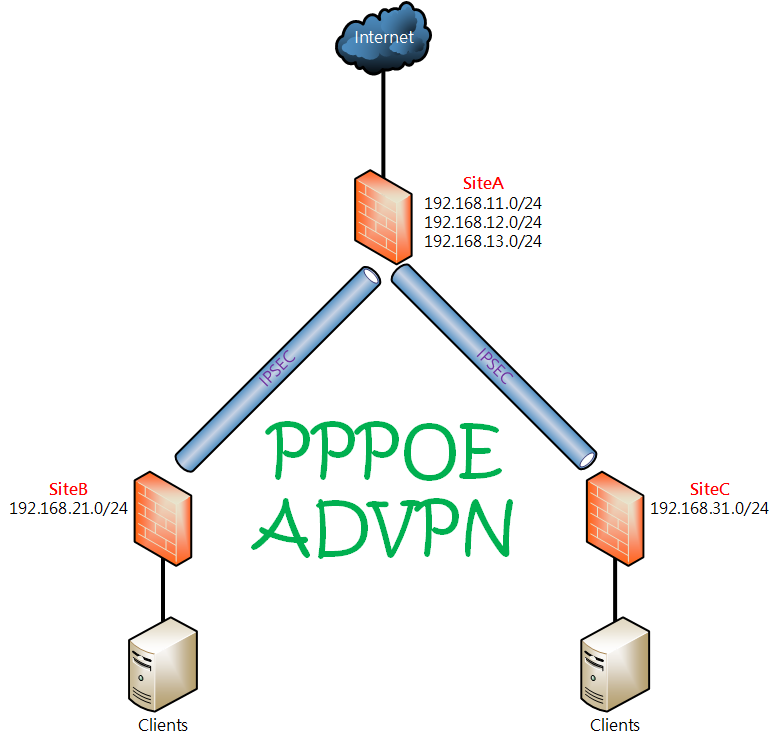
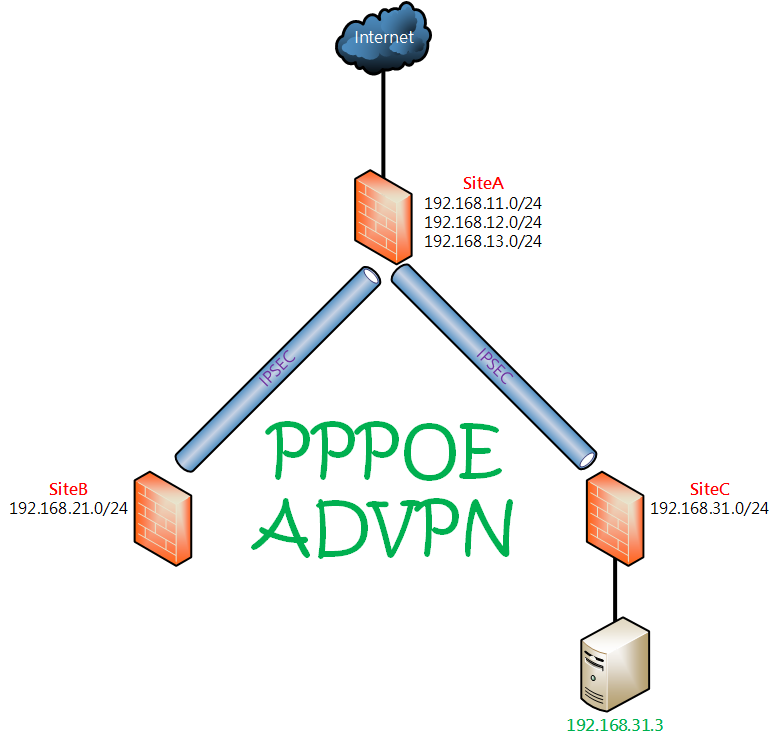
<span style="color: rgb(22, 145, 121);">**設計概念：**</span> <span style="color: rgb(224, 62, 45);">**SiteA**</span> **<span style="color: rgb(224, 62, 45);">(HQ)</span>**有固定IP，其餘分點 <span style="color: rgb(224, 62, 45);">**SiteB**</span>、**<span style="color: rgb(224, 62, 45);">SiteC</span>** 皆使用**<span style="color: rgb(224, 62, 45);">PPPOE</span>**，同時由於資訊安全控管的原則希望能Internet流量統一由同一個Gateway進出。

<span style="color: rgb(224, 62, 45);">**Firmware Ver. ：** </span>Fortigate-VM 7.0.15

<table border="1" id="bkmrk-wan-ip-lan-subnets-w" style="border-collapse: collapse; width: 100%; height: 220px; border: 1px solid rgb(52, 73, 94);"><colgroup><col style="width: 25.0298%;"></col><col style="width: 25.0298%;"></col><col style="width: 25.0298%;"></col><col style="width: 25.0298%;"></col></colgroup><tbody><tr style="height: 29.8px;"><td class="align-center" style="height: 29.8px; border-color: rgb(52, 73, 94);">  
</td><td class="align-center" style="height: 29.8px; border-color: rgb(52, 73, 94);">**<span style="color: rgb(35, 111, 161);">WAN IP</span>**  
</td><td class="align-center" style="height: 29.8px; border-color: rgb(52, 73, 94);">**<span style="color: rgb(35, 111, 161);">LAN Subnets</span>**  
</td><td class="align-center" style="height: 29.8px; border-color: rgb(52, 73, 94);">**<span style="color: rgb(35, 111, 161);">WAN IPSEC IP</span>**  
</td></tr><tr style="height: 63.4px;"><td class="align-center" style="height: 63.4px; border-color: rgb(52, 73, 94);"><span style="color: rgb(224, 62, 45);">**SiteA**</span>  
</td><td class="align-center" style="height: 63.4px; border-color: rgb(52, 73, 94);">WAN1 10.1.1.1

Gateway 10.1.1.254

</td><td class="align-center" style="height: 63.4px; border-color: rgb(52, 73, 94);">192.168.11.254/24

192.168.12.254/24

192.168.13.254/24

</td><td class="align-center" style="height: 63.4px; border-color: rgb(52, 73, 94);">172.17.1.1

</td></tr><tr style="height: 63.4px;"><td class="align-center" style="height: 63.4px; border-color: rgb(52, 73, 94);"><span style="color: rgb(224, 62, 45);">**SiteB**</span>  
</td><td class="align-center" style="height: 63.4px; border-color: rgb(52, 73, 94);">WAN1 PPPOE

(以DHCP模擬)

</td><td class="align-center" style="height: 63.4px; border-color: rgb(52, 73, 94);">192.168.21.254/24

</td><td class="align-center" style="height: 63.4px; border-color: rgb(52, 73, 94);">172.17.1.2

</td></tr><tr style="height: 63.4px;"><td class="align-center" style="height: 63.4px; border-color: rgb(52, 73, 94);">**<span style="color: rgb(224, 62, 45);">SiteC</span>**  
</td><td class="align-center" style="height: 63.4px; border-color: rgb(52, 73, 94);">WAN1 PPPOE

(以DHCP模擬)

</td><td class="align-center" style="height: 63.4px; border-color: rgb(52, 73, 94);">192.168.31.254/24

</td><td class="align-center" style="height: 63.4px; border-color: rgb(52, 73, 94);">172.17.1.3

</td></tr></tbody></table>

### <span style="color: rgb(35, 111, 161);">Hub設定過程</span>

#### <span style="color: rgb(35, 111, 161);"><span style="color: rgb(224, 62, 45);">**SiteA**</span>設定Interface</span>

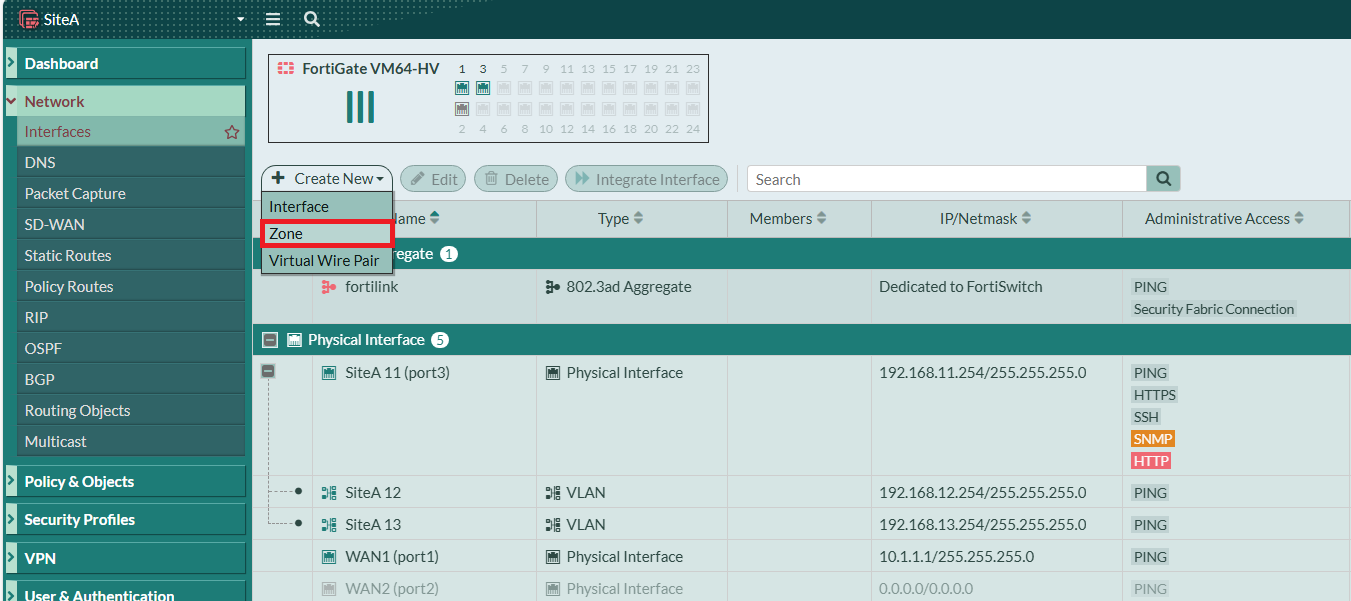
首先我們先將SiteA的WAN1、Local Subnets 192.168.11.254/24、192.168.12.254/24、192.168.13.254/24設定好。

[![圖片.png](https://mdfk.goddamn.idv.tw/uploads/images/gallery/2024-08/scaled-1680-/okrrvbsasx.png)](https://mdfk.goddamn.idv.tw/uploads/images/gallery/2024-08/okrrvbsasx.png)
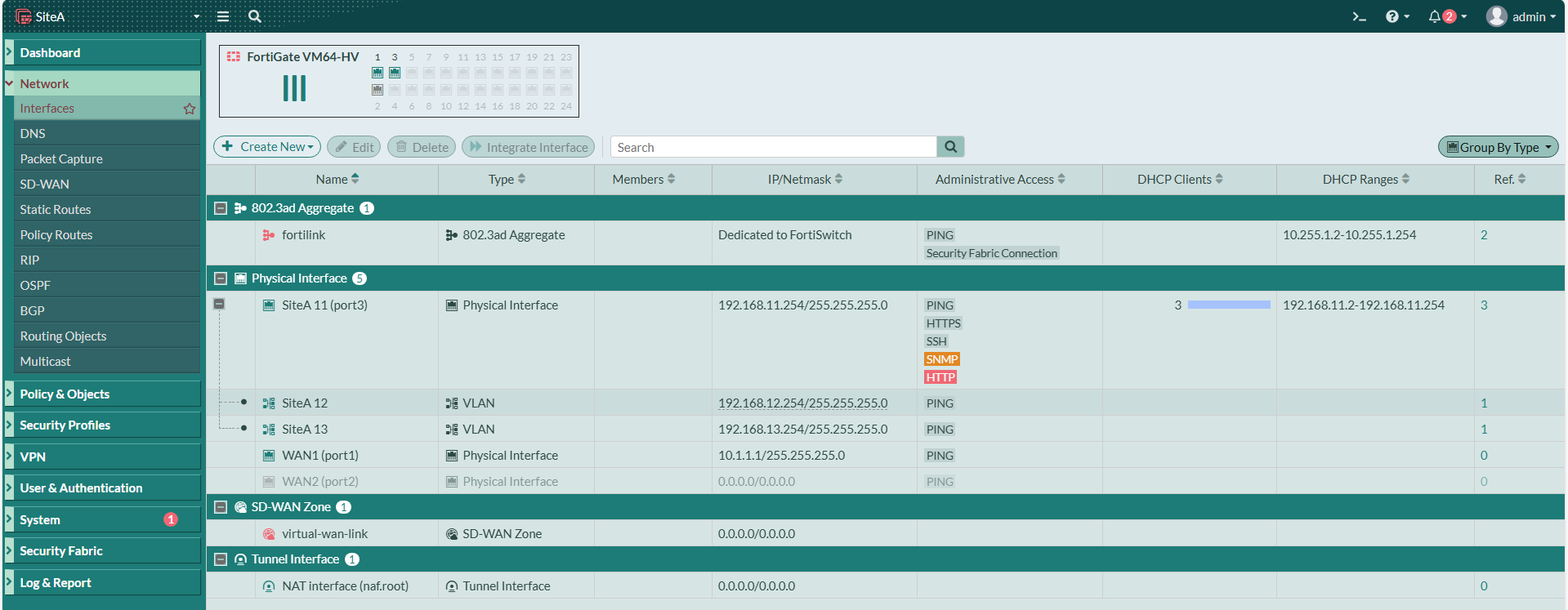
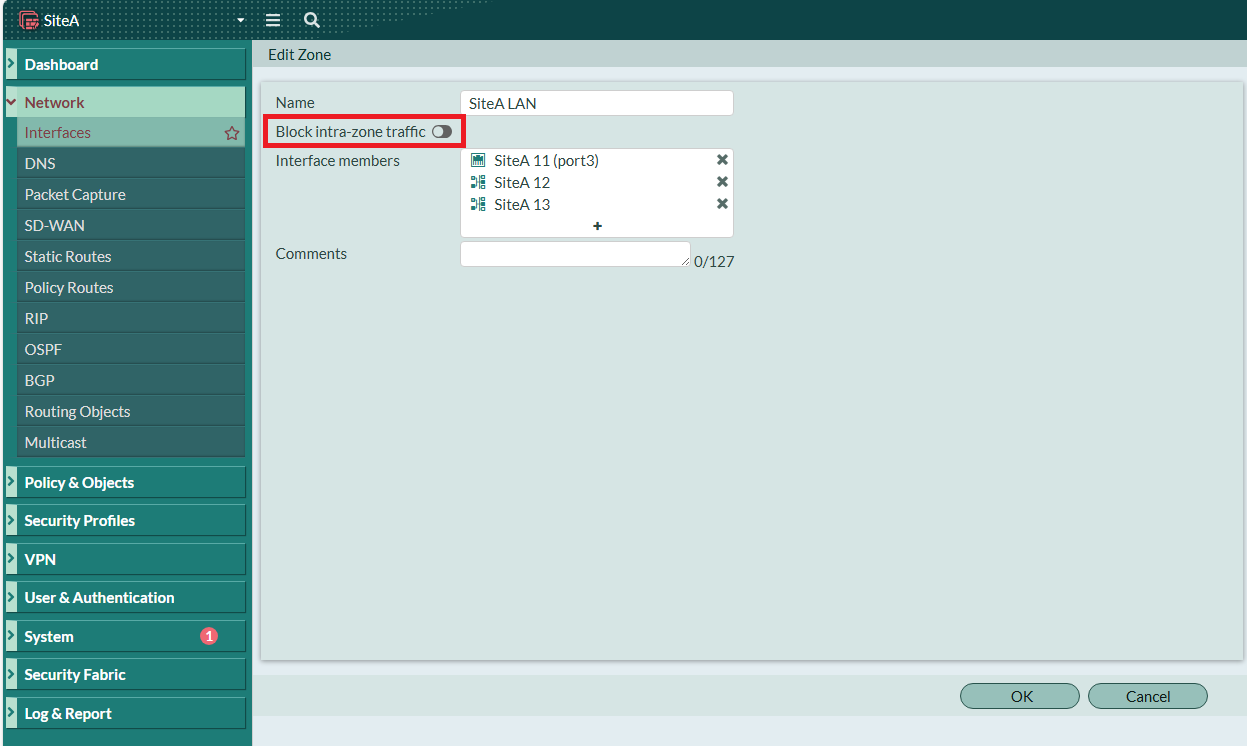
為了後續設定方便，我將三個Subnets綁成一個Zone，並且允許Interface之間互相溝通。

![圖片.png](https://mdfk.goddamn.idv.tw/uploads/images/gallery/2024-08/scaled-1680-/Ja1XLeE8Cl.png)

![圖片.png](https://mdfk.goddamn.idv.tw/uploads/images/gallery/2024-08/scaled-1680-/mphicqYwhx.png)

#### <span style="color: rgb(35, 111, 161);">設定<span style="color: rgb(224, 62, 45);">**SiteA**</span>上網</span>

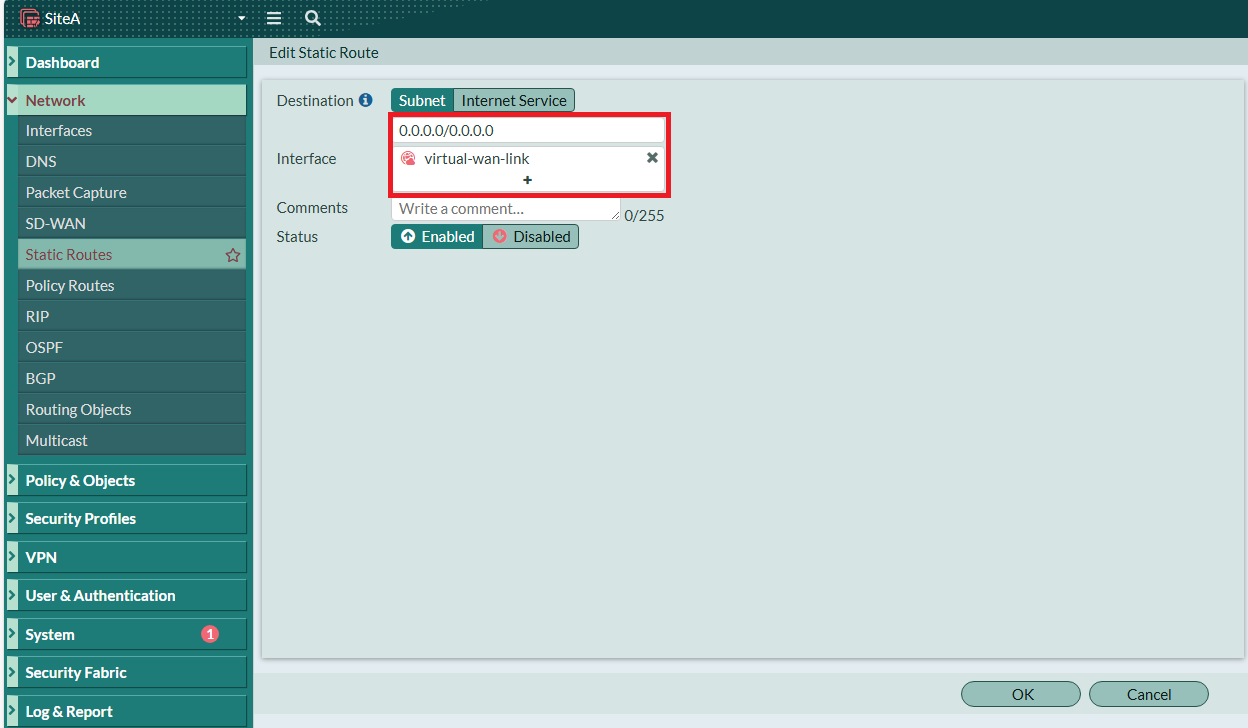
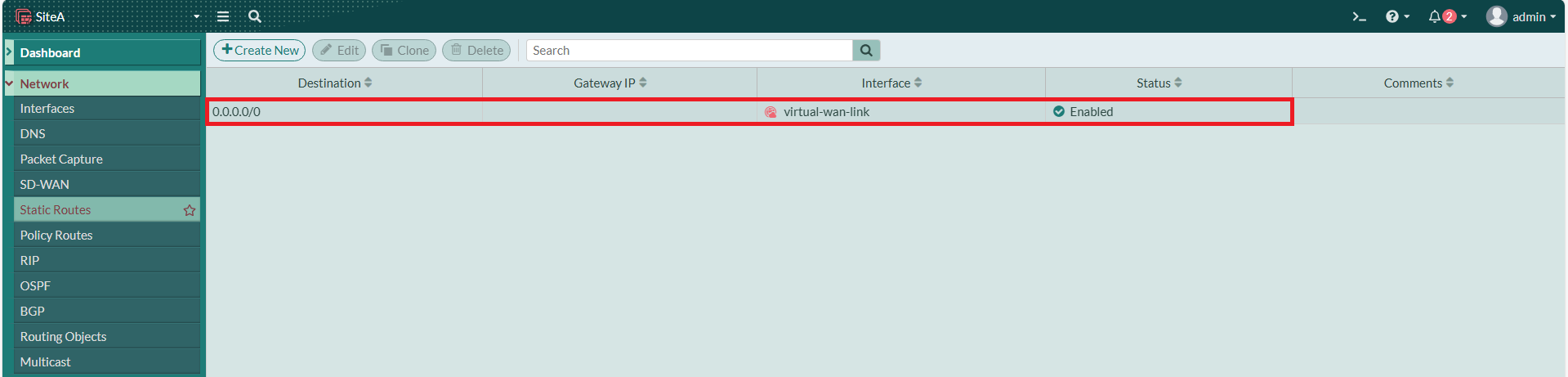
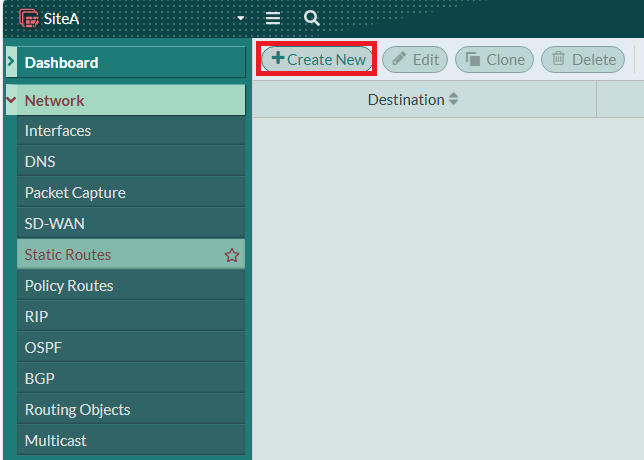
新增一筆 Static Route 0.0.0.0/0 進到 Default SD-WAN Zone
![圖片.png](https://mdfk.goddamn.idv.tw/uploads/images/gallery/2024-08/scaled-1680-/1wotudJOLO.png)

![圖片.png](https://mdfk.goddamn.idv.tw/uploads/images/gallery/2024-08/scaled-1680-/VsS8oCEAJG.png)

[![圖片.png](https://mdfk.goddamn.idv.tw/uploads/images/gallery/2024-08/scaled-1680-/5Jfs3iOPoF.png)](https://mdfk.goddamn.idv.tw/uploads/images/gallery/2024-08/5Jfs3iOPoF.png)

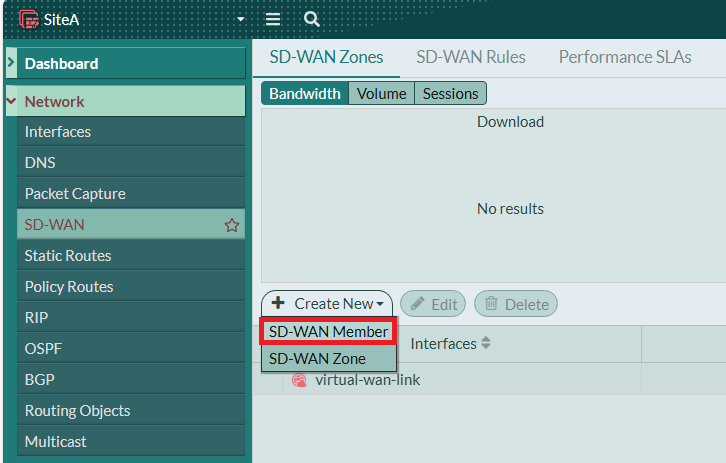
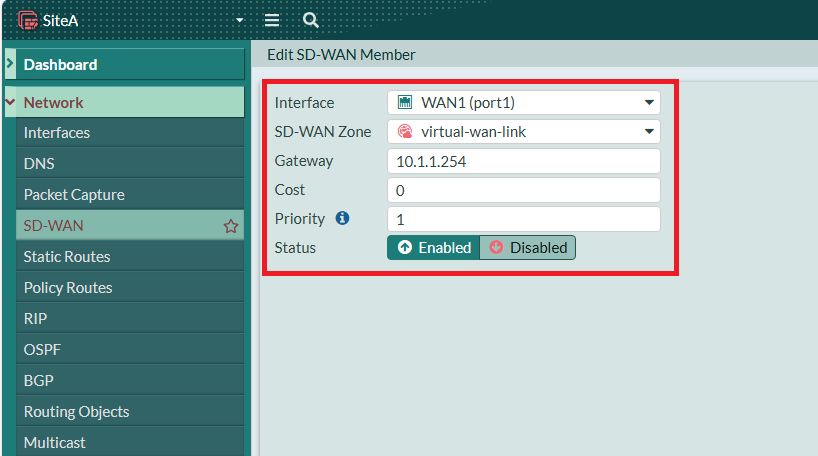
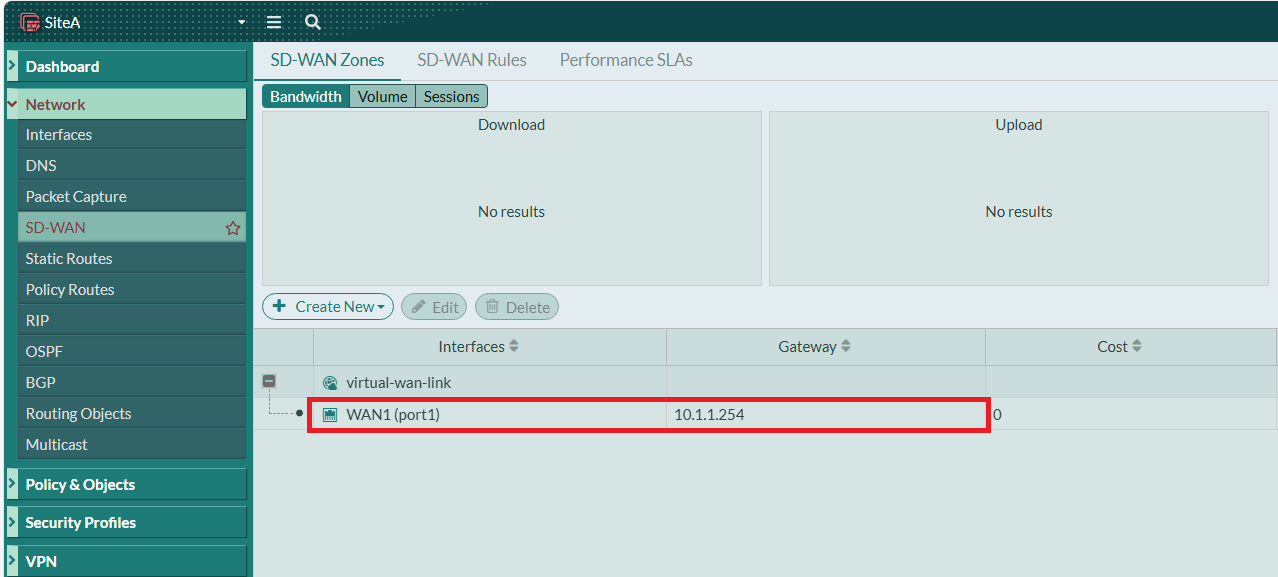
將 WAN1 加入 Default SD-WAN Zone 的 Member，並設定Gateway

![圖片.png](https://mdfk.goddamn.idv.tw/uploads/images/gallery/2024-08/scaled-1680-/pbujL0H8do.png)

![圖片.png](https://mdfk.goddamn.idv.tw/uploads/images/gallery/2024-08/scaled-1680-/x4aFhJ1BBy.png)

![圖片.png](https://mdfk.goddamn.idv.tw/uploads/images/gallery/2024-08/scaled-1680-/ZsDv4SkVLk.png)

#### <span style="color: rgb(35, 111, 161);">建立 <span style="color: rgb(224, 62, 45);">**SiteA**</span> IPSEC ADVPN HUB</span>

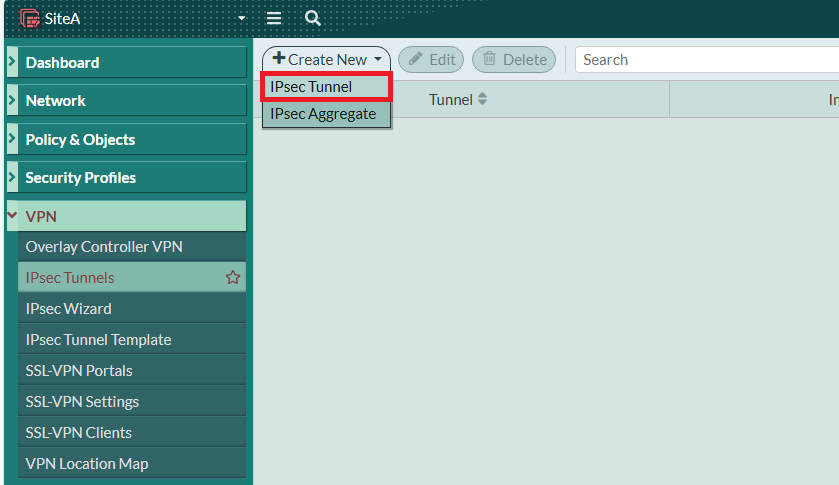
至 VPN 建立 IPSEC Tunnel

![圖片.png](https://mdfk.goddamn.idv.tw/uploads/images/gallery/2024-08/scaled-1680-/cvEEopqMfm.png)

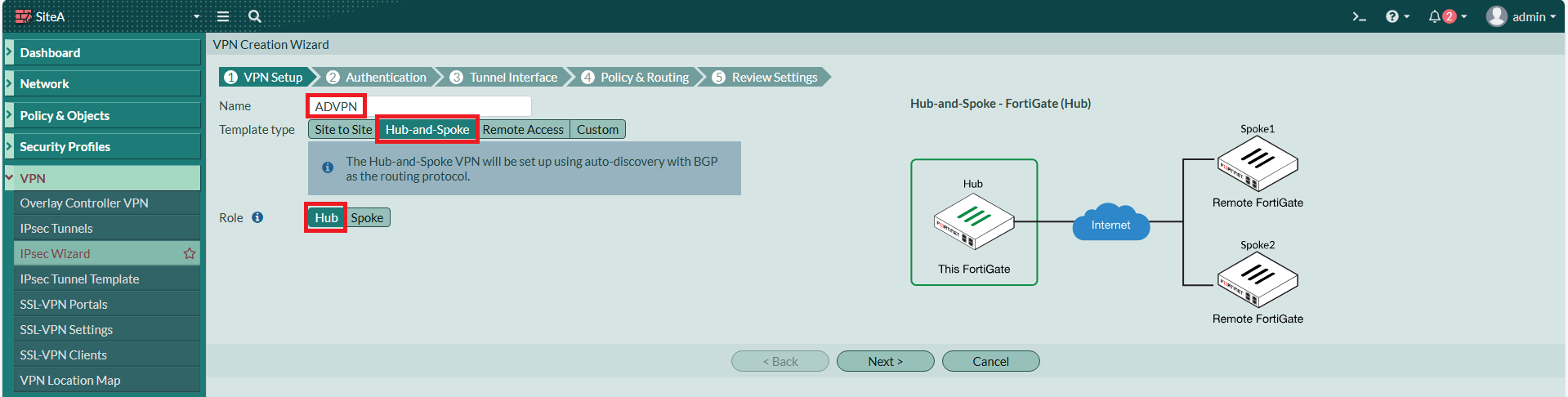
選擇 Hub-and-Spoke，角色選擇 Hub

[![圖片.png](https://mdfk.goddamn.idv.tw/uploads/images/gallery/2024-08/scaled-1680-/XODFh8iIR5.png)](https://mdfk.goddamn.idv.tw/uploads/images/gallery/2024-08/XODFh8iIR5.png)

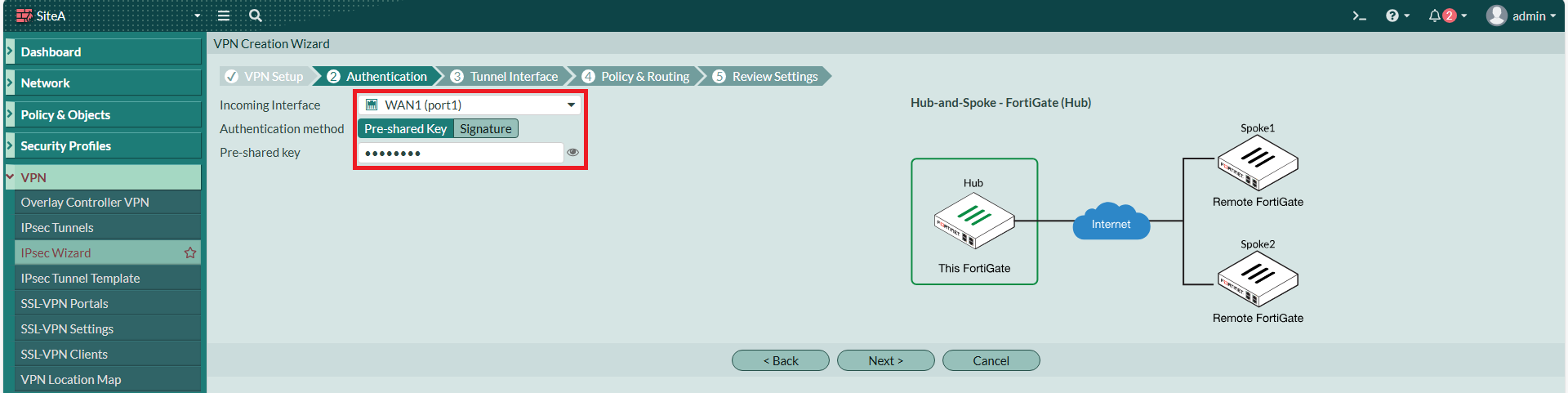
Interface選擇剛剛設定好的WAN1，指定一個Pre-shared Key

[![圖片.png](https://mdfk.goddamn.idv.tw/uploads/images/gallery/2024-08/scaled-1680-/8zF1N6iHBF.png)](https://mdfk.goddamn.idv.tw/uploads/images/gallery/2024-08/8zF1N6iHBF.png)

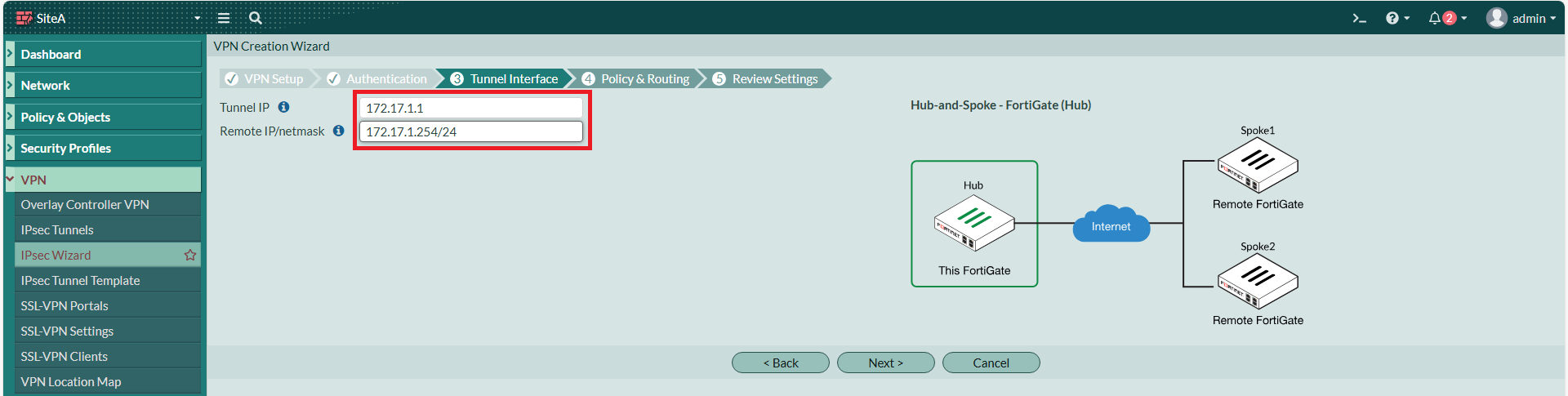
本地IP設為 172.17.1.1，Remote IP 隨便打，我選擇設為 172.17.1.254/24

[![圖片.png](https://mdfk.goddamn.idv.tw/uploads/images/gallery/2024-08/scaled-1680-/0TfqPFnyav.png)](https://mdfk.goddamn.idv.tw/uploads/images/gallery/2024-08/0TfqPFnyav.png)

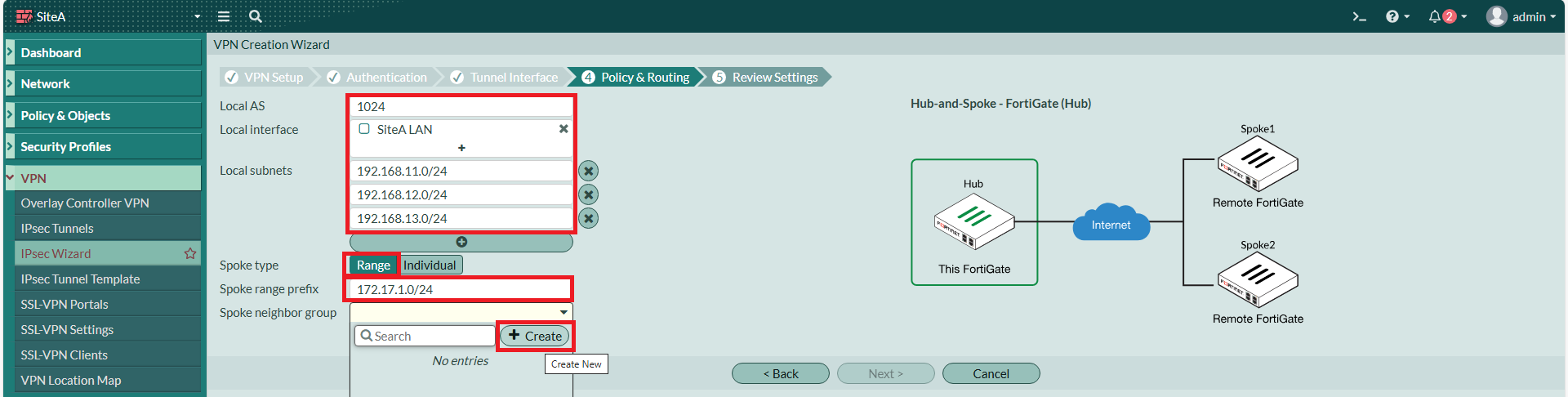
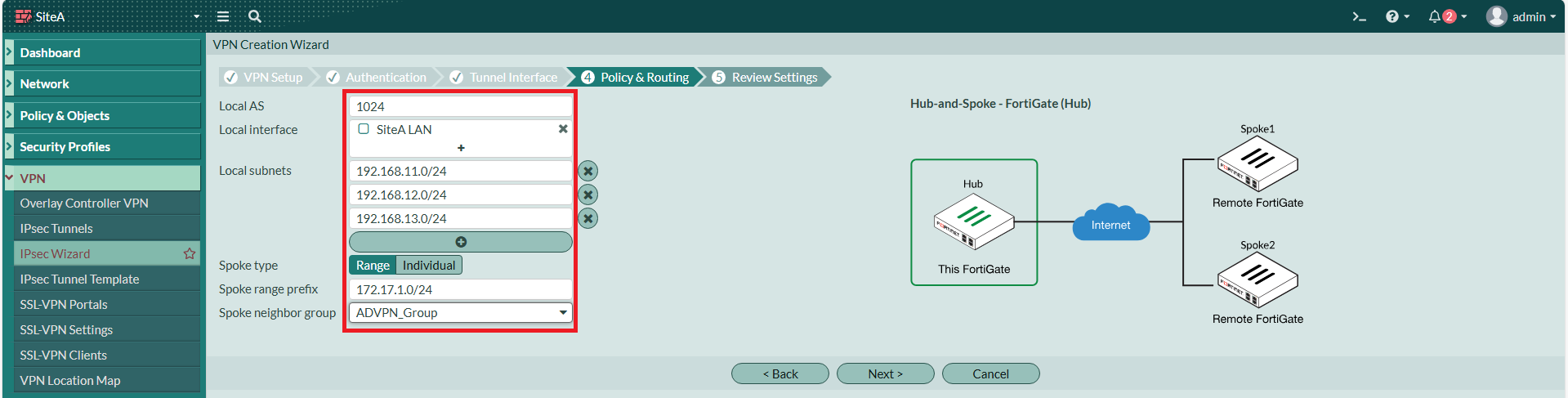
本地端AS我設為1024、本地端介面選擇上面建好的Zone、鍵入Local Subnets、Spoke Type 選擇 Range，指定Spoke 的 IP Range，並建立一個Spoke Neighbor Group。

[![圖片.png](https://mdfk.goddamn.idv.tw/uploads/images/gallery/2024-08/scaled-1680-/wPtMzTetq3.png)](https://mdfk.goddamn.idv.tw/uploads/images/gallery/2024-08/wPtMzTetq3.png)

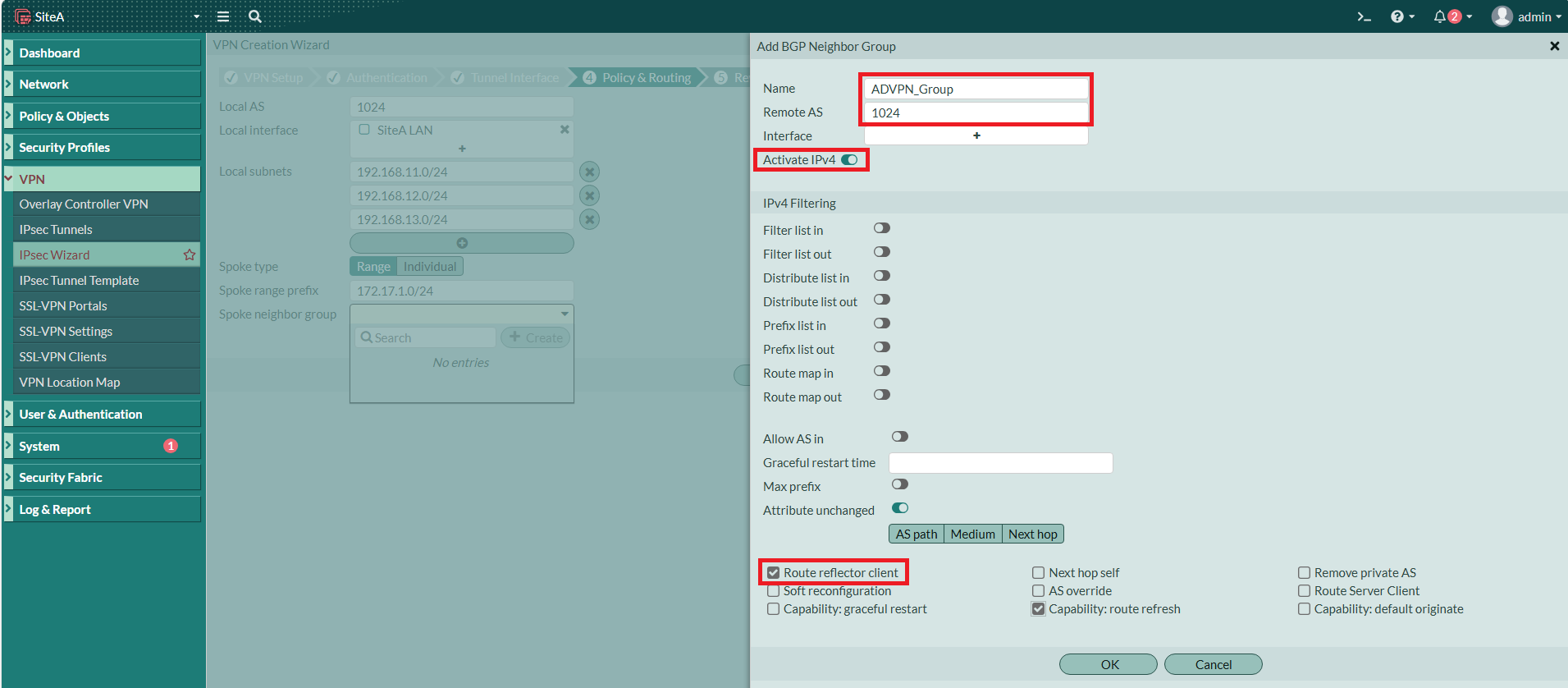
Neighbor Group Remote AS也設為1024、Activate IPv4，勾選 Route Reflector Client。

[![圖片.png](https://mdfk.goddamn.idv.tw/uploads/images/gallery/2024-08/scaled-1680-/7kPq98ygb1.png)](https://mdfk.goddamn.idv.tw/uploads/images/gallery/2024-08/7kPq98ygb1.png)

[![圖片.png](https://mdfk.goddamn.idv.tw/uploads/images/gallery/2024-08/scaled-1680-/AEv0gqPw0X.png)](https://mdfk.goddamn.idv.tw/uploads/images/gallery/2024-08/AEv0gqPw0X.png)
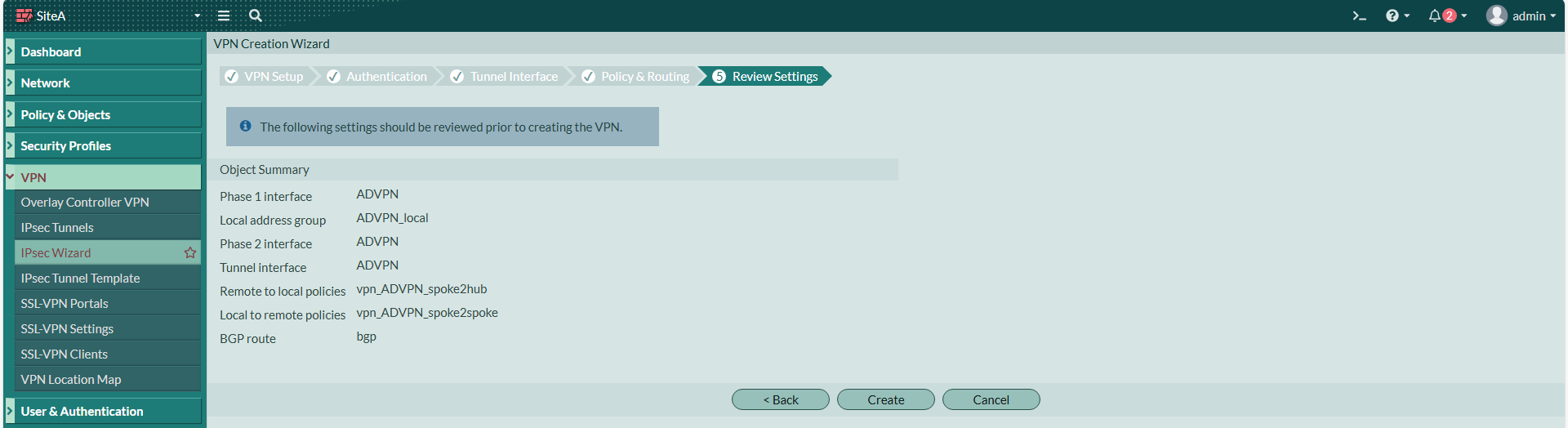
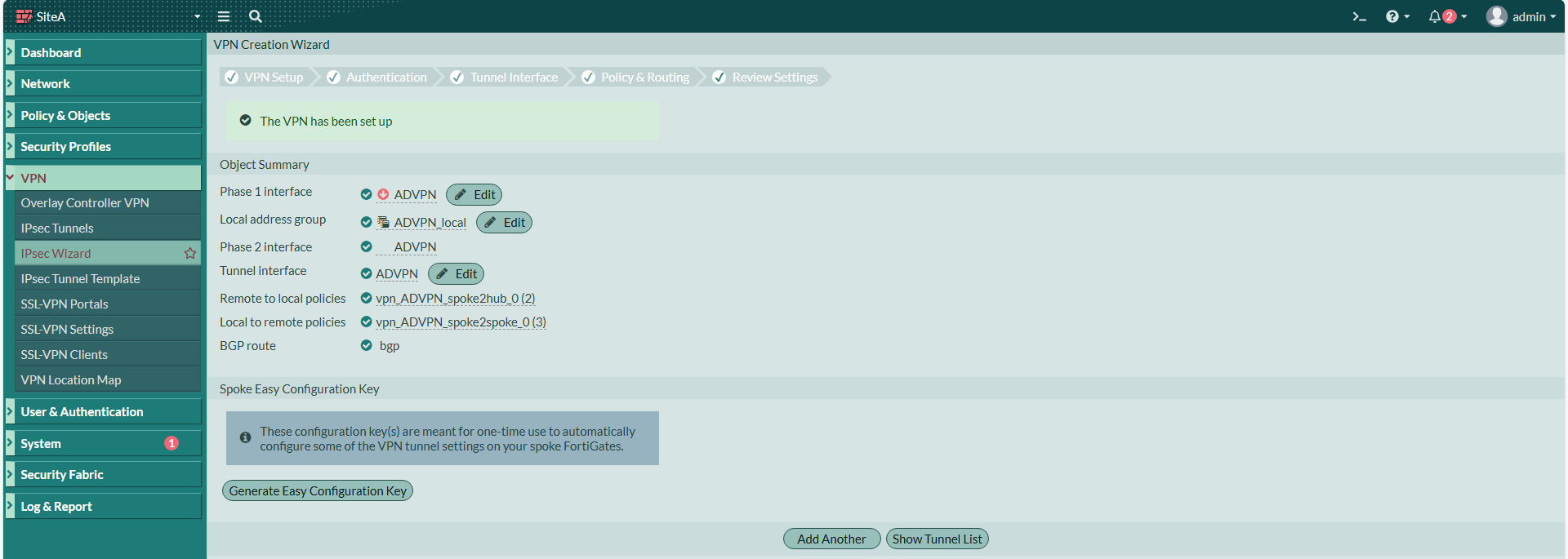
Wizzard建立完成

[![圖片.png](https://mdfk.goddamn.idv.tw/uploads/images/gallery/2024-08/scaled-1680-/pE7u2eH8IV.png)](https://mdfk.goddamn.idv.tw/uploads/images/gallery/2024-08/pE7u2eH8IV.png)
[![圖片.png](https://mdfk.goddamn.idv.tw/uploads/images/gallery/2024-08/scaled-1680-/Xt0TZl3DBQ.png)](https://mdfk.goddamn.idv.tw/uploads/images/gallery/2024-08/Xt0TZl3DBQ.png)
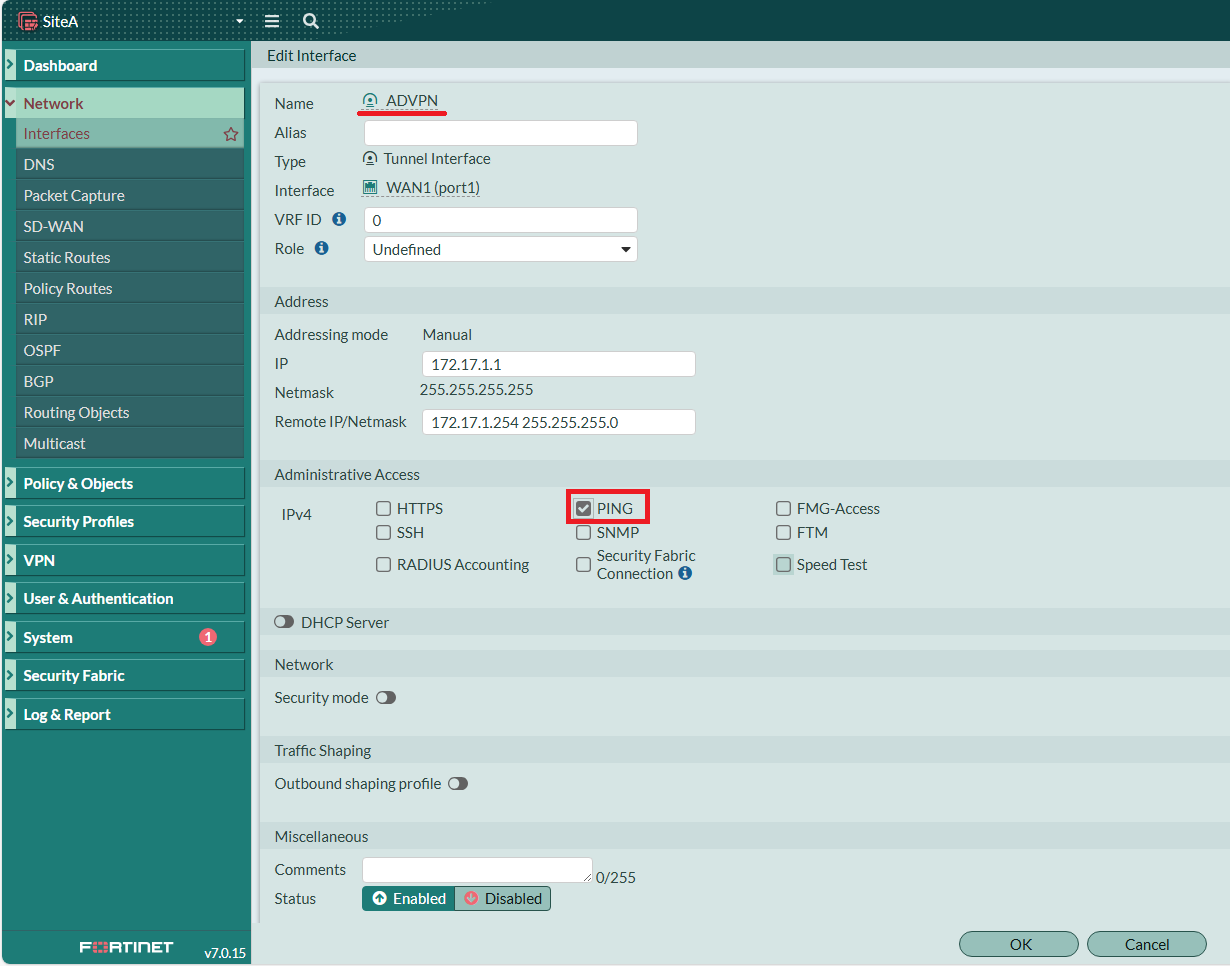
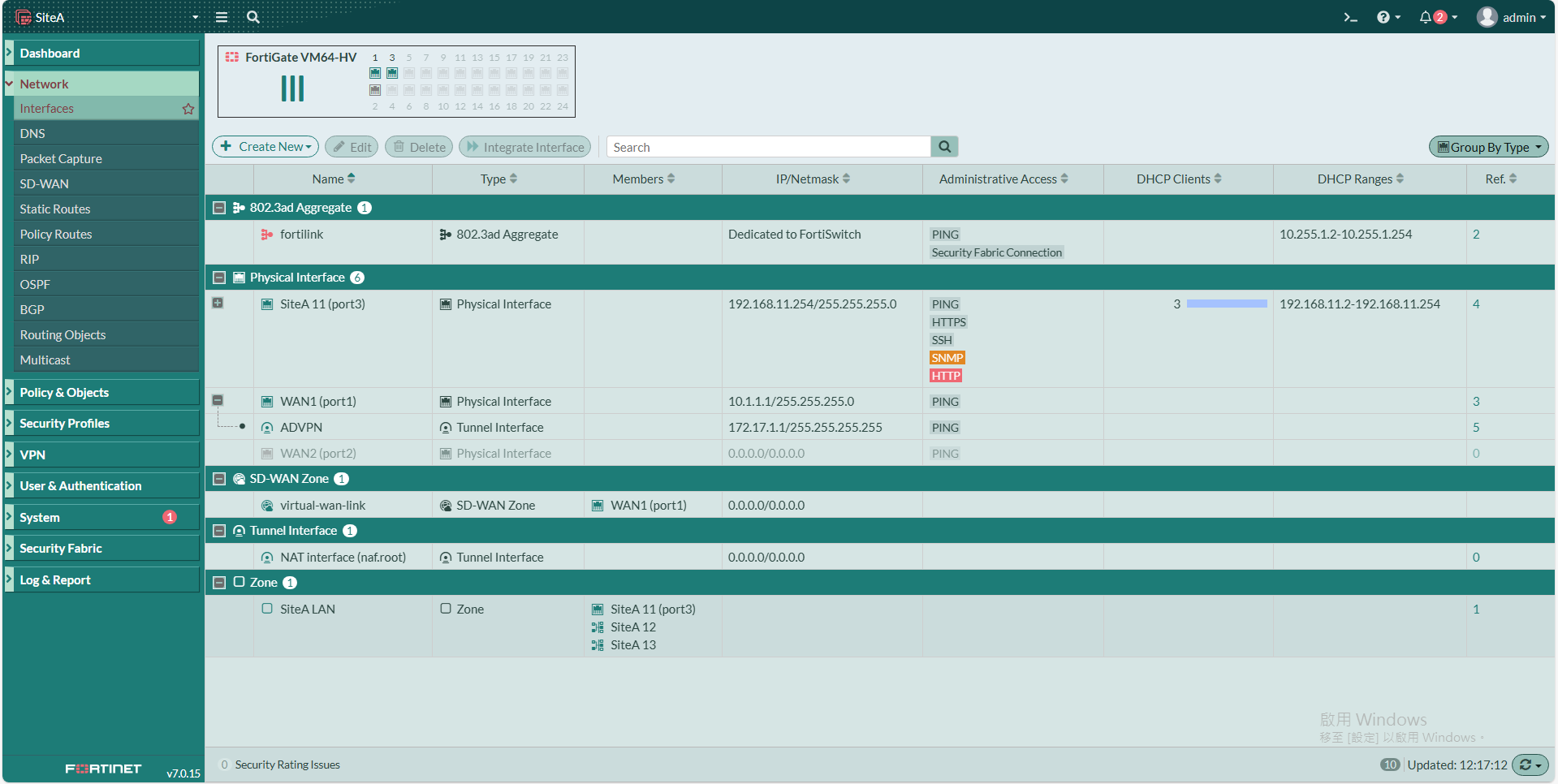
回到Interface，將<span style="color: rgb(224, 62, 45);">**ADVPN**</span> Interface 的 Ping 打開

![圖片.png](https://mdfk.goddamn.idv.tw/uploads/images/gallery/2024-08/scaled-1680-/Ooyn4gq9yG.png)

[![圖片.png](https://mdfk.goddamn.idv.tw/uploads/images/gallery/2024-08/scaled-1680-/WiqhEEGoFB.png)](https://mdfk.goddamn.idv.tw/uploads/images/gallery/2024-08/WiqhEEGoFB.png)

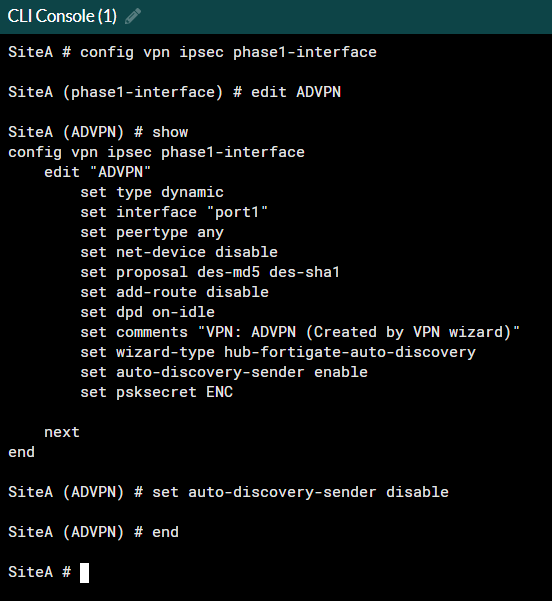
由於在這個情境下，ADVPN Full Mesh 是無法使用的，所以我們輸入下面指令來關閉自動建立 Spoke 之間IPSEC的功能。

```
config vpn ipsec phase1-interface
edit ADVPN
set auto-discovery-sender disable
end
```
![圖片.png](https://mdfk.goddamn.idv.tw/uploads/images/gallery/2024-08/scaled-1680-/M5djyv7Rot.png)

#### <span style="color: rgb(35, 111, 161);">設定BGP</span>

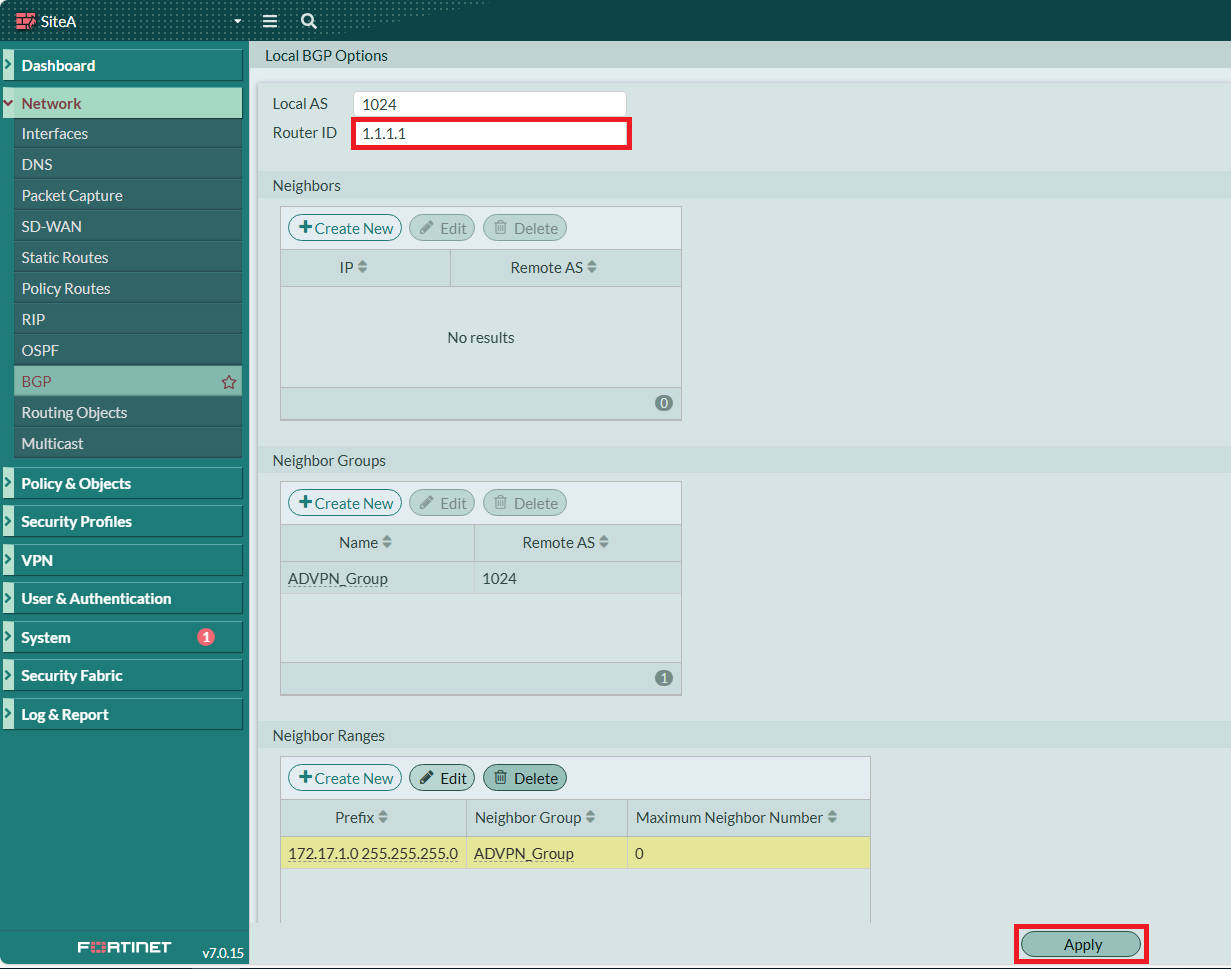
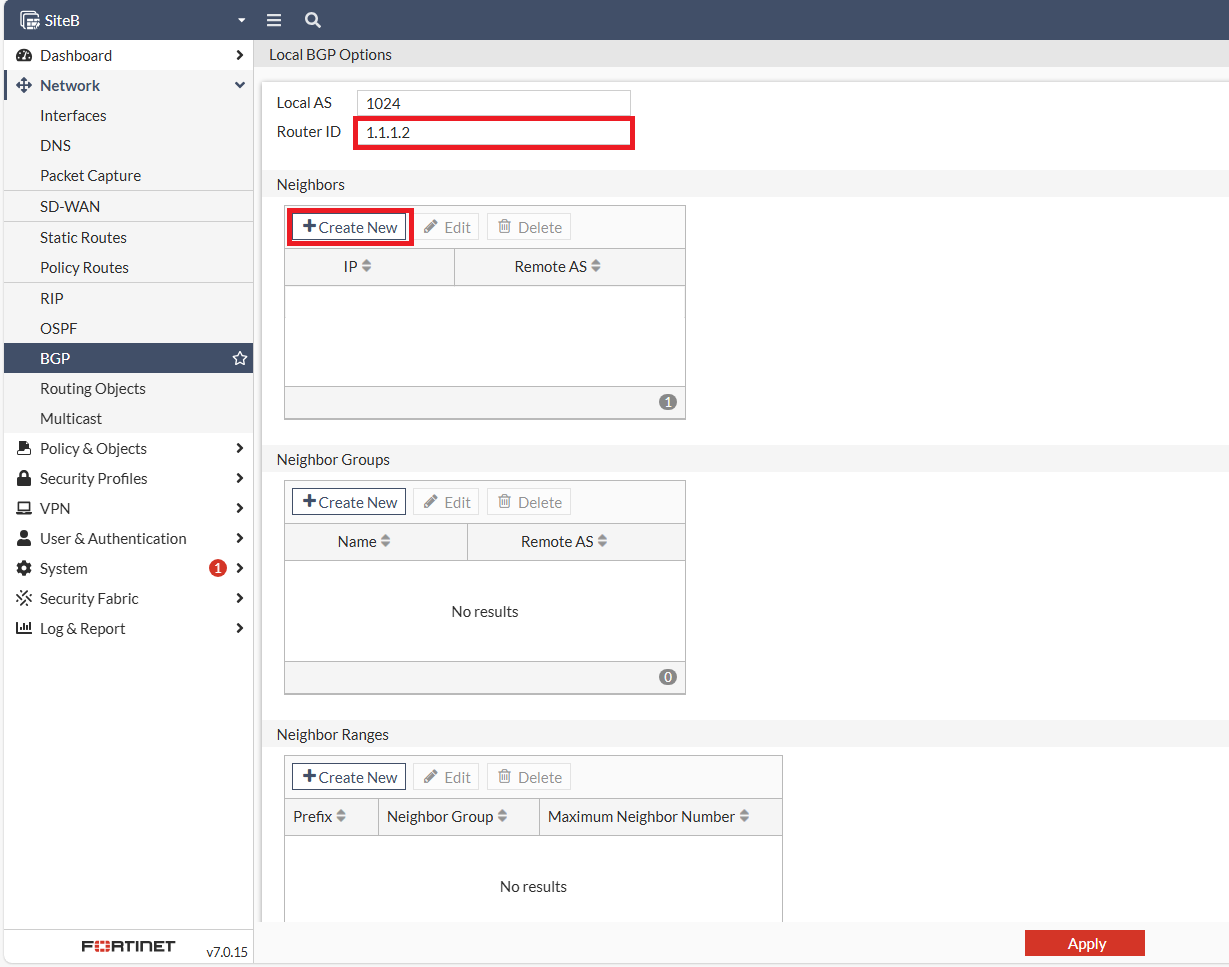
設定SiteA的Router ID，記得<span style="color: rgb(224, 62, 45);">**<span style="font-size: 12.0pt; mso-bidi-font-size: 11.0pt; font-family: '新細明體',serif; mso-bidi-font-family: 新細明體; mso-ansi-language: EN-US; mso-fareast-language: ZH-TW; mso-bidi-language: AR-SA;">要Apply !!</span>**<span style="font-size: 12.0pt; mso-bidi-font-size: 11.0pt; font-family: '新細明體',serif; mso-bidi-font-family: 新細明體; mso-ansi-language: EN-US; mso-fareast-language: ZH-TW; mso-bidi-language: AR-SA;"> </span></span>(鍵人我不知道忘了多少次 ...... Again ...... )

![圖片.png](https://mdfk.goddamn.idv.tw/uploads/images/gallery/2024-08/scaled-1680-/4D4Ohln6q7.png)

#### <span style="color: rgb(35, 111, 161);">設定Firewall Policy</span>

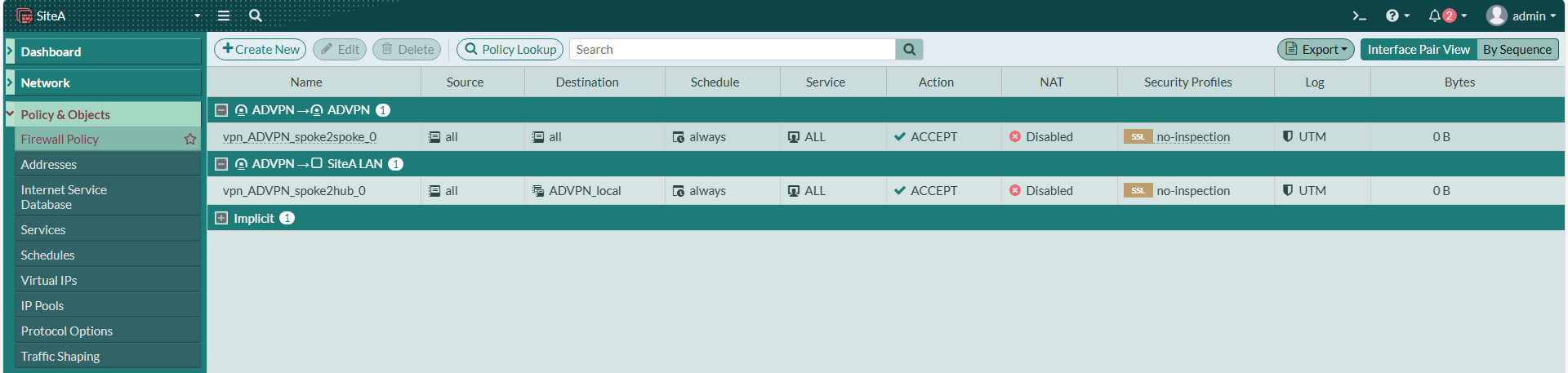
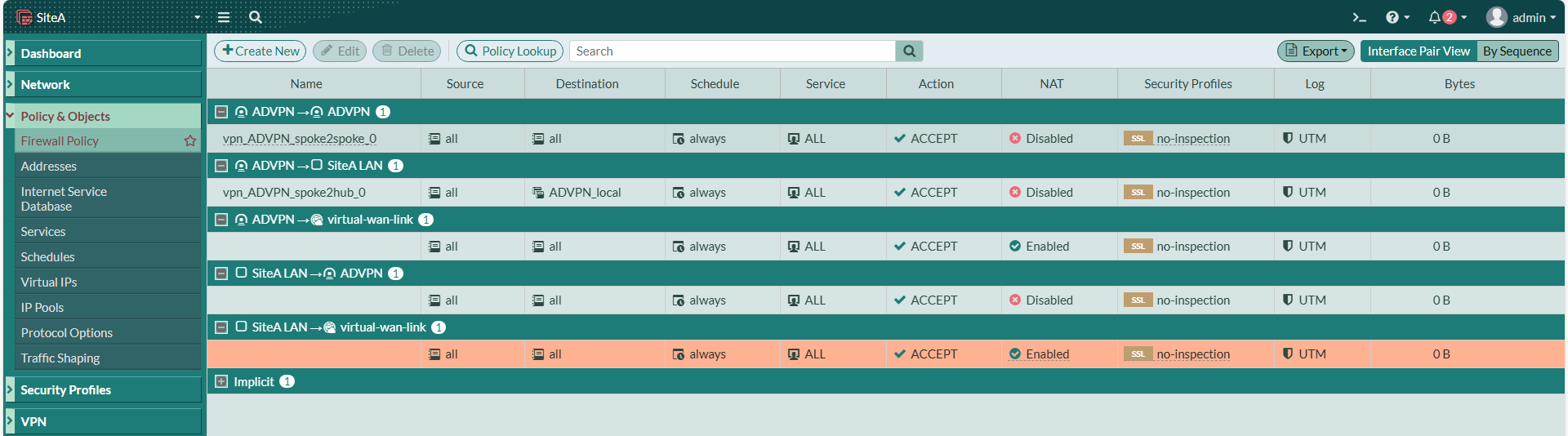
Wizzard會幫我們建立兩條Policy，但我們還需要更多

[![圖片.png](https://mdfk.goddamn.idv.tw/uploads/images/gallery/2024-08/scaled-1680-/He6GzbrAw2.png)](https://mdfk.goddamn.idv.tw/uploads/images/gallery/2024-08/He6GzbrAw2.png)

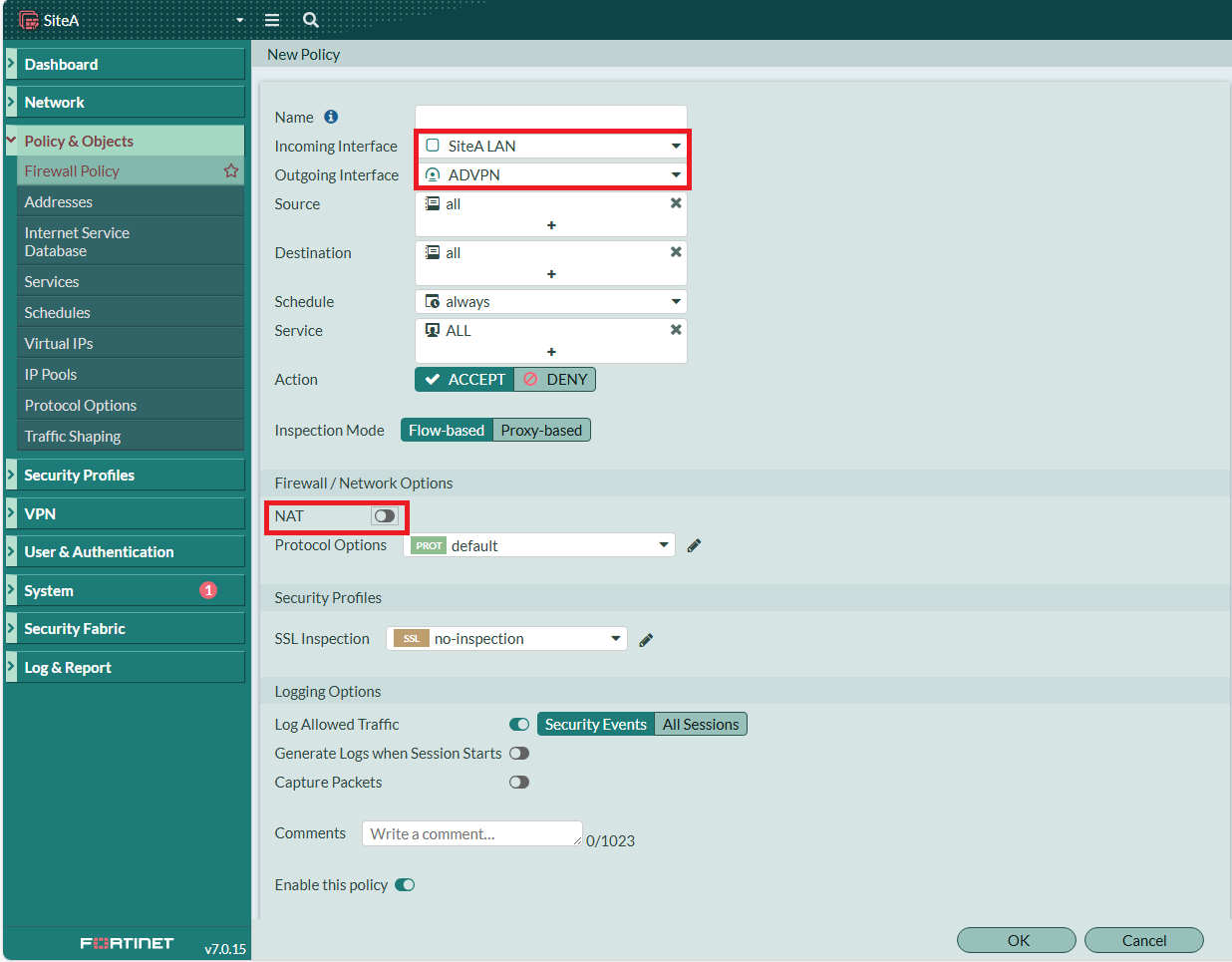
建立 SiteA LAN =&gt; ADVPN，不做NAT

![圖片.png](https://mdfk.goddamn.idv.tw/uploads/images/gallery/2024-08/scaled-1680-/tyq9yqblfA.png)

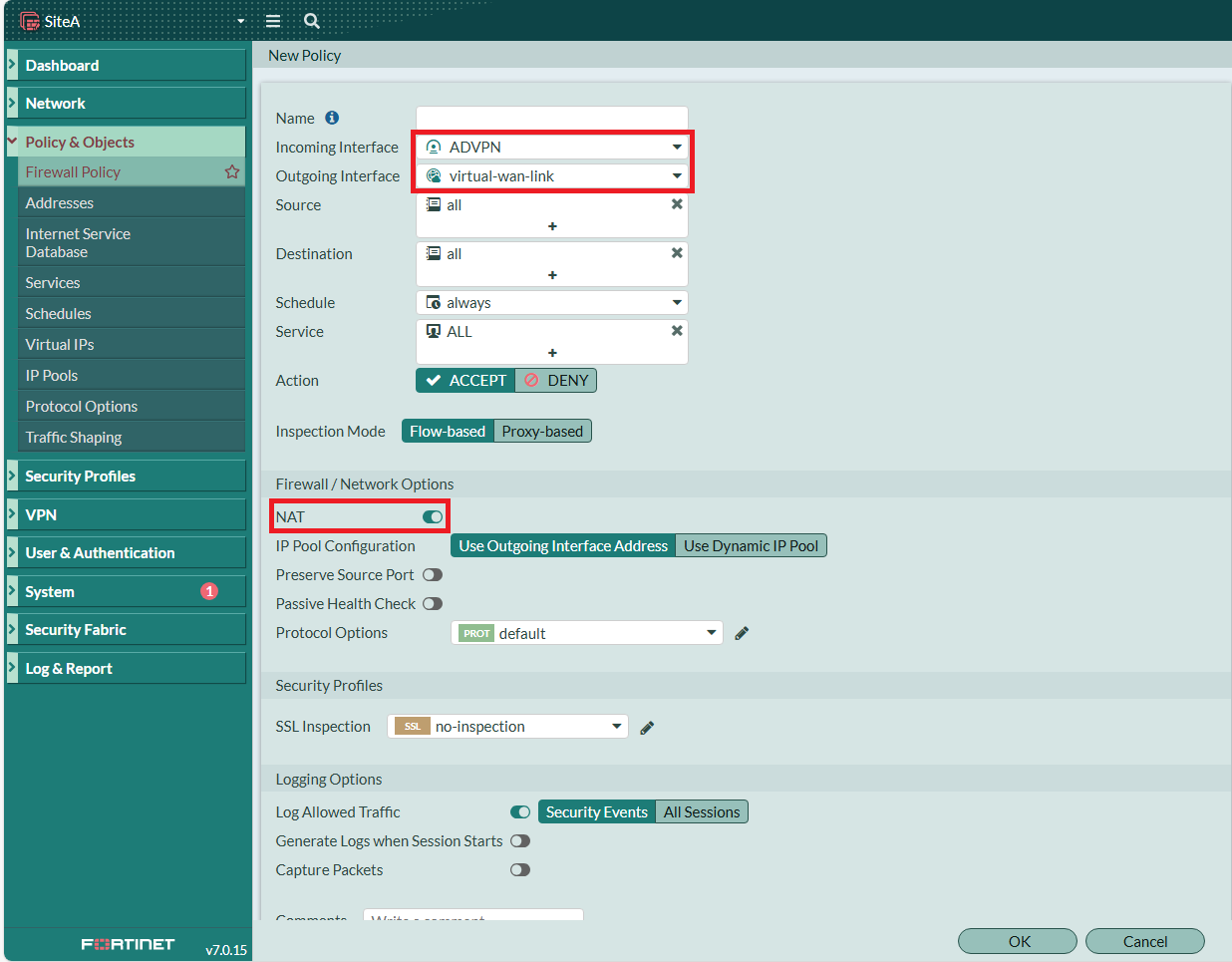
建立 ADVPN =&gt; SD-WAN 上網用，要做NAT

![圖片.png](https://mdfk.goddamn.idv.tw/uploads/images/gallery/2024-08/scaled-1680-/InUL9fwvtx.png)

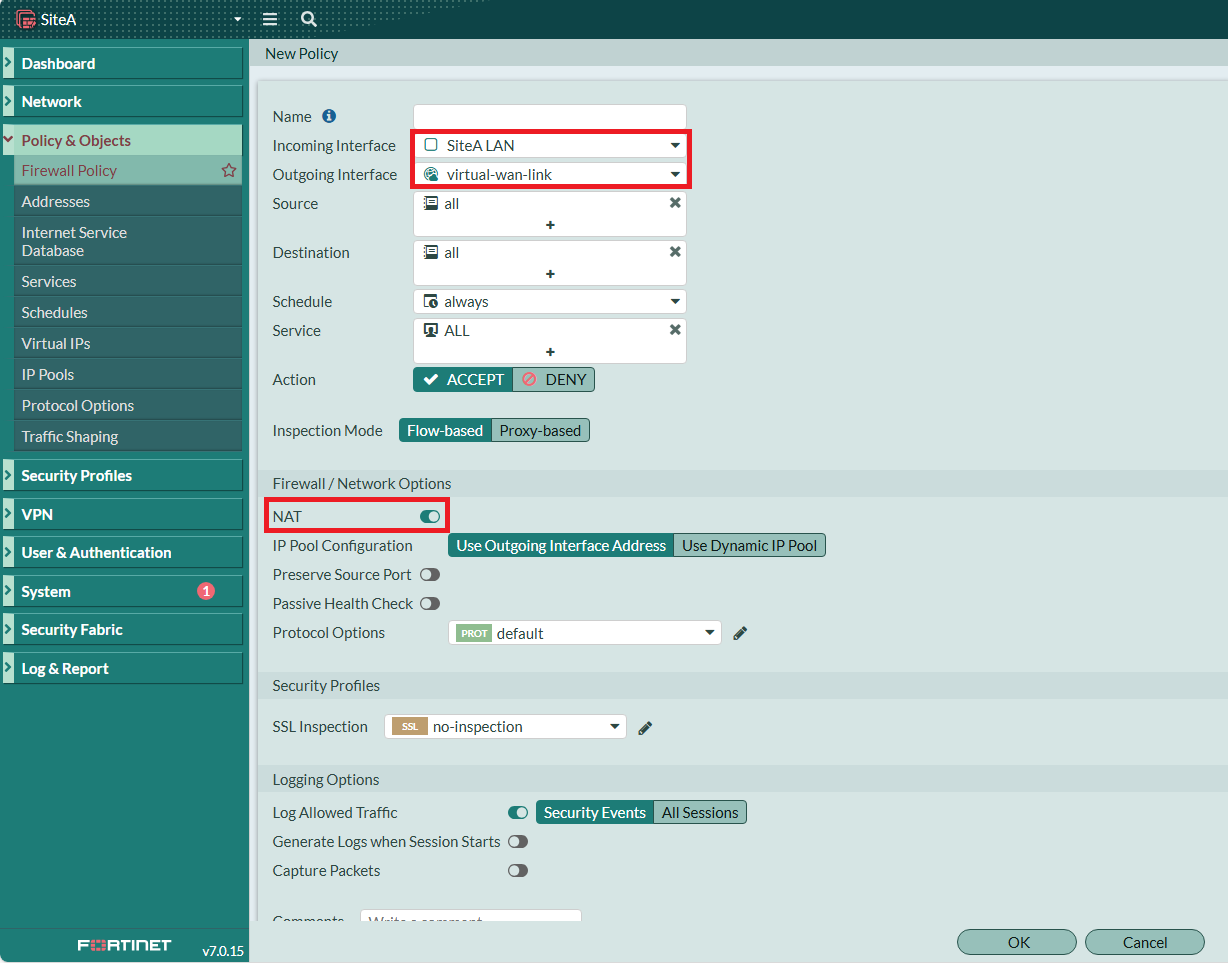
建立 SiteA LAN =&gt; SD-WAN 上網用，要做NAT

![圖片.png](https://mdfk.goddamn.idv.tw/uploads/images/gallery/2024-08/scaled-1680-/R07pT0jqYq.png)

<span style="color: rgb(224, 62, 45);">**SiteA** </span>設定至此大功告成

[![圖片.png](https://mdfk.goddamn.idv.tw/uploads/images/gallery/2024-08/scaled-1680-/z0wH5QQVZY.png)](https://mdfk.goddamn.idv.tw/uploads/images/gallery/2024-08/z0wH5QQVZY.png)

### <span style="color: rgb(35, 111, 161);">Spoke設定過程</span>

#### <span style="color: rgb(35, 111, 161);"><span style="color: rgb(224, 62, 45);">**SiteB**</span>設定Interface</span>

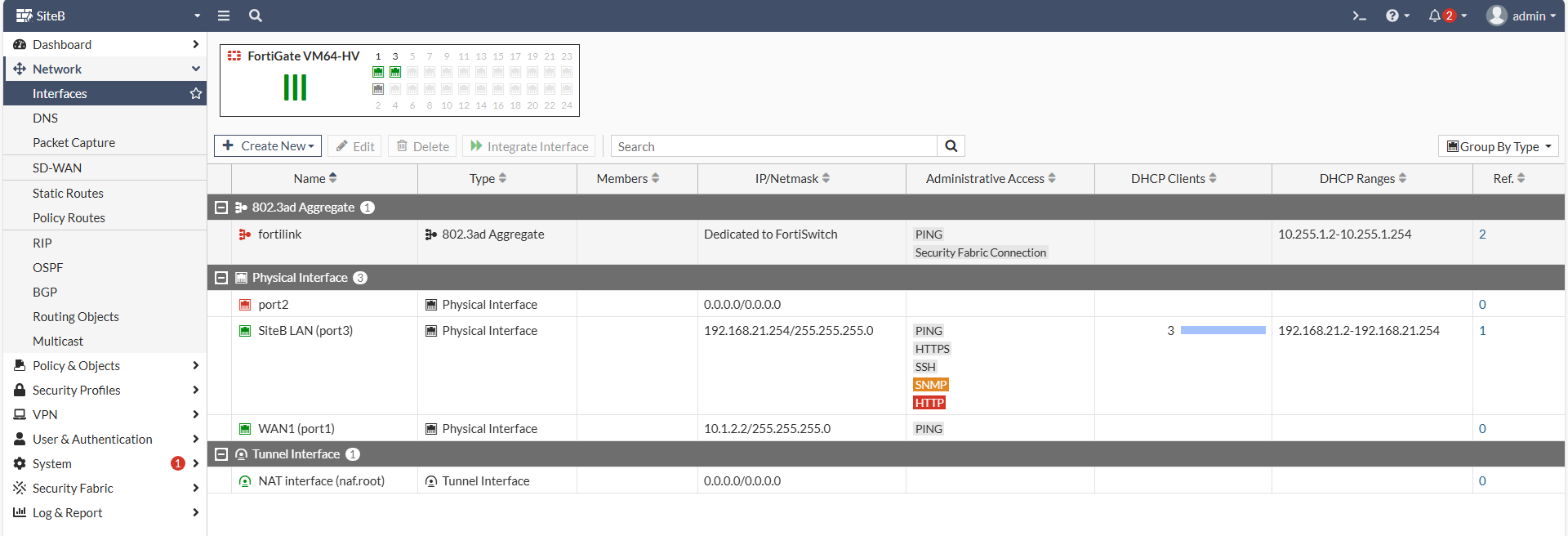
一樣，先設定好<span style="color: rgb(224, 62, 45);">**SiteB**</span>的Interface

[![圖片.png](https://mdfk.goddamn.idv.tw/uploads/images/gallery/2024-08/scaled-1680-/qFIJcQzcN7.png)](https://mdfk.goddamn.idv.tw/uploads/images/gallery/2024-08/qFIJcQzcN7.png)

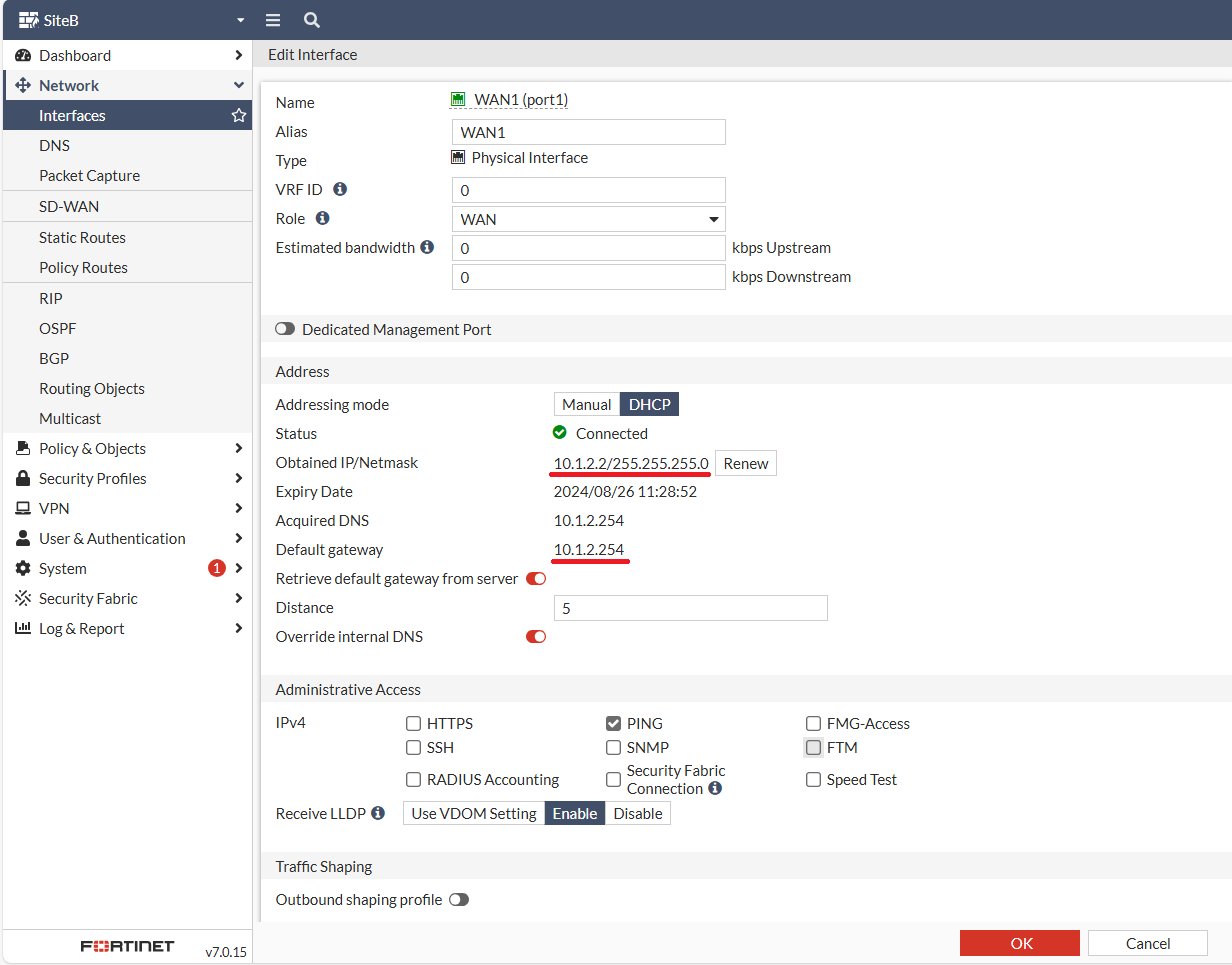
WAN的部分，我用DHCP來模擬PPPOE，可以看到自動取得了IP &amp; Gateway

[![圖片.png](https://mdfk.goddamn.idv.tw/uploads/images/gallery/2024-08/scaled-1680-/fnMRgPJyHt.png)](https://mdfk.goddamn.idv.tw/uploads/images/gallery/2024-08/fnMRgPJyHt.png)

#### <span style="color: rgb(35, 111, 161);">建立 <span style="color: rgb(224, 62, 45);">**SiteB**</span> IPSEC ADVPN Spoke</span>

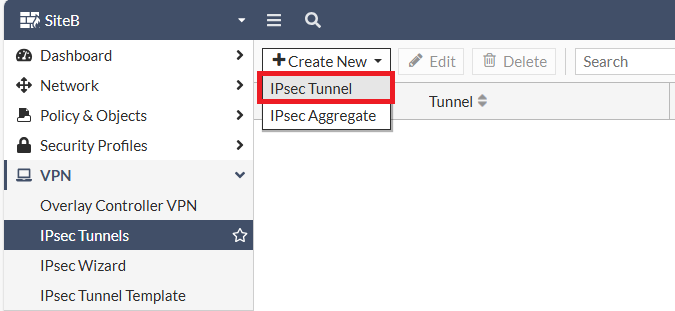
至 VPN 建立 IPSEC Tunnel

![圖片.png](https://mdfk.goddamn.idv.tw/uploads/images/gallery/2024-08/scaled-1680-/uhG7wlQtvB.png)

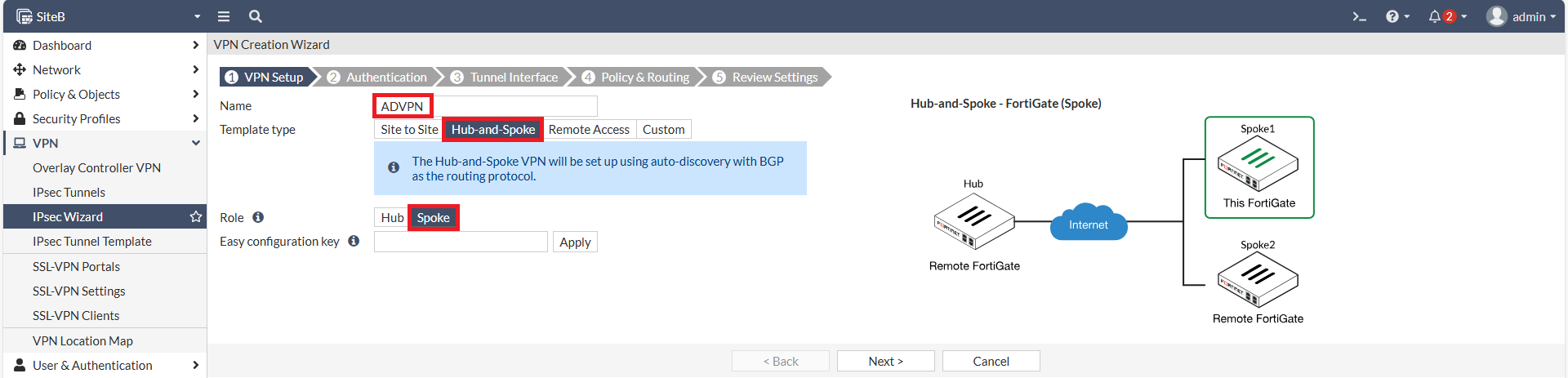
這一次我們選擇建立Spoke

[![圖片.png](https://mdfk.goddamn.idv.tw/uploads/images/gallery/2024-08/scaled-1680-/53aDM05u1C.png)](https://mdfk.goddamn.idv.tw/uploads/images/gallery/2024-08/53aDM05u1C.png)

鍵入SiteA的WAN IP、Pre-shared Key

[![圖片.png](https://mdfk.goddamn.idv.tw/uploads/images/gallery/2024-08/scaled-1680-/Biuf8l2QRr.png)](https://mdfk.goddamn.idv.tw/uploads/images/gallery/2024-08/Biuf8l2QRr.png)
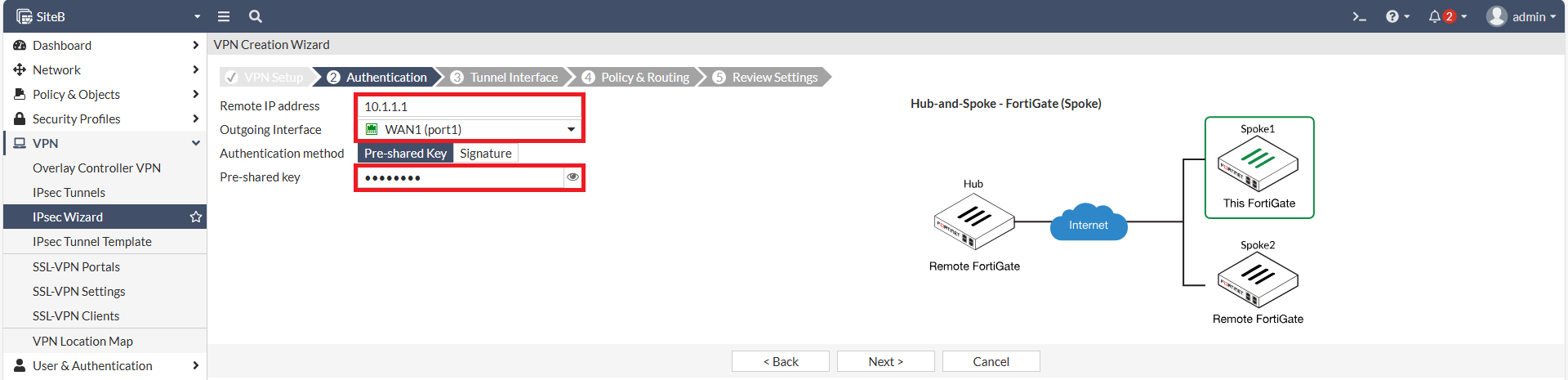
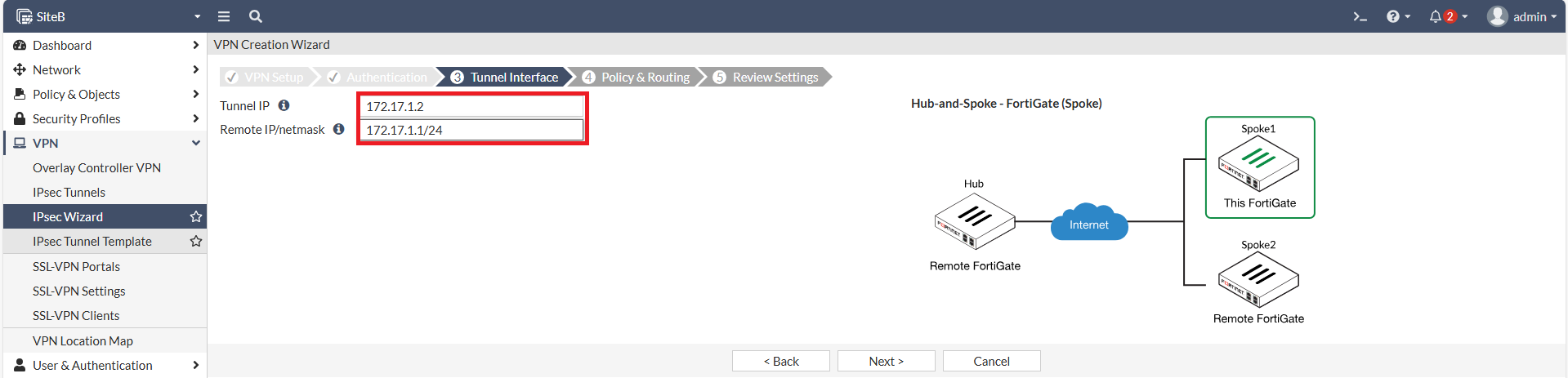
設定Local IPSEC IP、Remote IP設為<span style="color: rgb(224, 62, 45);">**SiteA**</span>的 IPSEC IP 172.17.1.1/24

[![圖片.png](https://mdfk.goddamn.idv.tw/uploads/images/gallery/2024-08/scaled-1680-/H3mKEBol2B.png)](https://mdfk.goddamn.idv.tw/uploads/images/gallery/2024-08/H3mKEBol2B.png)

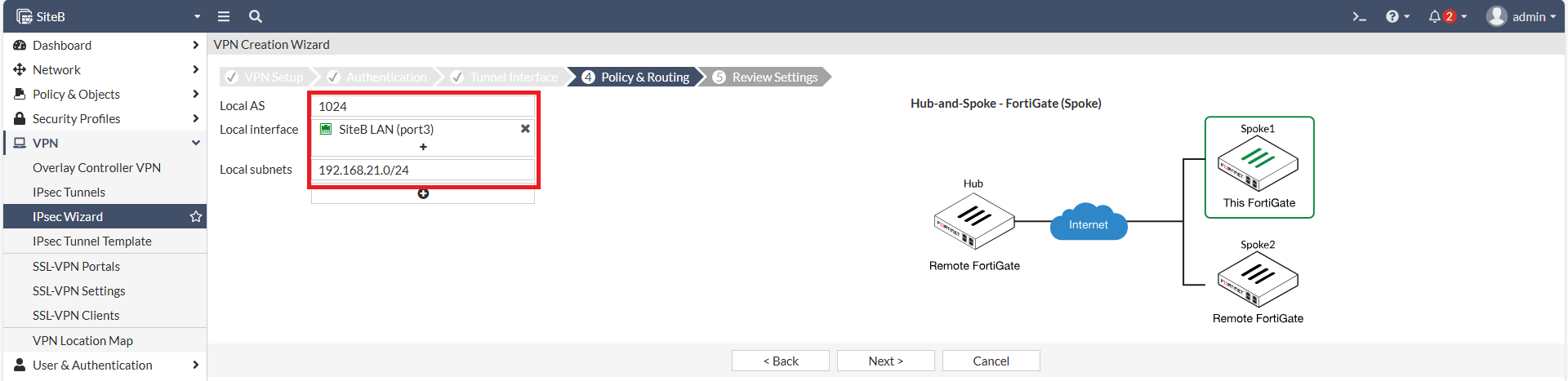
設定Local AS、Local Interface、Local Subnets。

[![圖片.png](https://mdfk.goddamn.idv.tw/uploads/images/gallery/2024-08/scaled-1680-/2DIDRXGYxx.png)](https://mdfk.goddamn.idv.tw/uploads/images/gallery/2024-08/2DIDRXGYxx.png)
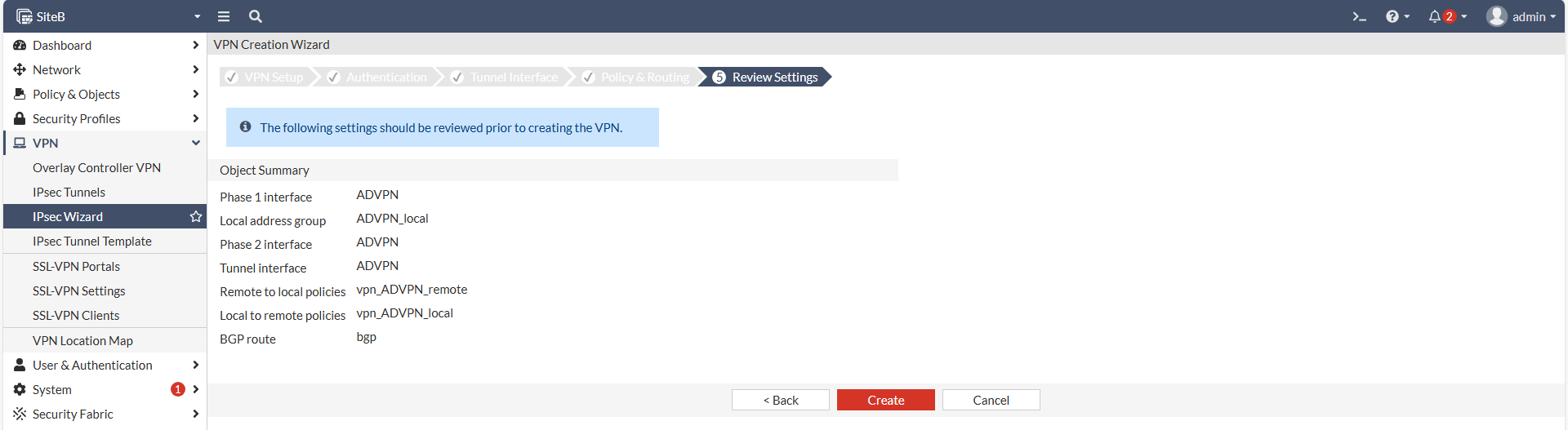
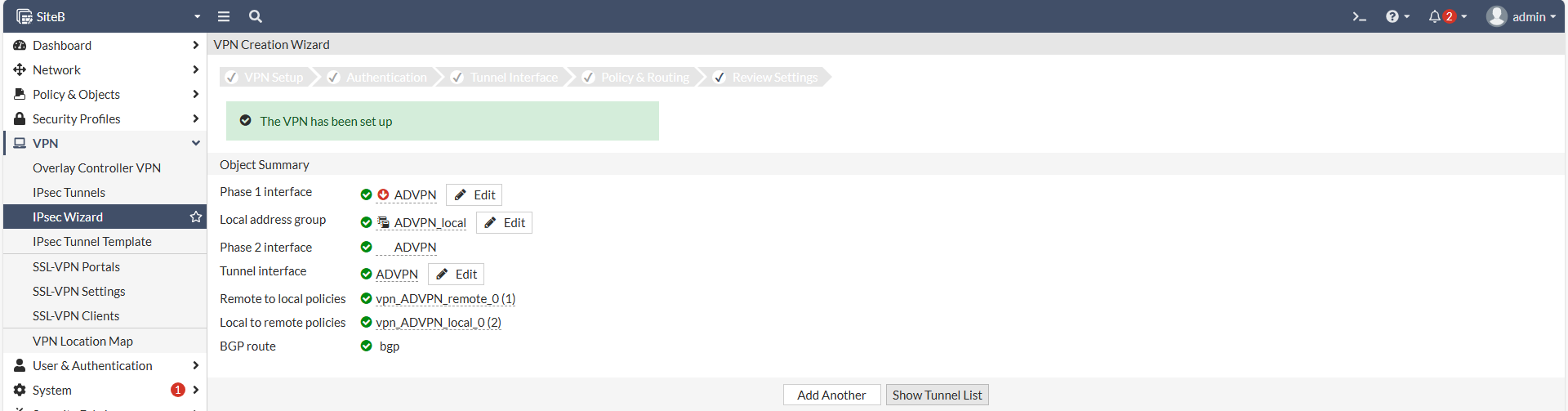
Wizzard建立完成

[![圖片.png](https://mdfk.goddamn.idv.tw/uploads/images/gallery/2024-08/scaled-1680-/FZlnT6PMcI.png)](https://mdfk.goddamn.idv.tw/uploads/images/gallery/2024-08/FZlnT6PMcI.png)
[![圖片.png](https://mdfk.goddamn.idv.tw/uploads/images/gallery/2024-08/scaled-1680-/EZnpaJSjaq.png)](https://mdfk.goddamn.idv.tw/uploads/images/gallery/2024-08/EZnpaJSjaq.png)
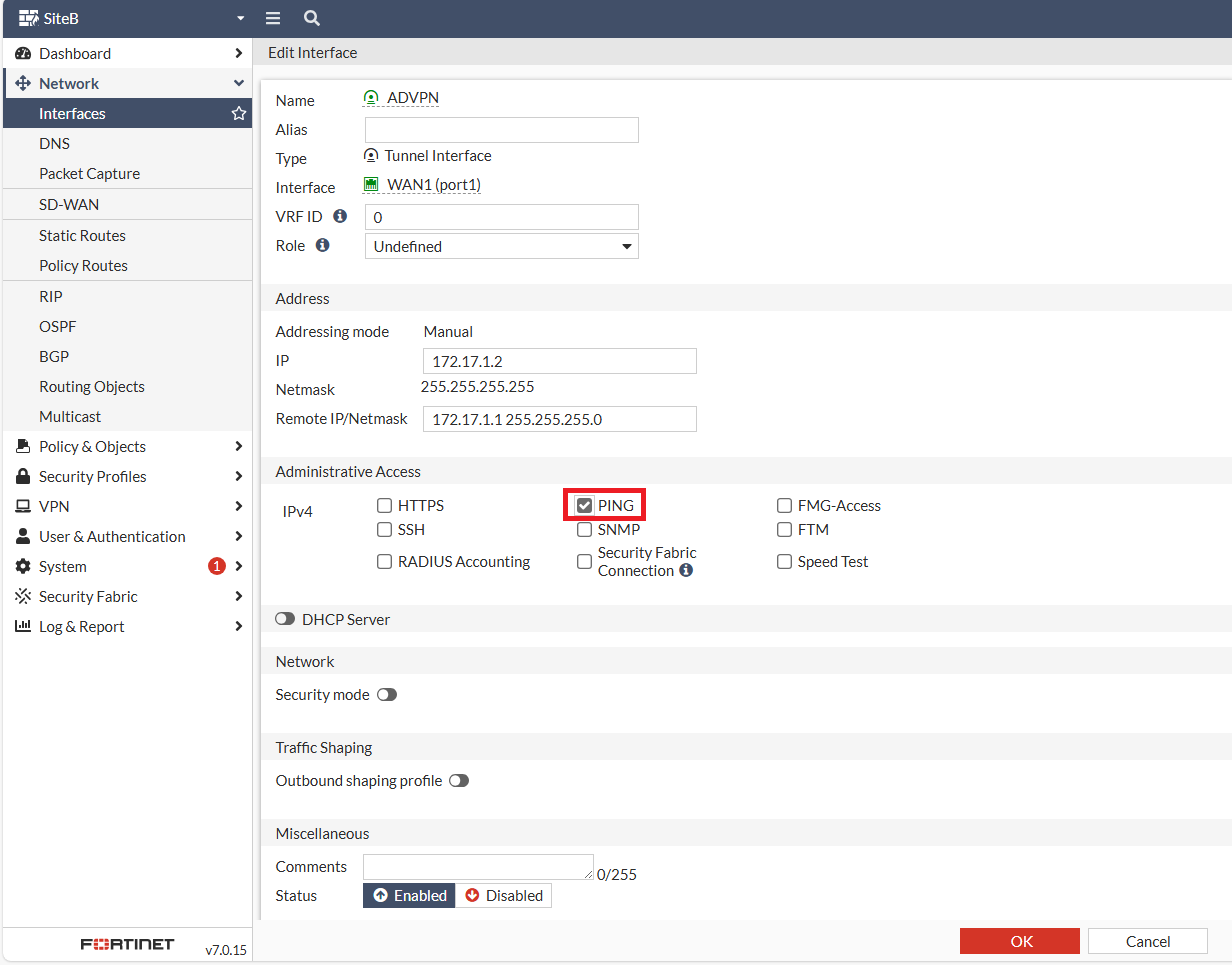
回到Interface，一樣將<span style="color: rgb(224, 62, 45);">**ADVPN**</span> Interface 的 Ping 打開，我就不贅述了。

![圖片.png](https://mdfk.goddamn.idv.tw/uploads/images/gallery/2024-08/scaled-1680-/Xs0QFSrM4X.png)

#### <span style="color: rgb(35, 111, 161);">設定BGP</span>

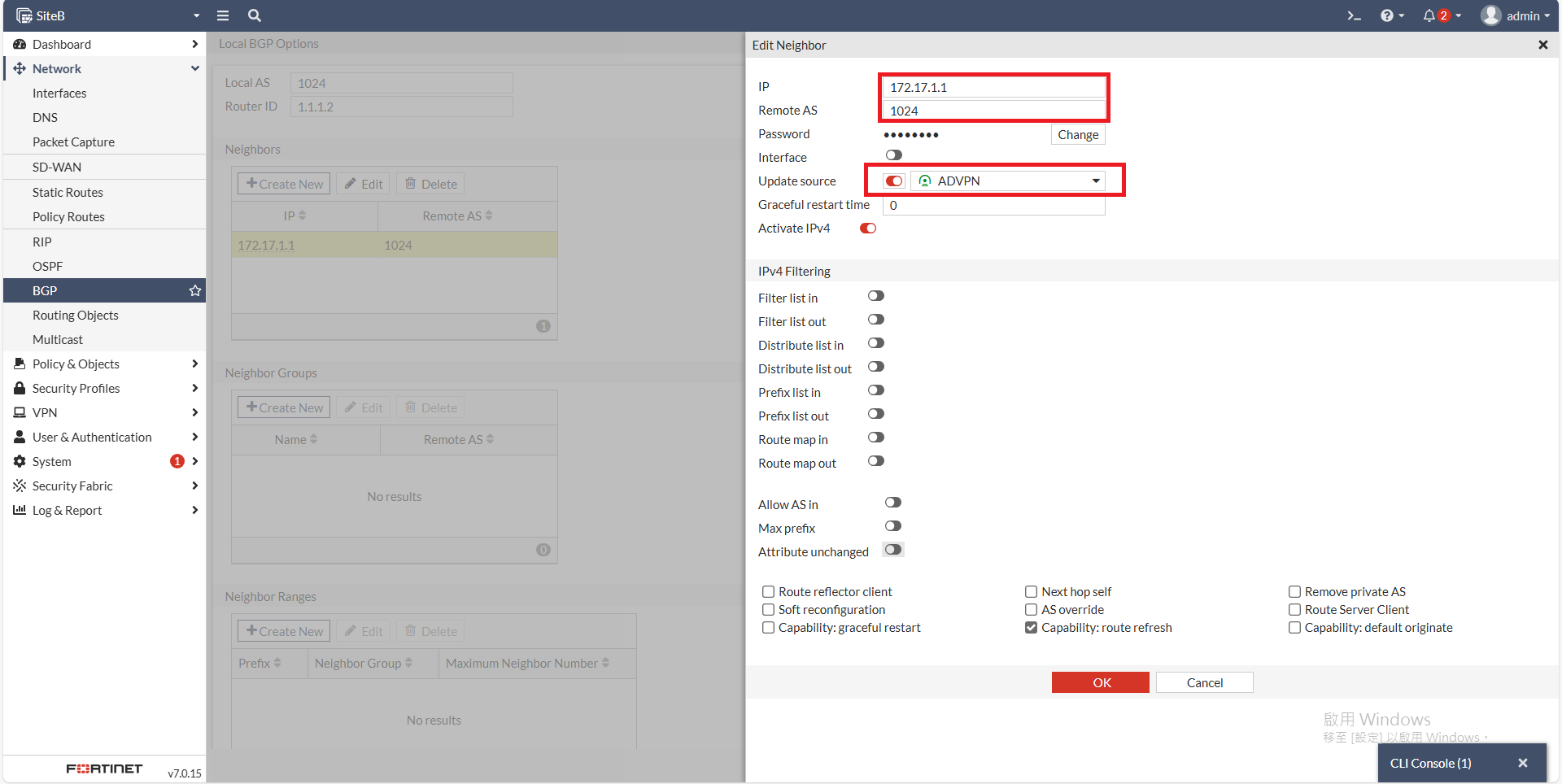
設定<span style="color: rgb(224, 62, 45);">**SiteB**</span>的Router ID、Neighbors設定 <span style="color: rgb(224, 62, 45);">**SiteA**</span> 的IPSEC IP<span style="color: rgb(224, 62, 45);"><span style="font-size: 12.0pt; mso-bidi-font-size: 11.0pt; font-family: '新細明體',serif; mso-bidi-font-family: 新細明體; mso-ansi-language: EN-US; mso-fareast-language: ZH-TW; mso-bidi-language: AR-SA;"> </span></span>

![圖片.png](https://mdfk.goddamn.idv.tw/uploads/images/gallery/2024-08/scaled-1680-/EdJP7IV0WT.png)

Update Source 選擇 ADVPN

[![圖片.png](https://mdfk.goddamn.idv.tw/uploads/images/gallery/2024-08/scaled-1680-/o9mSHVIlKO.png)](https://mdfk.goddamn.idv.tw/uploads/images/gallery/2024-08/o9mSHVIlKO.png)

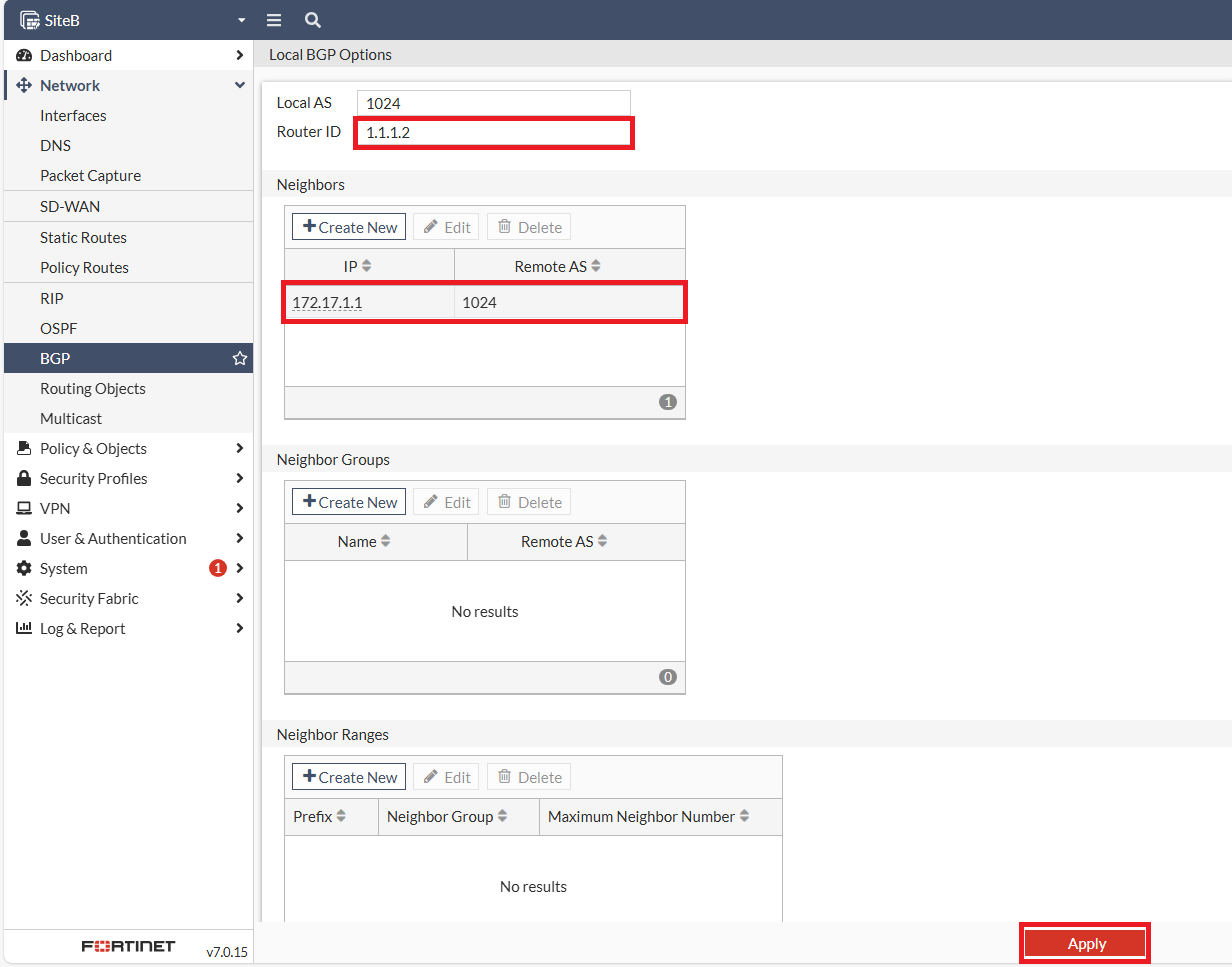
記得<span style="color: rgb(224, 62, 45);">**<span style="font-size: 12.0pt; mso-bidi-font-size: 11.0pt; font-family: '新細明體',serif; mso-bidi-font-family: 新細明體; mso-ansi-language: EN-US; mso-fareast-language: ZH-TW; mso-bidi-language: AR-SA;">要Apply !!</span>**</span>

![圖片.png](https://mdfk.goddamn.idv.tw/uploads/images/gallery/2024-08/scaled-1680-/x9j5FU1mLE.png)

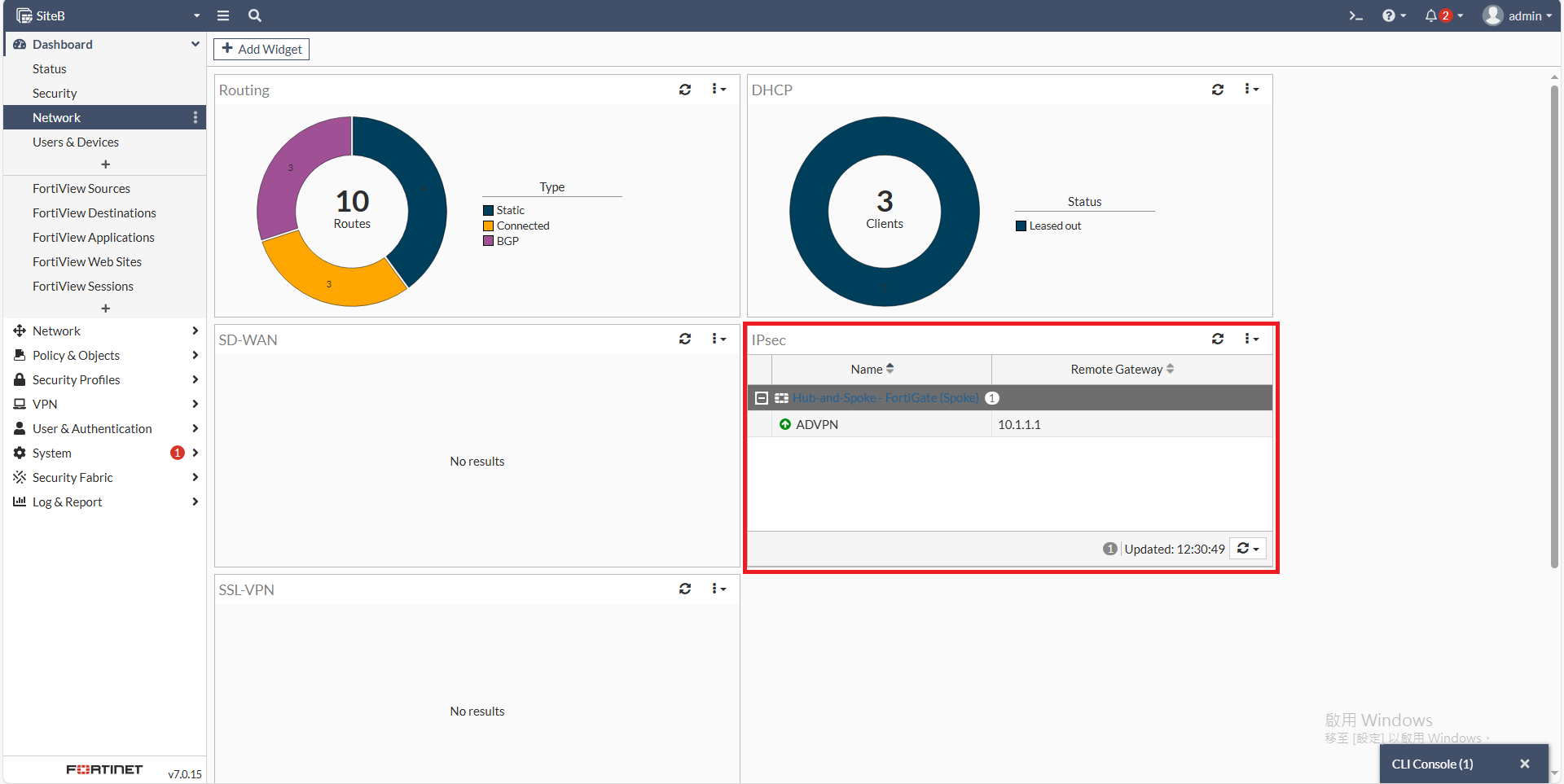
其實這個時候IPSEC應該已經起來了

[![圖片.png](https://mdfk.goddamn.idv.tw/uploads/images/gallery/2024-08/scaled-1680-/b0Crfs8FGW.png)](https://mdfk.goddamn.idv.tw/uploads/images/gallery/2024-08/b0Crfs8FGW.png)

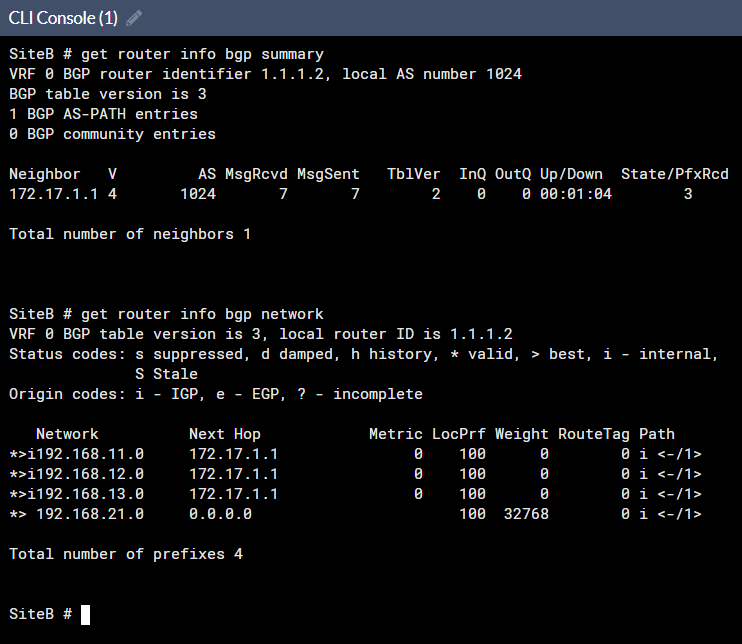
確認BGP狀態良好，<span style="color: rgb(224, 62, 45);">**SiteA**</span>的路由有同步過來

```
get router info bgp summary
get router info bgp network
```
![圖片.png](https://mdfk.goddamn.idv.tw/uploads/images/gallery/2024-08/scaled-1680-/a0Jopl45Xs.png)

#### <span style="color: rgb(35, 111, 161);">確認Firewall Policy</span>

Wizzard都幫我們建好了，這樣足矣

[![圖片.png](https://mdfk.goddamn.idv.tw/uploads/images/gallery/2024-08/scaled-1680-/ZFGngrZBv1.png)](https://mdfk.goddamn.idv.tw/uploads/images/gallery/2024-08/ZFGngrZBv1.png)

#### <span style="color: rgb(35, 111, 161);">設定Static Route  
</span>

所以大功告成了 **<span style="color: rgb(224, 62, 45);">(?)</span>**  
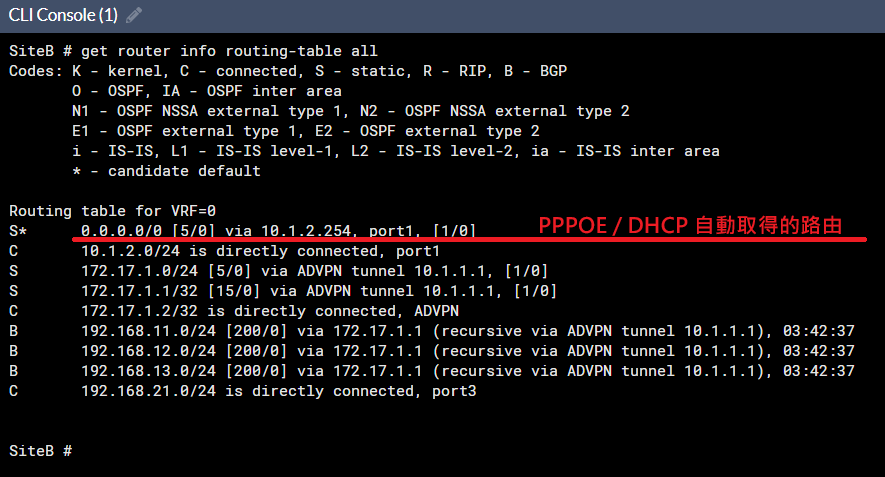
不不不，<span style="color: rgb(132, 63, 161);">**路由在這裡才是整篇的關鍵**</span>，我們看一下下圖

Default Route 0.0.0.0/0 是往WAN1 Gateway設，但其實我們並沒有設定任何的路由，這個路由是由 PPPOE / DHCP自動派發的

```
get router info routing-table all
```
![圖片.png](https://mdfk.goddamn.idv.tw/uploads/images/gallery/2024-08/scaled-1680-/VLfIo1AFlK.png)

如果依照這種設定，Internet流量會走WAN1出去而不是回到<span style="color: rgb(224, 62, 45);">**SiteA**</span>走SD-WAN，所以在這邊我們要變更一下路由設定

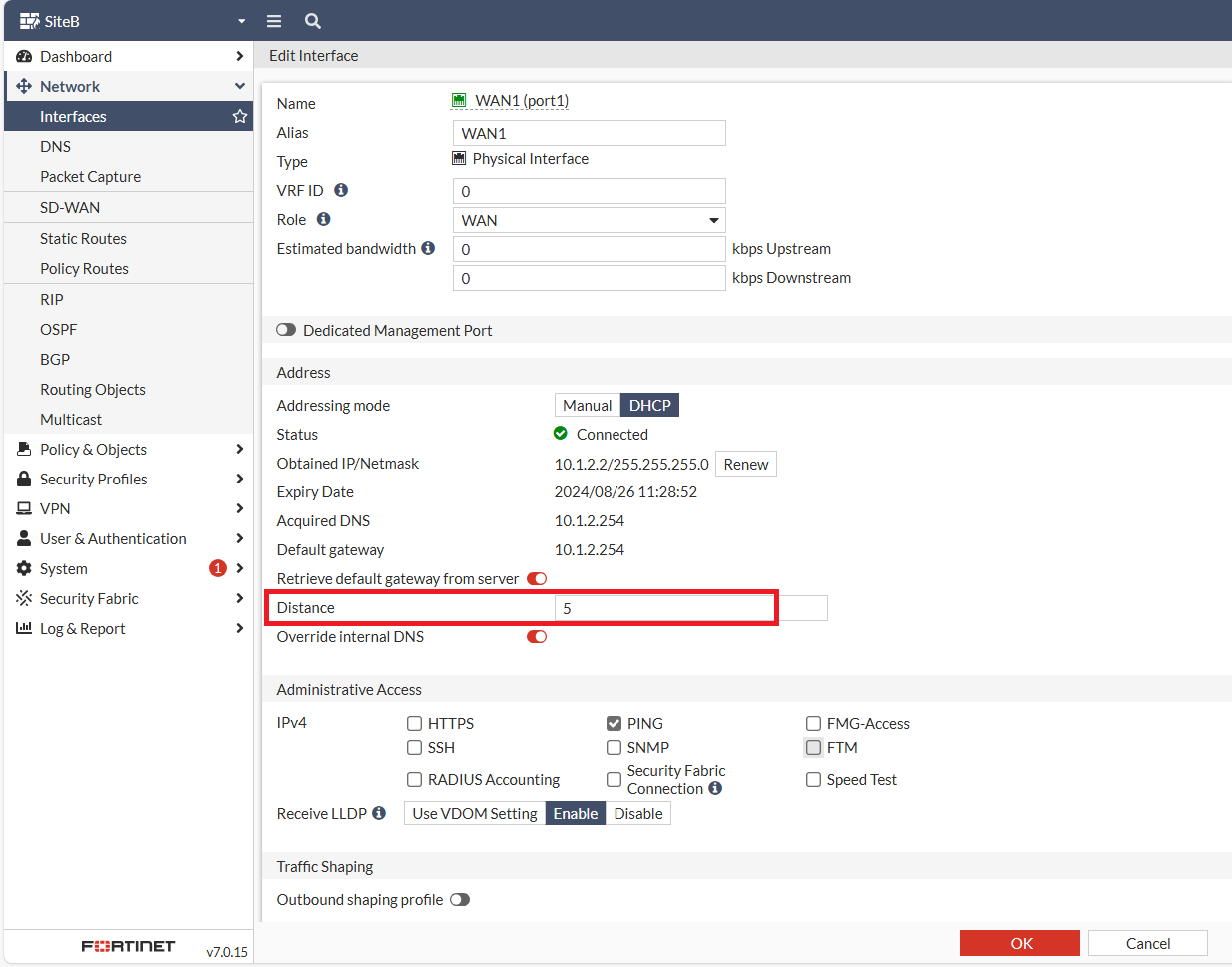
從 WAN Interface 可知，PPPOE / DHCP 預設的 Distance 是 5

![圖片.png](https://mdfk.goddamn.idv.tw/uploads/images/gallery/2024-08/scaled-1680-/e4W876yJf2.png)

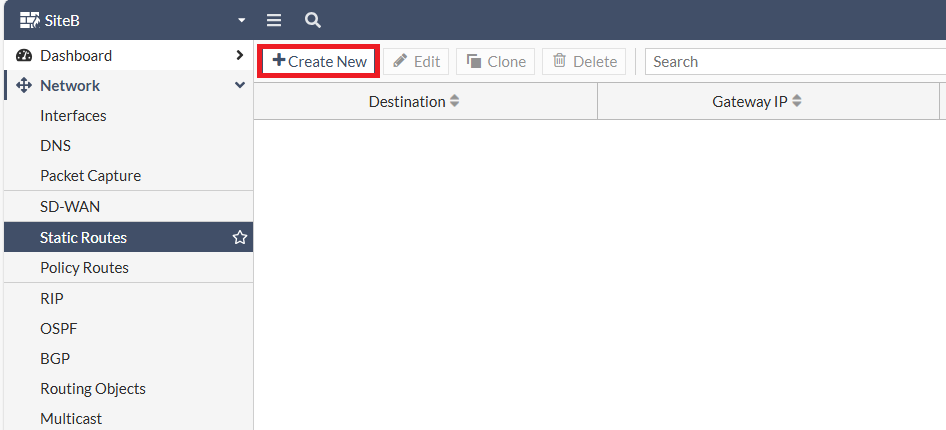
所以在這邊我們要新增兩筆路由

![圖片.png](https://mdfk.goddamn.idv.tw/uploads/images/gallery/2024-08/scaled-1680-/QhdfFFgDXC.png)

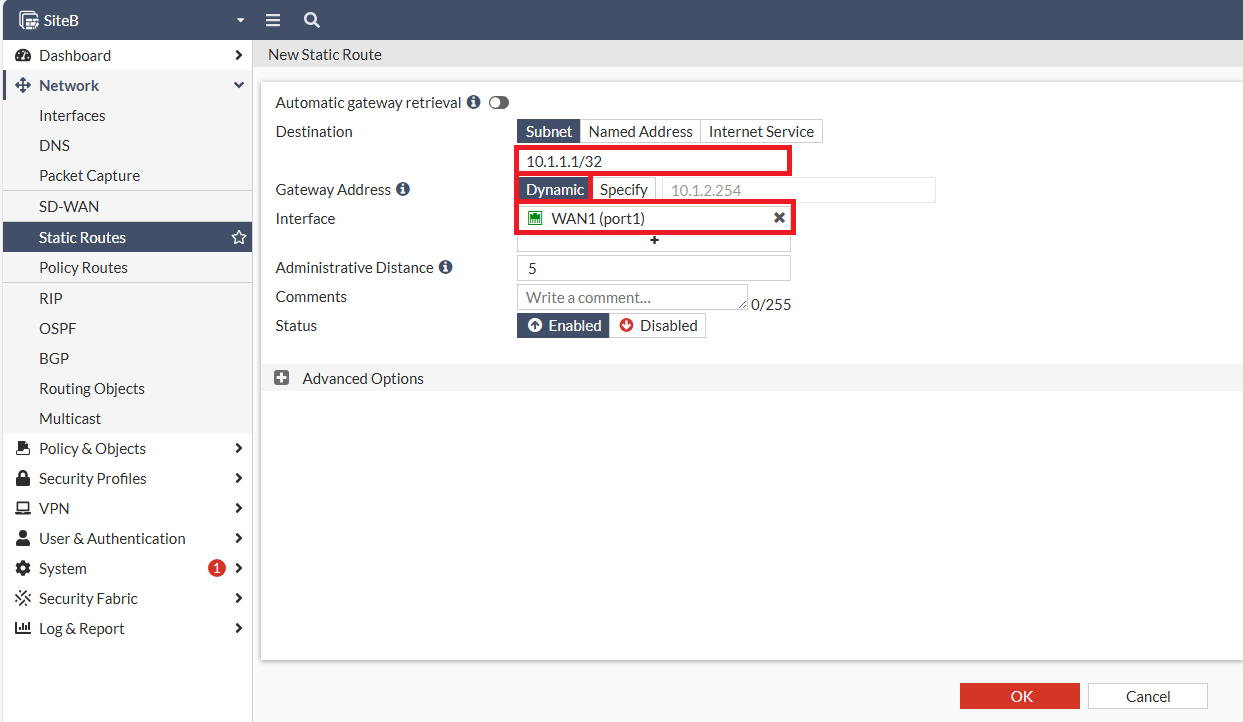
1\. 往 <span style="color: rgb(224, 62, 45);">**SiteA**</span> WAN IP 走 WAN1 的 Dynamic Gateway，Distance 一樣設為 5

[![圖片.png](https://mdfk.goddamn.idv.tw/uploads/images/gallery/2024-08/scaled-1680-/RDn9G6A40D.png)](https://mdfk.goddamn.idv.tw/uploads/images/gallery/2024-08/RDn9G6A40D.png)

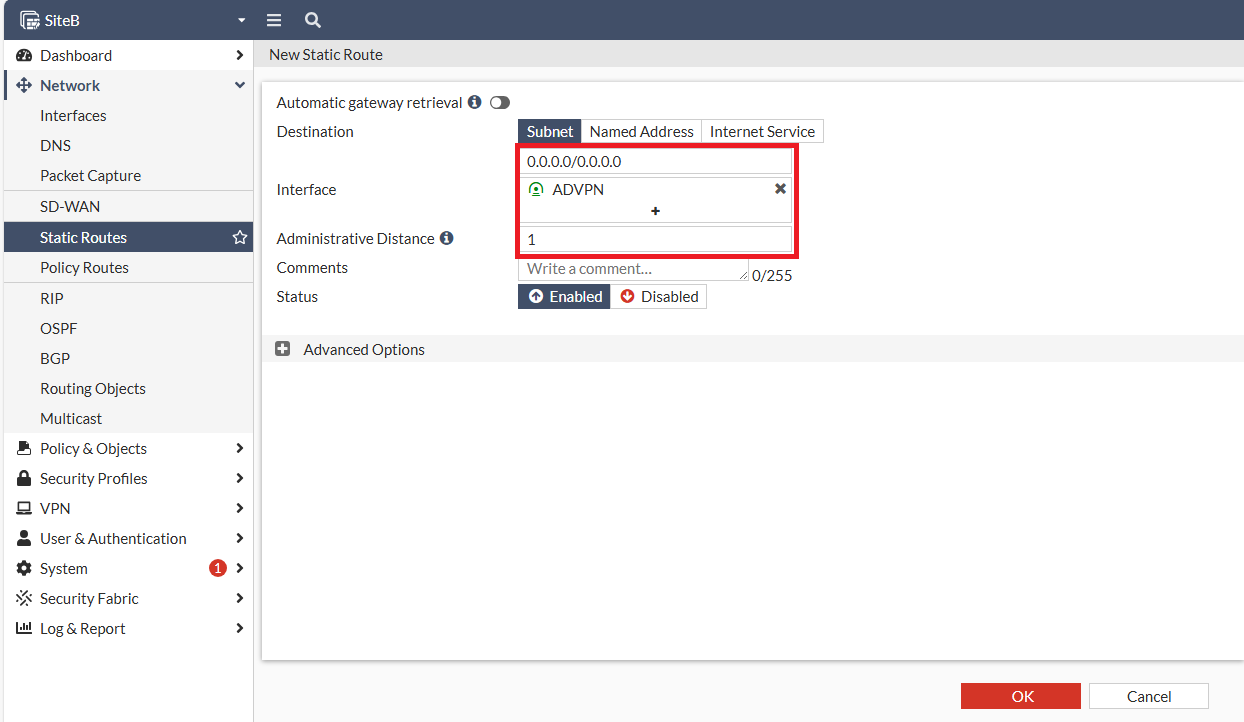
2\. Default Route 0.0.0.0/0改走 ADVPN，Distance 必須設定比 PPPOE / DHCP 小才會優先走，在此我們設為 1。

[![圖片.png](https://mdfk.goddamn.idv.tw/uploads/images/gallery/2024-08/scaled-1680-/QA4HZZK8Du.png)](https://mdfk.goddamn.idv.tw/uploads/images/gallery/2024-08/QA4HZZK8Du.png)

[![圖片.png](https://mdfk.goddamn.idv.tw/uploads/images/gallery/2024-08/scaled-1680-/VzmHfyBu9R.png)](https://mdfk.goddamn.idv.tw/uploads/images/gallery/2024-08/VzmHfyBu9R.png)

設定完再看一次路由

[![圖片.png](https://mdfk.goddamn.idv.tw/uploads/images/gallery/2024-08/scaled-1680-/JNLcbJejN5.png)](https://mdfk.goddamn.idv.tw/uploads/images/gallery/2024-08/JNLcbJejN5.png)
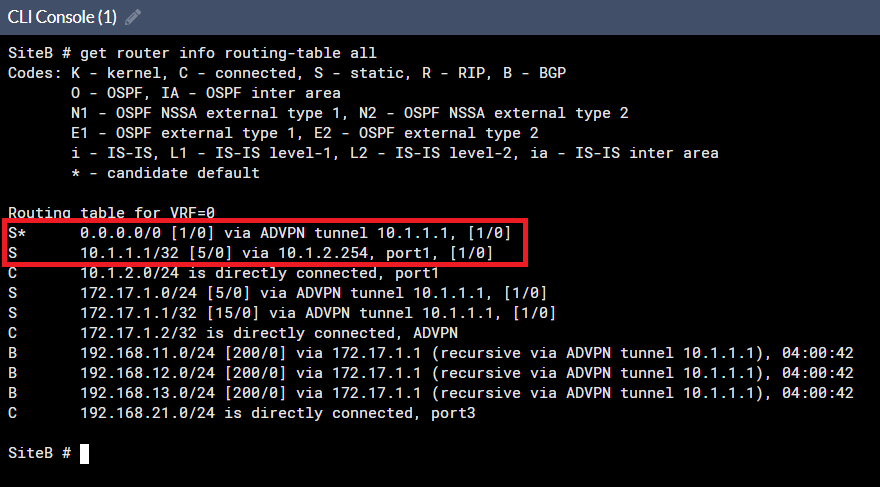
<span style="color: rgb(224, 62, 45);">**SiteB**</span>到此設定就大功告成了

#### <span style="color: rgb(35, 111, 161);">建立 <span style="color: rgb(224, 62, 45);">**SiteC**</span> IPSEC ADVPN Spoke</span>

比照<span style="color: rgb(224, 62, 45);">**SiteB**</span>步驟建立，不贅述

### <span style="color: rgb(35, 111, 161);">狀態確認</span>

#### <span style="color: rgb(35, 111, 161);">IPSEC狀態</span>

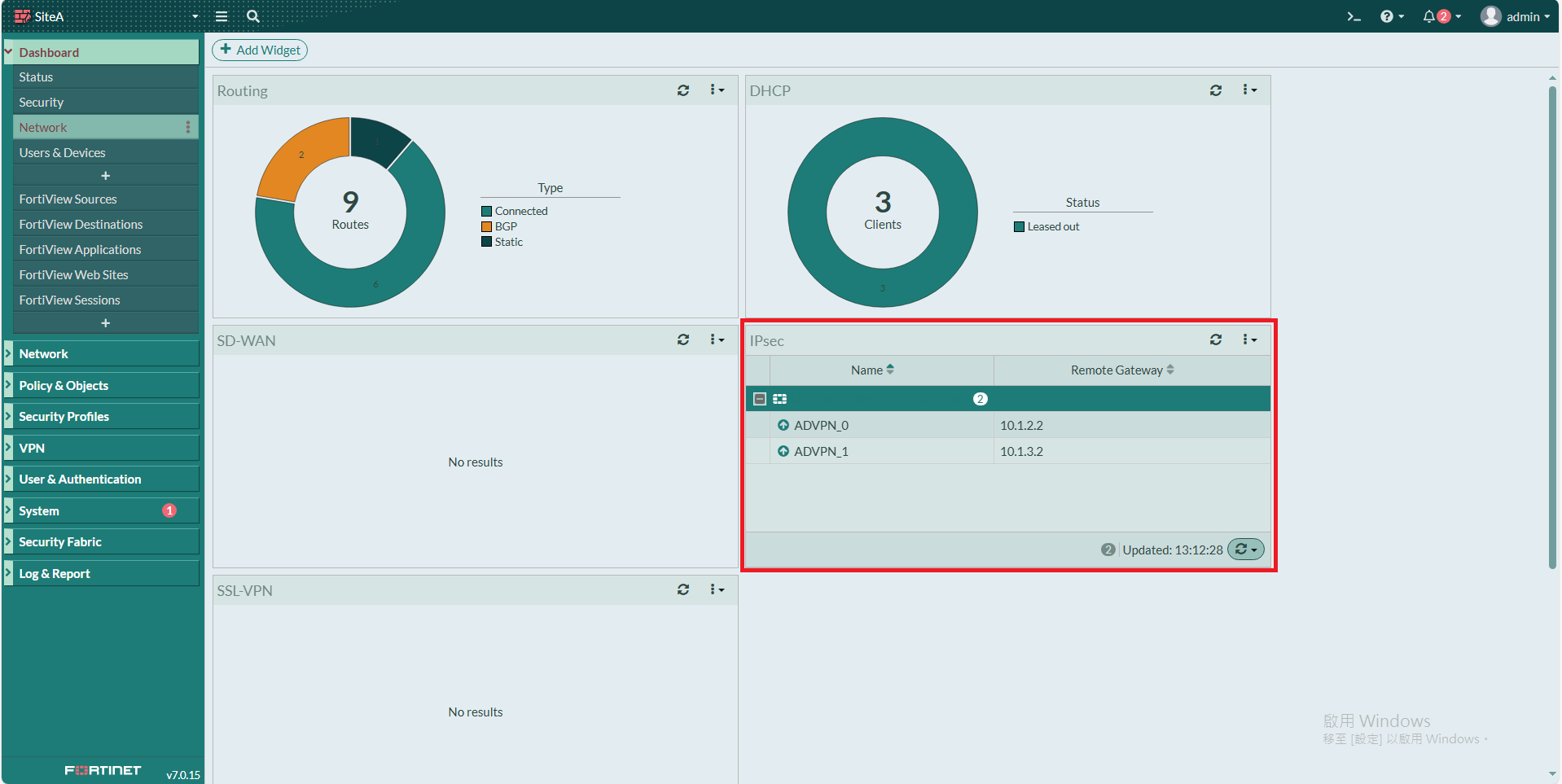
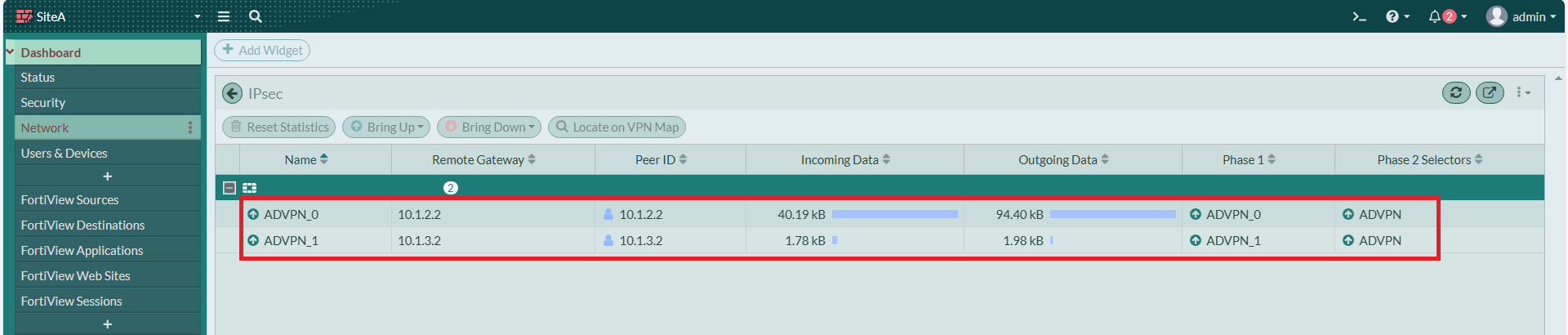
回到<span style="color: rgb(224, 62, 45);">**SiteA**</span>，確認ADVPN都有自動連上來了

[![圖片.png](https://mdfk.goddamn.idv.tw/uploads/images/gallery/2024-08/scaled-1680-/8HEBXkmZhm.png)](https://mdfk.goddamn.idv.tw/uploads/images/gallery/2024-08/8HEBXkmZhm.png)

[![圖片.png](https://mdfk.goddamn.idv.tw/uploads/images/gallery/2024-08/scaled-1680-/QD3Pz4oZEO.png)](https://mdfk.goddamn.idv.tw/uploads/images/gallery/2024-08/QD3Pz4oZEO.png)
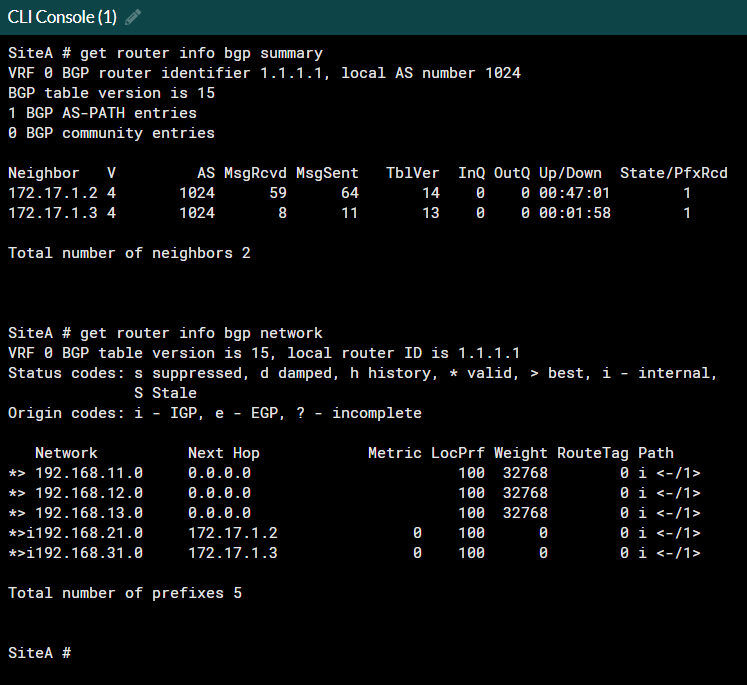
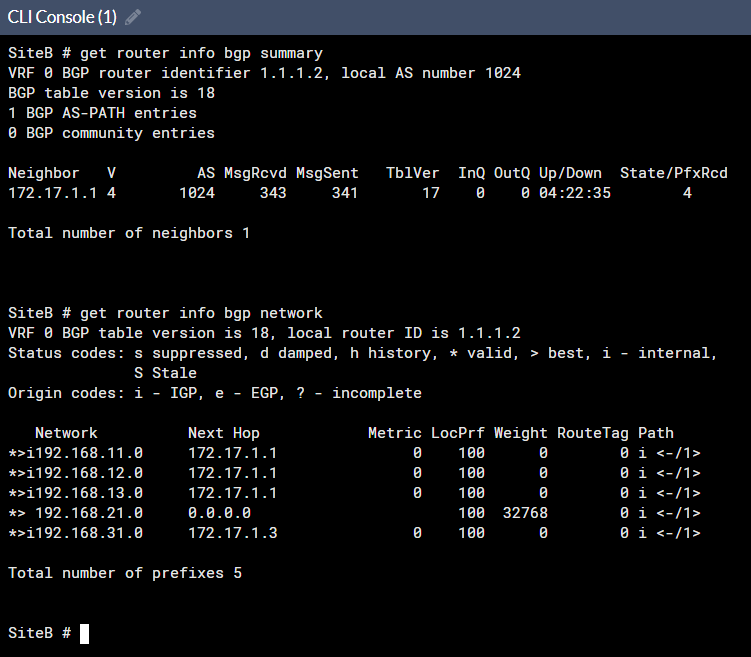
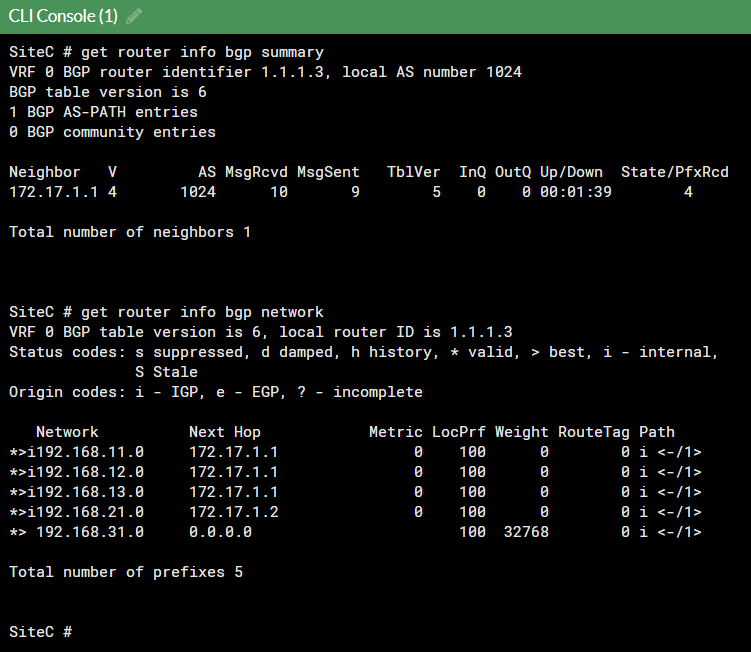
#### <span style="color: rgb(35, 111, 161);">BGP 狀態</span>

```
get router info bgp summary
get router info bgp network
```

<span style="color: rgb(224, 62, 45);">**SiteA**</span>

![圖片.png](https://mdfk.goddamn.idv.tw/uploads/images/gallery/2024-08/scaled-1680-/TrhBdknIa3.png)

<span style="color: rgb(224, 62, 45);">**SiteB**</span>

[![圖片.png](https://mdfk.goddamn.idv.tw/uploads/images/gallery/2024-08/scaled-1680-/EAYJO2Dy57.png)](https://mdfk.goddamn.idv.tw/uploads/images/gallery/2024-08/EAYJO2Dy57.png)

<span style="color: rgb(224, 62, 45);">**SiteC**</span>

![圖片.png](https://mdfk.goddamn.idv.tw/uploads/images/gallery/2024-08/scaled-1680-/l0Rne0CG3G.png)

#### <span style="color: rgb(35, 111, 161);">路由狀態</span>

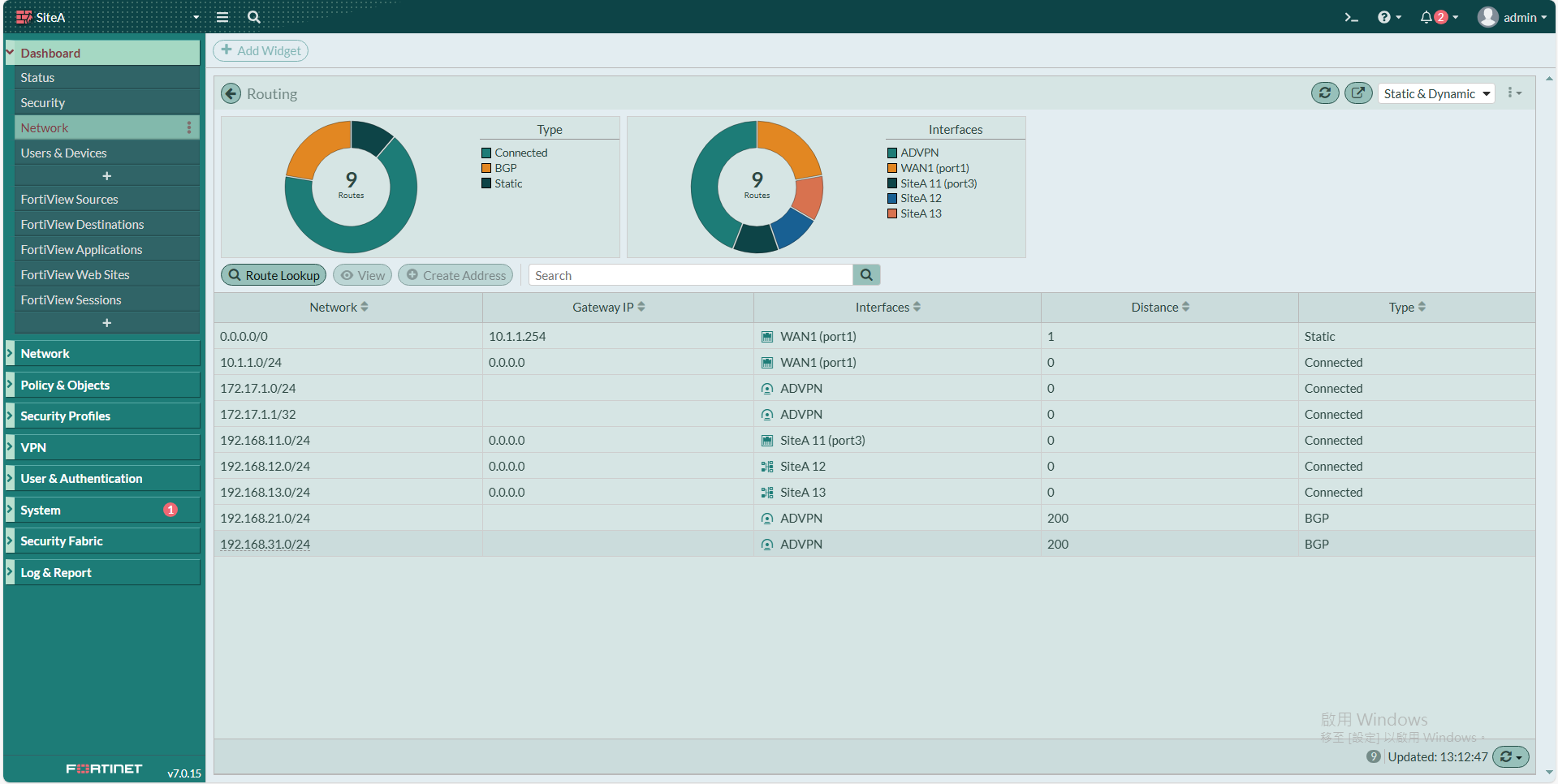
<span style="color: rgb(224, 62, 45);">**SiteA**</span>

[![圖片.png](https://mdfk.goddamn.idv.tw/uploads/images/gallery/2024-08/scaled-1680-/GCYM5HRcI9.png)](https://mdfk.goddamn.idv.tw/uploads/images/gallery/2024-08/GCYM5HRcI9.png)

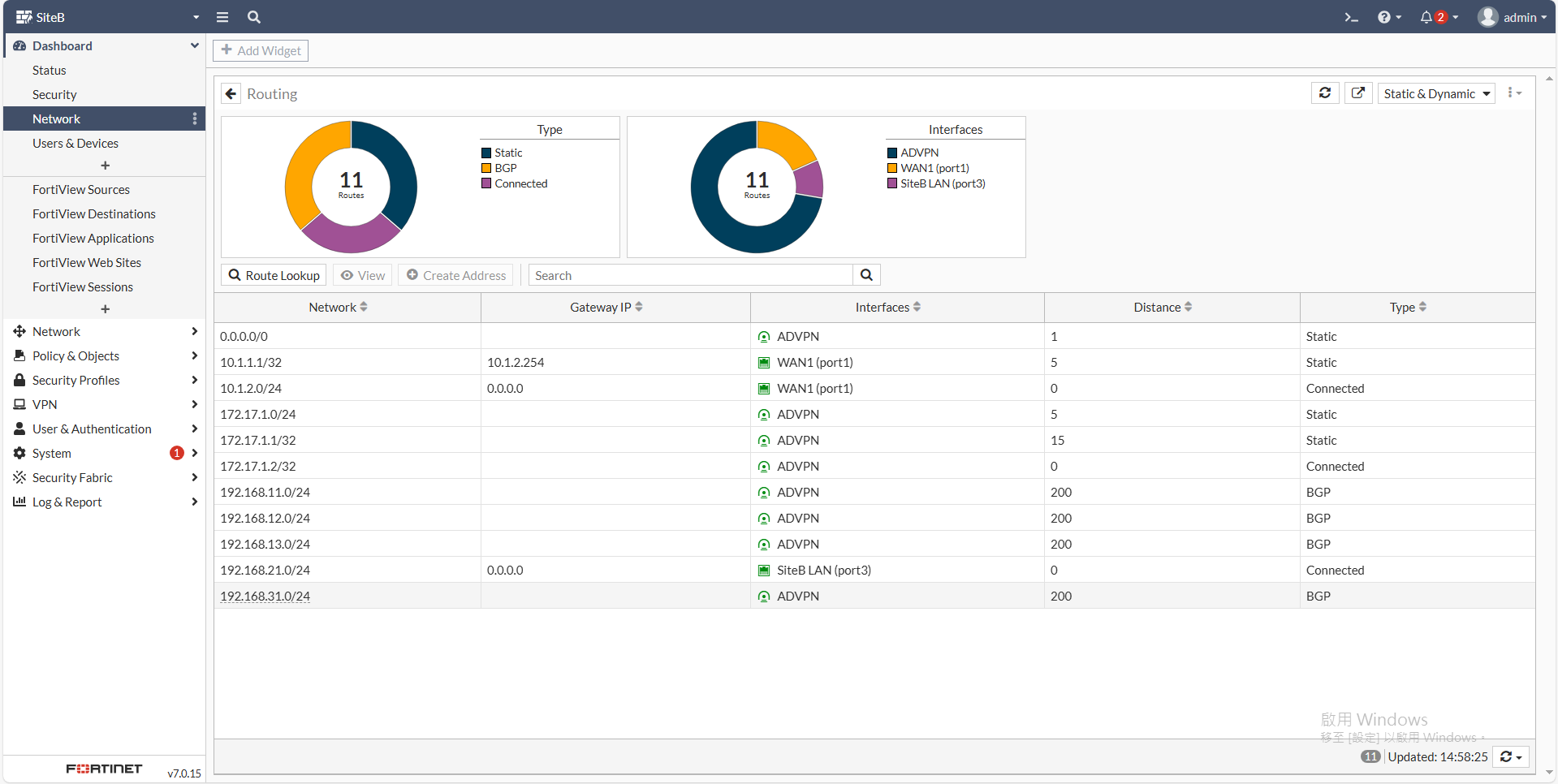
<span style="color: rgb(224, 62, 45);">**SiteB**</span>

[![圖片.png](https://mdfk.goddamn.idv.tw/uploads/images/gallery/2024-08/scaled-1680-/9ejXgtTZHN.png)](https://mdfk.goddamn.idv.tw/uploads/images/gallery/2024-08/9ejXgtTZHN.png)

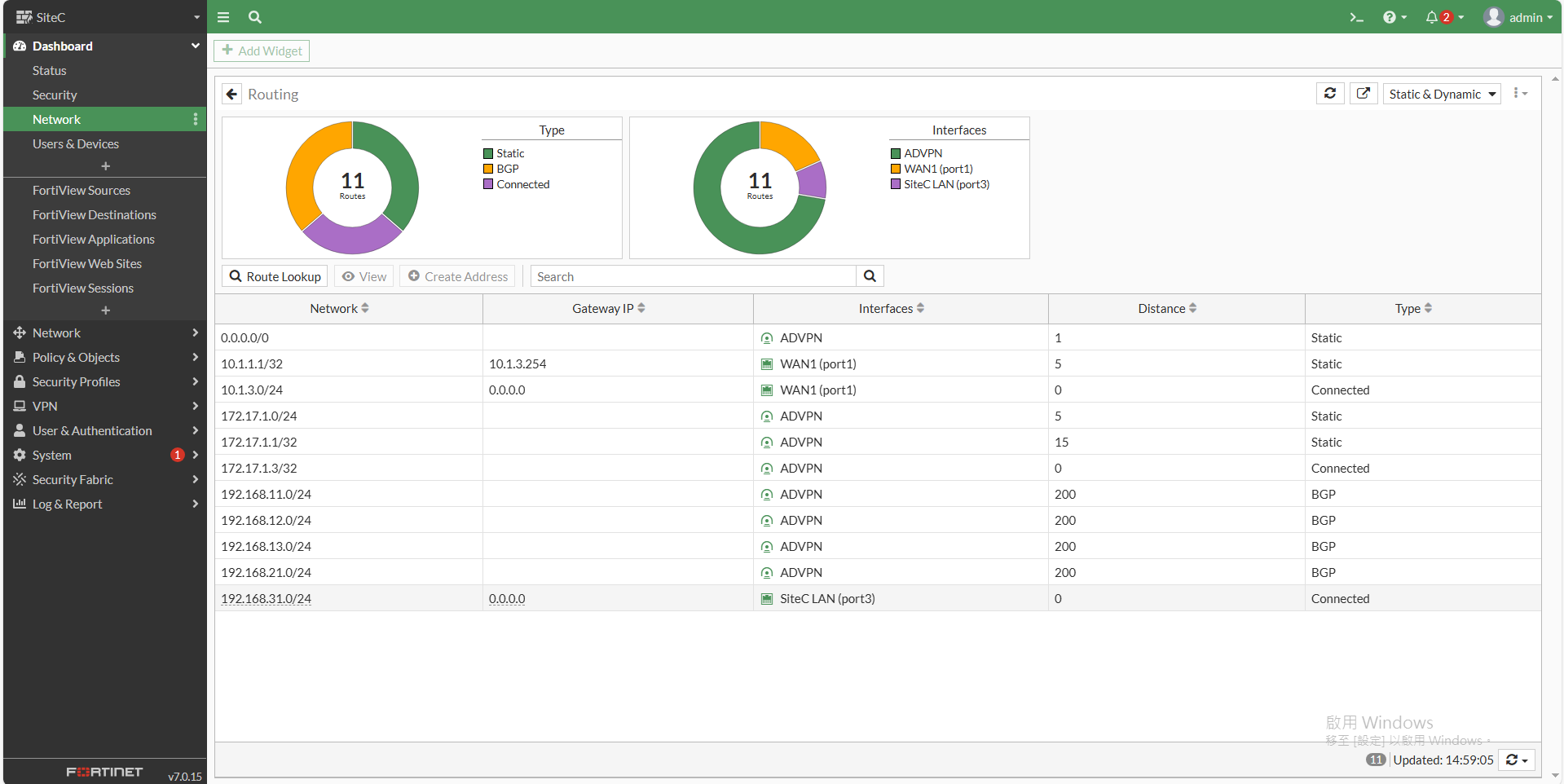
<span style="color: rgb(224, 62, 45);">**SiteC**</span>

[![圖片.png](https://mdfk.goddamn.idv.tw/uploads/images/gallery/2024-08/scaled-1680-/ELixXre2lW.png)](https://mdfk.goddamn.idv.tw/uploads/images/gallery/2024-08/ELixXre2lW.png)

### <span style="color: rgb(35, 111, 161);">連線測試</span>

![圖片.png](https://mdfk.goddamn.idv.tw/uploads/images/gallery/2024-08/scaled-1680-/LURTlHtqv2.png)

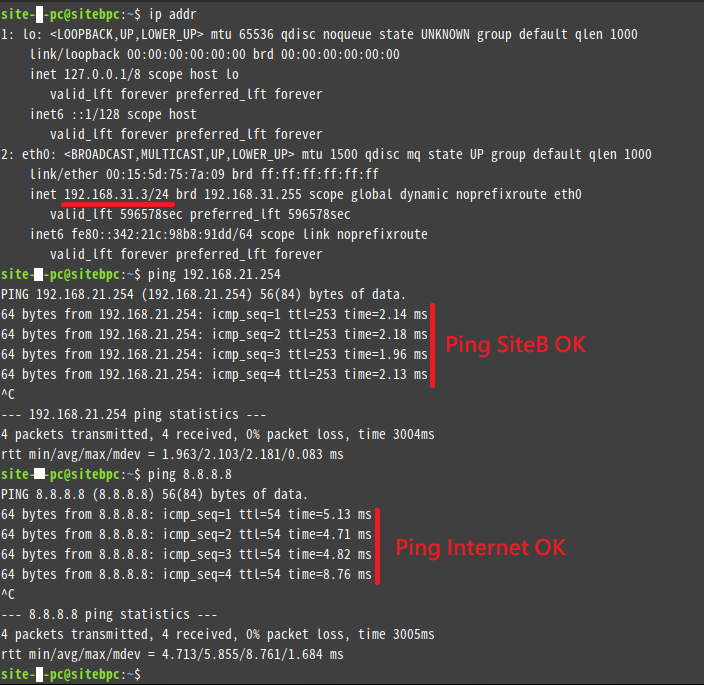
我在 <span style="color: rgb(224, 62, 45);">**SiteC**</span> 放了一台PC，Ping **<span style="color: rgb(224, 62, 45);">SiteB</span>** LAN Interface OK、Ping Internet OK

![圖片.png](https://mdfk.goddamn.idv.tw/uploads/images/gallery/2024-08/scaled-1680-/aF8T9pEQVt.png)

Traceroute <span style="color: rgb(224, 62, 45);">**SiteB**</span> Interface，透過**<span style="color: rgb(224, 62, 45);">SiteA</span>**過去 OK

![圖片.png](https://mdfk.goddamn.idv.tw/uploads/images/gallery/2024-08/scaled-1680-/Gb116G82nR.png)

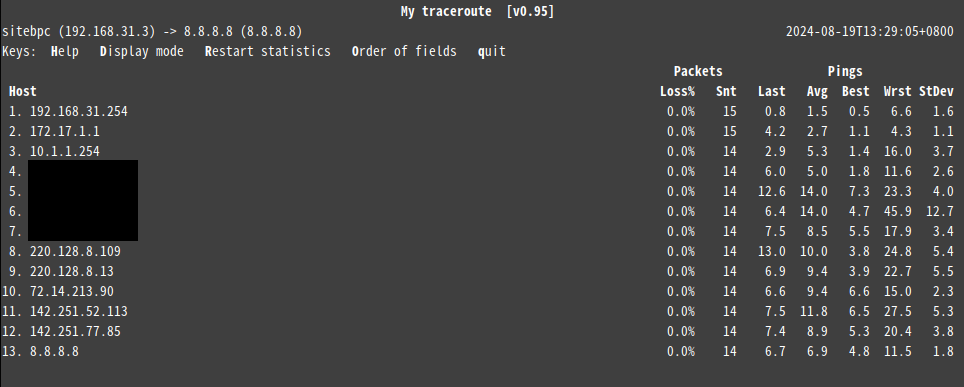
Traceroute Internet，透過<span style="color: rgb(224, 62, 45);">**SiteA**</span>過去 OK

![圖片.png](https://mdfk.goddamn.idv.tw/uploads/images/gallery/2024-08/scaled-1680-/IUvY0tU1lh.png)

### <span style="color: rgb(35, 111, 161);">結語</span>

由於中華電信的PPPOE在未申請固定IP的狀況下每72小時更換一次IP，在IP可能不斷變動的狀況下，各分點透過 PPPOE 網路與 HQ IPSEC ADVPN 介接，透過iBGP自動交換路由，並統一由HQ出Internet以利於政策與資安控管，透過這種架構大幅降低了設定的複雜度，同時減少了企業建置VPN的線路成本，是很實用的一種應用提供給大家參考。