# Let's Encrypt 免費SSL憑證
# 安裝設定Let's Encrypt (Apache2)
**系統環境 :**
OS: Debian GNU/Linux 12 (bookworm) x86\_64
Host: PRO ADL-U Cubi 5 (MS-B0A8) 1.0
Kernel: 6.8.4-3-pve
Uptime: 5 hours, 52 mins
Packages: 556 (dpkg)
Shell: bash 5.2.15
Terminal: /dev/pts/3
CPU: 12th Gen Intel i7-1255U (4) @ 4.700GHz
Memory: 241MiB / 4096MiB
Apache2
**1. 請先設定好DNS對應,使外部DNS可連線到該站台,並安裝必要元件**
```
apt-get update
apt-get install certbot python3-certbot-apache -y
```
**2. 顯示Certbot參數**
```
certbot -h
```
\- - - - - - - - - - - - - - - - - - - - - - - - - - - - - - - - - - - - - - - -
certbot \[SUBCOMMAND\] \[options\] \[-d DOMAIN\] \[-d DOMAIN\] ...
Certbot can obtain and install HTTPS/TLS/SSL certificates. By default,
it will attempt to use a webserver both for obtaining and installing the
certificate. The most common SUBCOMMANDS and flags are:
obtain, install, and renew certificates:
(default) run Obtain & install a certificate in your current webserver
certonly Obtain or renew a certificate, but do not install it
renew Renew all previously obtained certificates that are near
expiry
enhance Add security enhancements to your existing configuration
-d DOMAINS Comma-separated list of domains to obtain a certificate for
\--apache Use the Apache plugin for authentication & installation
\--standalone Run a standalone webserver for authentication
(the certbot nginx plugin is not installed)
\--webroot Place files in a server's webroot folder for authentication
\--manual Obtain certificates interactively, or using shell script
hooks
-n Run non-interactively
\--test-cert Obtain a test certificate from a staging server
\--dry-run Test "renew" or "certonly" without saving any certificates
to disk
manage certificates:
certificates Display information about certificates you have from Certbot
revoke Revoke a certificate (supply --cert-name or --cert-path)
delete Delete a certificate (supply --cert-name)
manage your account:
register Create an ACME account
unregister Deactivate an ACME account
update\_account Update an ACME account
show\_account Display account details
\--agree-tos Agree to the ACME server's Subscriber Agreement
-m EMAIL Email address for important account notifications
More detailed help:
-h, --help \[TOPIC\] print this message, or detailed help on a topic;
the available TOPICS are:
all, automation, commands, paths, security, testing, or any of the
subcommands or plugins (certonly, renew, install, register, nginx,
apache, standalone, webroot, etc.)
-h all print a detailed help page including all topics
\--version print the version number
\- - - - - - - - - - - - - - - - - - - - - - - - - - - - - - - - - - - - - - - -
**3. 申請憑證**
```
certbot certonly --apache -w /var/www/xxxxxx/ -d xx.aa.bb.cc --email xxx@aa.bb.cc
```
**4. 確認憑證**
申請完成之後,應該會在 /etc/letsencrypt/live/xx.aa.bb.cc 中找到憑證入如下
lrwxrwxrwx 1 root root 43 Jun 7 22:53 cert.pem -> ../../archive/xx.aa.bb.cc/cert1.pem
lrwxrwxrwx 1 root root 44 Jun 7 22:53 chain.pem -> ../../archive/xx.aa.bb.cc/chain1.pem
lrwxrwxrwx 1 root root 48 Jun 7 22:53 fullchain.pem -> ../../archive/xx.aa.bb.cc/fullchain1.pem
lrwxrwxrwx 1 root root 46 Jun 7 22:53 privkey.pem -> ../../archive/xx.aa.bb.cc/privkey1.pem
**5. Apache2 conf放上憑證**
```
vim /etc/apache2/sites-availible/xxxxxx.conf
```
<VirtualHost \*:443>
SSLEngine on
ServerAdmin webmaster@localhost
DocumentRoot /var/www/xxxxxx
** SSLCertificateFile /etc/letsencrypt/live/xx.aa.bb.cc/cert.pem**
** SSLCertificateKeyFile /etc/letsencrypt/live/xx.aa.bb.cc/privkey.pem**
** SSLCertificateChainFile /etc/letsencrypt/live/xx.aa.bb.cc/chain.pem**
</VirtualHost>
存檔之後 Restart Apache Service
```
systemctl restart apache2
```
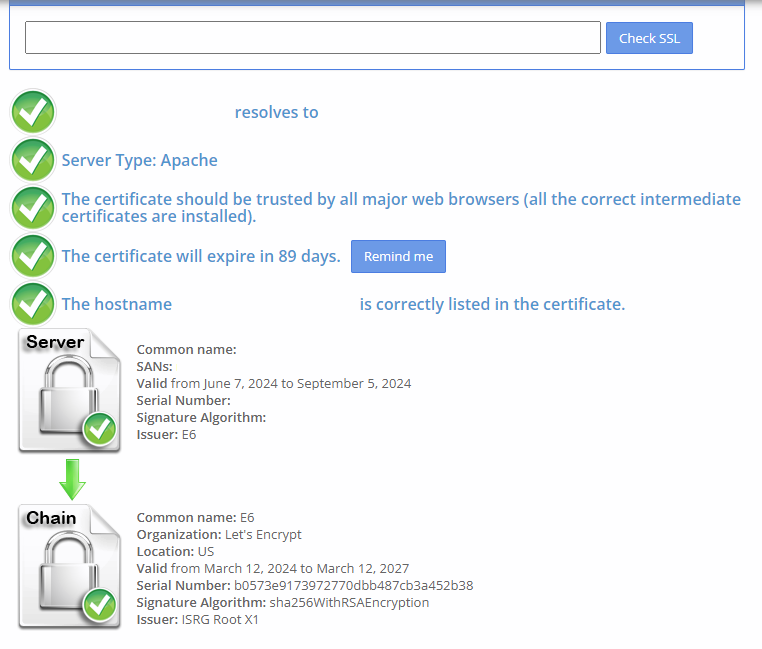
**6. 檢查SSL設定是否正確**
[](https://mdfk.goddamn.idv.tw/uploads/images/gallery/2024-06/STuQ2oD3yp.png)
**7. 確認 certbot.timer 執行正常、Certificates renew正常**
```
systemctl status certbot.timer
```
\* certbot.timer - Run certbot twice daily
Loaded: loaded (/lib/systemd/system/certbot.timer; **enabled**; preset: **enabled**)
Active: **active** (waiting) since Fri 2024-06-07 17:37:05 CST; 6h ago
Trigger: Sat 2024-06-08 08:04:10 CST; 8h left
Triggers: \* certbot.service
Jun 07 17:37:05 systemd\[1\]: Started certbot.timer - Run certbot twice daily.
```
certbot renew --dry-run
```
Saving debug log to /var/log/letsencrypt/letsencrypt.log
\- - - - - - - - - - - - - - - - - - - - - - - - - - - - - - - - - - - - - - - -
Processing /etc/letsencrypt/renewal/xx.aa.bb.cc.conf
\- - - - - - - - - - - - - - - - - - - - - - - - - - - - - - - - - - - - - - - -
Simulating renewal of an existing certificate for xx.aa.bb.cc
\- - - - - - - - - - - - - - - - - - - - - - - - - - - - - - - - - - - - - - - -
Congratulations, all simulated renewals succeeded:
/etc/letsencrypt/live/mdfk.goddamn.idv.tw/fullchain.pem (**success**)
\- - - - - - - - - - - - - - - - - - - - - - - - - - - - - - - - - - - - - - - -