# Proxmox VE
# 疑難雜症
# LXC Container Permission denied 備份失敗
**錯誤訊息 : **LXC Container 備份時出現下列錯誤訊息,備份失敗
INFO: create storage snapshot 'vzdump'
INFO: creating vzdump archive '/mnt/pve/xxxxxx/dump/vzdump-lxc-401-2024\_06\_08-00\_19\_50.tar.zst'
INFO: tar: /mnt/pve/xxxxxx/dump/vzdump-lxc-401-2024\_06\_08-00\_19\_50.tmp: **Cannot open: Permission denied**
INFO: tar: Error is not recoverable: exiting now
**問題成因 :**
只有在 非特權容器 (Unpriviledged container) 才會發生,如果是 特權容器 (Priviledged container) 則可以順利備份。這兩種模式在 vzdump 程式備份時使用的身份不一樣,前者會使用大於 100000 的 UID,而後者直接用 root 執行。
**解決方式 : **修改 pve /etc/vzdump.conf
```
mkdir /temp && mkdir /temp/vzdump
vim /etc/vzdump.conf
```
**
**
\# vzdump default settings
**tmpdir: /temp/vzdump**
\#dumpdir: DIR
\#storage: STORAGE\_ID
\#mode: snapshot|suspend|stop
\#bwlimit: KBPS
\#performance: \[max-workers=N\]\[,pbs-entries-max=N\]
\#ionice: PRI
\#lockwait: MINUTES
\#stopwait: MINUTES
\#stdexcludes: BOOLEAN
\#mailto: ADDRESSLIST
\#prune-backups: keep-INTERVAL=N\[,...\]
\#script: FILENAME
\#exclude-path: PATHLIST
\#pigz: N
\#notes-template: {{guestname}}
存檔後即可
**資料來源 :**
**節省工具箱 Jason Tools** [http://blog.jason.tools/2021/07/proxmox-ve-vzdump-lxc-fail.html](http://blog.jason.tools/2021/07/proxmox-ve-vzdump-lxc-fail.html)
# Storage 相關
# Ceph指令
##### **\#建立Crush Rule**
ceph osd crush rule create-replicated rule-nvme default host nvme
ceph osd crush rule create-replicated rule-hdd default host hdd
ceph osd crush rule rm replicated\_rule
#####
##### **為HDD Pool建立SSD快取**
ceph osd tier add Ceph\_Pool Cache
ceph osd tier cache-mode Cache writeback
ceph osd tier set-overlay Ceph\_Pool Cache
ceph osd pool set Cache hit\_set\_type bloom
\#ceph osd pool set Cache hit\_set\_count 12
\#ceph osd pool set Cache hit\_set\_period 14400
ceph osd pool set Cache target\_max\_bytes xxxxxx
ceph osd pool set Cache target\_max\_objects xxxxxx
ceph osd pool set Cache min\_read\_recency\_for\_promote 2
ceph osd pool set Cache min\_write\_recency\_for\_promote 2
ceph osd pool set Cache cache\_target\_dirty\_ratio 0.4
ceph osd pool set Cache cache\_target\_dirty\_high\_ratio 0.6
ceph osd pool set Cache cache\_target\_full\_ratio 0.8
ceph osd pool set Cache cache\_min\_flush\_age 600
ceph osd pool set Cache cache\_min\_evict\_age 1800
##### **\#remove Cache Pool**
ceph osd tier cache-mode Cache readproxy
radow -p Cache ls
radow -p Cache cache-flush-evict-all
ceph osd tire remove-overlay Ceph\_Pool
ceph osd tire remove Ceph\_Pool Cache
ceph delete Cache Cache --yes-i-really-really-mean-it
##### **\#移除以前是Ceph LVM的Disk Lable**
ceph-volume lvm zap /dev/sdX --destroy
##### **\#確認Ceph 狀態**
ceph -s
ceph osd pool stats
#####
**\#關閉ceph cluster準備**
ceph osd set noout
ceph osd set nobackfill
ceph osd set norecover
##### **\#ceph cluster開機後執行**
ceph osd unset noout
ceph osd unset nobackfill
ceph osd unset norecover
# ZFS指令
# 設定ZFS使用SSD做Cache與Log
zpool add ZFS\_Pool cache << /dev/xxxx >>
zpool add ZFS\_Pool log << /dev/xxxx >>
# 顯示ZFS相關資訊
zfs list
[](https://mdfk.goddamn.idv.tw/uploads/images/gallery/2024-06/ty4image.png)
zpool list
[](https://mdfk.goddamn.idv.tw/uploads/images/gallery/2024-06/XJfimage.png)
zpool status
[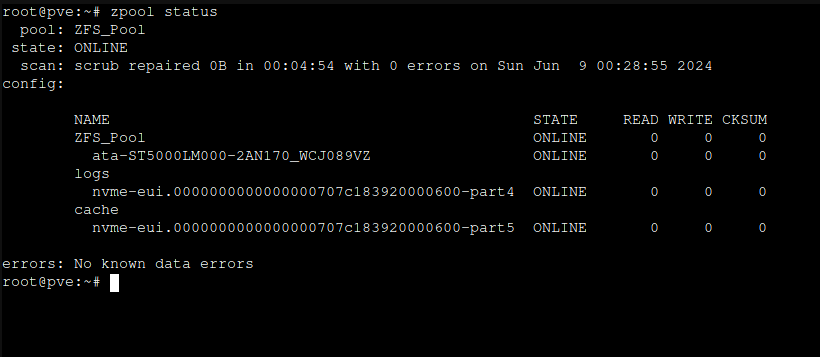](https://mdfk.goddamn.idv.tw/uploads/images/gallery/2024-06/G9uimage.png)
# GuestOS相關
# Guest OS安裝Qemu Guest Agent
## **各版本OS安裝Qemu Guest Agent的方式**
# Windows 2012以後
最新的VirtIO ISO中有 Qemu-GA可以安裝
[https://fedorapeople.org/groups/virt/virtio-win/direct-downloads/stable-virtio/virtio-win.iso](https://fedorapeople.org/groups/virt/virtio-win/direct-downloads/stable-virtio/virtio-win.iso)
# Windows 2008 R2 / 7
最後能安裝的版本為 100.0
[https://fedorapeople.org/groups/virt/virtio-win/direct-downloads/archive-qemu-ga/qemu-ga-win-100.0.0.0-3.el7ev/](https://fedorapeople.org/groups/virt/virtio-win/direct-downloads/archive-qemu-ga/qemu-ga-win-100.0.0.0-3.el7ev/)
**注意 !!** 只要安裝了比100更新的版本會造成安裝錯誤,並無法再安裝任何版本的Qemu-GA,請勿必注意 !!
# Windows 2003(含) 以前
無任何Qemu-GA可以安裝
# CentOS/Redhat/Rocky
dnf install qemu-guest-agent -y
systemctl enable qemu-guest-agent
systemctl start qemu-guest-agent
# Ubuntu / Debian
apt update && apt -y install qemu-guest-agent
systemctl enable qemu-guest-agent
systemctl start qemu-guest-agent